





Software features
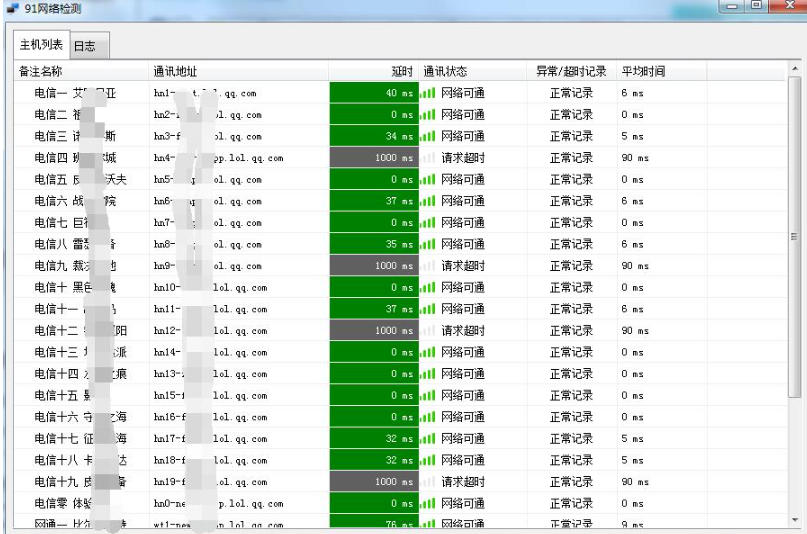
Real-time visual feedback
Use color to identify network status:
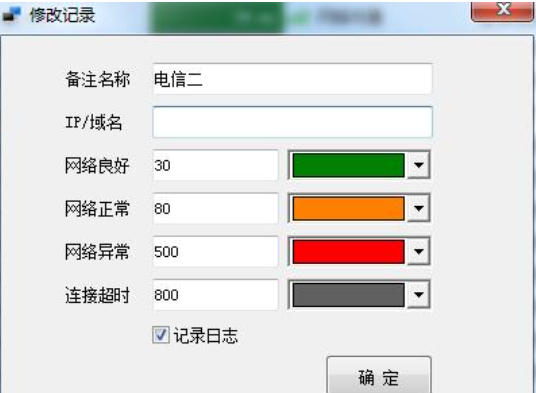
Green: smooth (default delay <50ms)
Yellow: Stuttering (default delay ≥50ms)
Red: disconnected
Users can customize the threshold (adjust the smoothness/stuttering standard by modifying the configuration file).
Highly customizable
Multi-server monitoring: Supports adding unlimited entries to monitor game servers, local servers or any website.
Interface adaptive: Automatically save the window size after adjustment, and restore the original settings next time you start it.
Independent configuration files: Each user can create an exclusive configuration file and save personalized settings (such as monitoring targets, interface layout).
Lightweight and portable
Green software, no installation required, run directly after decompression.
Low resource usage and suitable for rapid deployment on different devices.
Electronic map and log function
Configurable electronic map to mark device location, suitable for enterprise network management.
The log interface records historical detection data to facilitate problem tracing.
Software function
Latency monitoring
Real-time detection of delays in connecting to designated servers or websites helps users quickly locate network problems (such as their own network failures or server abnormalities).
Multiple target monitoring
Supports simultaneous monitoring of multiple servers (such as "League of Legends" regional servers, local servers or custom websites) to meet the needs of complex network environments.
Operation optimization
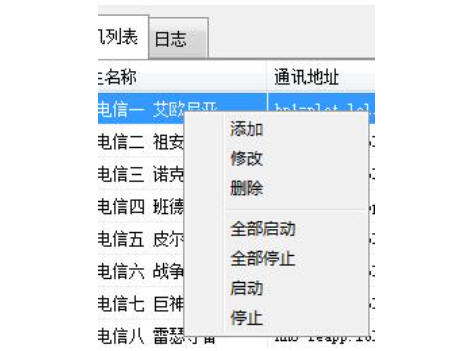
Right-click operation: supports deleting and modifying monitoring targets, and flexibly adjusting the monitoring list.
Scheduled arming: A variety of scheduled tasks can be configured to realize automated network watch.
Compatibility and scalability
Browser-based remote management supports multi-tab console operation.
The HSKRC transmission protocol independently developed by Oray is adopted to improve the stability of data transmission.
FAQ
Unable to start software
Solution:
Download the installation package again to ensure file integrity.
Update your operating system to the latest version to avoid compatibility issues.
Temporarily disable firewall or anti-virus software to prevent accidental interception.
91 network detection update log:
1. The pace of optimization never stops!
2. More little surprises are waiting for you to discover~
Huajun editor recommends:
Huajun Software Park also has popular software with the same functions as this software, such as:Changyan Teaching Guide,Baidu enterprise network disk,Kingsoft Netdisk,Micro force synchronization,Dandelion WiFiWait, you can collect it if you need it!




Your comment needs to be reviewed before it can be displayed