




Features of Douyu Live Companion
The operation is simple and even novices can get started quickly.
Rich in functions to meet a variety of live broadcast needs.
Strong compatibility and high stability.
Douyu Live Companion Highlights
Game live broadcast
E-sports competitions, stand-alone games, online mobile games, etc. support low-latency transmission to ensure viewers’ real-time viewing experience.
entertainment live broadcast
Singing, dancing, chatting, talk shows and other talent shows enhance interactivity and fun.
Educational live broadcast
Online courses, skills training, and knowledge sharing provide clear image quality and stable transmission.
E-commerce live broadcast
Product delivery, product demonstrations, interactive promotions, and simultaneous push streaming on multiple platforms are supported.
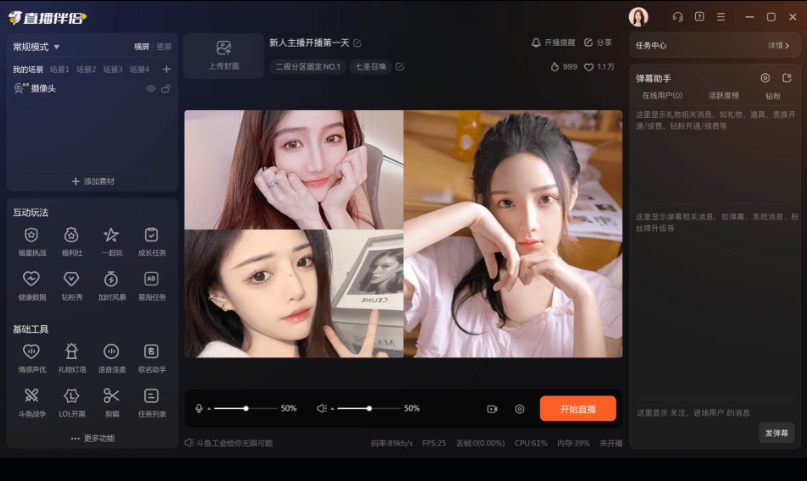
How to use Douyu Live Companion
1. First of all, you need a Douyu account to log in. If you don’t have one, first register a Douyu live broadcast companion.
2. Select the game you want to live broadcast
Click Select Game at the bottom of the companion interface, and the system will automatically grab the game currently open in your program. Click Start, and your game screen will appear on the companion.
Douyu Live Companion
3. Live screen capture
Capture the screen: Of course, if you need to record the desktop or other content besides games, or there is a game that cannot be recognized, you can choose the screenshot option. (The game needs to be set to borderless or windowed)
Full screen capture, as the name suggests, means that your partner gets your full screen, and whatever appears on your screen will appear in your live broadcast room. Capturing and recording means taking a screenshot. You can select any area on the screen to live broadcast. Whatever content you select will be broadcast in the live broadcast room.
4. Window selection
The companion will determine the window you have currently opened, which is simple and clear. You can record the content of the window you want to record.
5. Screen modification settings
Videos, cameras, text, and pictures can be added by clicking on them. The added content can be adjusted in size and position in the companion's preview screen.
Douyu Live Companion System Settings
After clicking Settings in the lower right corner of the Live Companion interface, you can see the Live Companion's settings for video, live streaming, and equipment.
a. Video settings
Douyu Live Companion
In the video setting interface, you can adjust the video live broadcast screen. The system will have recommended values by default to adapt to the live broadcast conditions of most anchors. Anchors with good network and machine conditions can adjust the video parameters to suit their own live broadcast needs. But it doesn’t matter if you don’t understand the parameters. Mate specially provides the system’s automatic judgment function. You don’t know how to set it? It doesn't matter, click the network test button, and Mate will detect your upload speed and automatically adjust the optimal solution for your network. No need to worry, it can be done with one click.
b. Live broadcast settings
In the live broadcast settings, adjust options such as mouse display and Aero effect.
Generally, there are no special problems and no adjustment is required.
c. Device settings
Microphone is added to your microphone during live broadcast.
The volume is adjusted to add other sounds from your computer that are not microphones during live broadcast (including game sounds and music).
Live streaming companion selects available devices by default. If the selection fails, please manually switch and try.
Douyu Live Companion
When the microphone or system sound exists and is successfully captured by the live broadcast partner, there will be a corresponding green bar under the corresponding icon on the interface.
d.Other settings
You can set the shortcut keys for live broadcast and the storage address of the recording in other settings.
Douyu Live Companion Function
Multi-platform real-time live broadcast: Supports Douyu platform live broadcast, covering many types of scenarios such as games, entertainment, shows, e-commerce, and virtual live broadcasts.
One-click broadcasting: After logging in to your Douyu account, set the push code (usually obtained automatically), and you can quickly start live broadcasting.
Mobile game screencasting: Supports Apple wired/wireless and Android wired/wireless screencasting methods to wirelessly project mobile phone screens into live broadcasts.
Barrage interaction: Real-time display of barrages sent by viewers to facilitate real-time interaction between anchors; supports plug-ins such as gift thanks, barrage song requests, voting and lottery, etc. to enhance the fun of live broadcasts.
Adding multimedia elements: Add text, pictures, videos, GIF animations, browser windows (used for displaying web pages, voting, etc.) and other elements in the live broadcast screen.
Scene switching: You can create multiple scenes (such as "Game Live Broadcast", "Chat Interaction" and "Standby Screen") and switch between different live broadcast sessions with one click.
Local recording: While live broadcasting, high-definition videos can be recorded losslessly to the local hard drive to facilitate later editing and production of videos (such as uploading to Bilibili, Douyin and other platforms).
Douyu Live Companion FAQ
Installation of Live Companion failed or error reported?
Possible reasons:
The system environment is incompatible (such as versions below Windows 7, 32-bit systems).
The installation package is damaged or the download is incomplete.
Anti-virus software intercepts (such as 360 and Tinder misjudged as risky programs).
Solution:
Confirm system requirements:
Operating system: Windows 7 and above (64-bit).
Hardware configuration: CPU i3 or above, memory 4GB or above.
Re-download the installation package (download from the official website, avoid third-party platforms).
Temporarily turn off the anti-virus software or add the live streaming partner to the whitelist.
Douyu Live Companion update log:
Sweep the bug out and carry it out to the end
Optimize user feedback issues and improve detailed experience
Huajun editor recommends:
The editor has been using software like Douyu Live Companion for many years, but this software is still the best to use.Windows Media Player,FreeSmith,swf play wizard,All-in-one audio and video format decoder,Taijie videoIt is also a good software and is recommended for students to download and use.





















Useful
Useful
Useful