





How to use M3U8 player
M3U8playerThe method of use is also very simple. Click the left mouse button in the address bar input box to paste the M3U8 source address for playback.
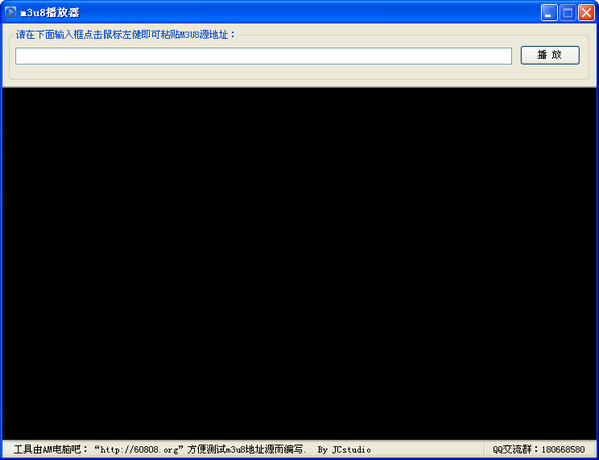
M3U8 player usage tutorial
The video content of some websites is used in the m3u8 format, especially some of the video links forwarded on the mobile phone. So for the m3u8 format, how to specify the player on the computer and play it? Let’s take a look!
1. Download the M3U8 player directly from this site
Specific method: After downloading and installing, click the left mouse button in the address bar input box to paste the M3U8 source address for playback. Isn't it very simple?
2. Use other players to specify playback
1. On the computer, download and install VCL MediaPlayersoftware.
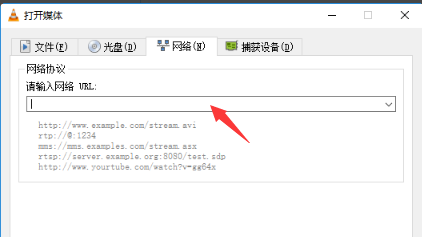
2. In the VCL, click the "Media" menu, then select "Open Network Streaming", and then click the "Network" page, as shown in the figure below:
3. In the text box under "Please enter the network URL", paste the m3u8 address you want to play, as shown in the figure below:
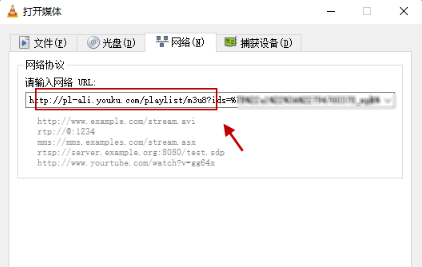
4. Then, click the "Play" button in the lower right corner to play; if it cannot be opened by default, you can choose the "Streaming" method to play;
5. You can play videos after officially starting to connect to the Internet.
What is m3u8?
M3U is the directory information of the song. When downloading audio in .FLAC lossless format, it will be accompanied by an M3U directory file.
M3U8 is also a kind of M3U, but its encoding format is UTF-8 format. M3U is encoded with the Latin-1 character set.
Comparison of similar software:
The official version of QQ Video Player is a new local player launched by Tencent that supports video and music files in any format. QQ Video Player pioneers lightweight multi-player core technology, deeply exploring and leveraging the hardware acceleration capabilities of the new generation of graphics cards. QQ Video Player pursues smaller, faster and smoother features, allowing you to truly have a five-star audio-visual enjoyment in an exclusive space without any plug-ins and advertisements! Huajun Software Park provides the official download of QQ Video Player!
M3U8 player:
m3u8 is Apple’s streaming media format. Don’t know how to play m3u8 files? Why not try this M3U8 player, which supports Windows operating system. The operation is simple, even a novice can do it in minutes. Don’t miss such a practical M3U8 player. If you need it, come to Huajun to download and experience it!
M3U8 player FAQ
What should I do if the encoding format is not supported?
Problem description: The video encoding format in the M3U8 playlist may not be supported by the player.
Workaround: Try using a player that supports the encoding, or convert the video encoding to match the player's requirements.
M3U8 player update log:
1: Optimized performance
2: We are serious about solving bug problems
Warm reminder: Huajun Software Park provides you with the download of Stellar Player, please feel free to use it.
Huajun editor recommends:
The editor of Huajun Software Park recommends that you download the M3U8 player. The editor has personally tested it and you can use it with confidence. In addition, Huajun Software Park provides you withWindows Media Player,FreeSmith,swf play wizard,All-in-one audio and video format decoder,Taijie videoIt’s also a pretty good software, you might as well download it and give it a try if you need it! The editor is waiting for you in wind and rain!




Useful
Useful
Useful