
Hot search terms: 360 Security Guard Office365 360 browser WPS Office iQiyi Huawei Cloud Market Tencent Cloud Store
Hot search terms: 360 Security Guard Office365 360 browser WPS Office iQiyi Huawei Cloud Market Tencent Cloud Store

Internet TV Storage size: 260.40 MB Time: 2016-08-30
Software introduction: Douyu live streaming companion software functions Highlights of Douyu Live Companion Software Mobile game screencasting and virtual camera Support hand...
off off together off In the following content, the editor specifically introduces how to check the frame number of the Douyu live broadcast partner. For those who don’t know yet, let’s take a look. I hope that this tutorial can help everyone.
1. Open Douyu Live Companion, find the settings item at the top of the software interface, and then click the settings button to enter the system settings interface;
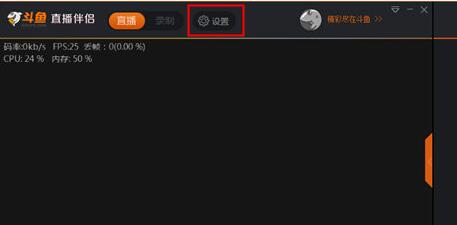
2. In the system settings interface, you can find that there are six options: video, live broadcast, equipment, others, push address, and playback. The frame number setting is in the video column. There are six frame number options: 20fps, 25fps, 30fps, 40fps, 50fps, and 60fps. You can choose the frame number according to your computer configuration. If you are not sure about your computer configuration, you can directly choose the frame number recommended by the system! The system recommends 25fps for the editor. After the frame number is set, you can start the live broadcast.

Dear friends, after reading the above exciting content, you all know how to check the frame number of Douyu Live Partner!

 How to add background music in python-How to add background music in python
 How to configure environment variables in python - How to configure environment variables in python
 How to run python - How to run python
 How to create a project in python - How to create a project in python
 How to make a blue sky background with scratch-How to make a blue sky background with scratch
 Microsoft Edge browser
 Steam
Steam
 Tencent Video
 WPS Office
 iQiyi
iQiyi
 Sohu video player
 Lightning simulator
 MuMu emulator
 Eggman Party
 What to do if there is no sound after reinstalling the computer system - Driver Wizard Tutorial
 How to switch accounts in WPS Office 2019-How to switch accounts in WPS Office 2019
 How to clear the cache of Google Chrome - How to clear the cache of Google Chrome
 How to fire bullets in scratch-How to fire bullets in scratch
