



PDFBinder (PDF merging tool) FAQ:
What should I do if I encounter a PDF document that cannot be added?
If you encounter a PDF document that cannot be added and it is prompted that PDF document does not allow copying, you can use //www.pdfcrack.com/ to process it online, and then import it into pdfbinder.
Can PDFBinder change the order?
Simply use the up and down arrows on the menu to adjust the order.
PDFBinder (PDF merge tool) software functions
1. Merge multiple pdf files quickly and accurately
2. PDFBinder supports specifying page range and merging
3. Convert JPG, BMP, PNG, TIFF to PDF
4, 2-1, 4-1 page arrangement, saving paper and time
5. PDFBinder supports opening encrypted PDF formats, editing, copying and printing
How to use PDFBinder (PDF merge tool)
1. Download PDFBINDER from this site, unzip it and double-click the program to start it. This software is a green version and does not require installation.
2. Open the PDFBinder program and click the “Add file…” button:

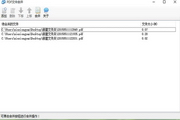
3. Select the file in the pop-up menu:
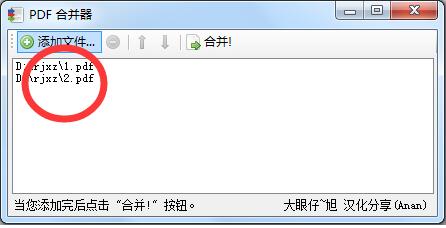
4. After adding, click the "Bind!" button:

5. Select the merged save location in the pop-up dialog box:

6. Double-click the PDF file we merged to take a look. It has been successfully merged.
7. Click on the added file, and then click on the delete symbol in the previous line to delete the added PDF file.

Comparison of similar software
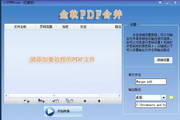
迅捷pdf合并软件可以将多个pdf文件批量合并成一个pdf文件。 The software is simple to operate, supports dragging and adding files, and can achieve fast merging effect. It is a professional pdf merger tool.
If you are interested in the fast pdf merging software, you can click to download and experience it.
PDFBinder:
PDFBinder is a very simple open source PDF merging software. It is easy to use and only has the function of merging PDF files. , you can easily merge multiple PDFs into a single PDF and support sorting.
Editor’s summary: These two are software for PDF merging. The editor prefers PDFBinder. It is simple to operate and very practical. You can choose to download it according to your own needs.
PDF practical gadgets
PDF Split Tool
Wonderfulshare PDF Split, you can evenly cut the PDF document, and you can arbitrarily extract the specified page numbers in the PDF document, such as which page, and you can also extract the specified page number spacing in the PDF document, such as which page to which page, which is very convenient.
PDF merge
If you want to merge multiple PDFs into one file, of course use PDFBinder, throw in the multiple PDF files that need to be merged, arrange them in the order before and after adjustment, and finally Bind!
PDF to Word document
Deli pdf to word, you can easily convert non-editable PDF documents into editable word documents, support multi-format conversion, and also support conversion between PDF and multiple formats.
PDFBinder (PDF merging tool) update log:
* Sort alphabetically when adding files via context menu.
*Annotations (marks, comments) are saved.
Huajun editor recommends:
PDFBinder (PDF merging tool) is a high-performance software that meets everyone's requirements. The software is free and non-toxic, and has well-received software. Our Huajun Software Park has the most authoritative software, green and free, officially authorized, and similarHiFormat PDF Converter,Zhuanzhuan Master,PDF editor, I hope everyone will come to download it!












Useful
Useful
Useful