





Official introduction to Samsung mobile phone data recovery software
Samsung mobile phone data recovery is a data recovery software released by Swift Studio specifically for Samsung mobile phones. It supports the recovery of text messages, address books (contacts), and call records on mainstream Samsung series mobile phones such as Galaxy and Note. Temporarily, it does not support the recovery of photos, QQ chat records, and WeChat records on the phone, but supports the recovery of photos, QQ chat records, and WeChat records on the external mobile phone memory card.
Samsung mobile phone data recovery software instructions
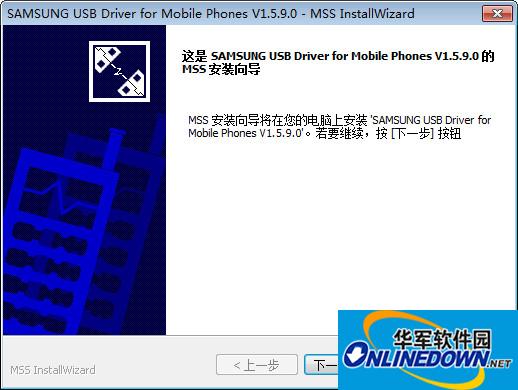
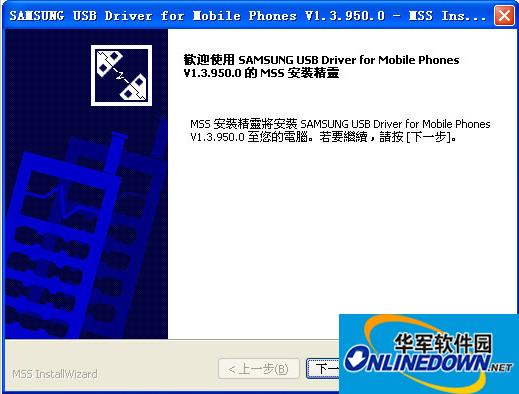
1. Download the Samsung mobile phone data recovery software on this page and install it
2. Connect the Samsung mobile phone to the computer and root the phone.
3. Click to open Samsung mobile phone data recovery software
4. Select the "Scan from phone" method and click the button. When finished, click the Scan button to scan.

5. The important thing is to scan, wait for the scan...

6. The last step is to filter and restore the scanned files.
Notes on Samsung mobile phone data recovery software
Before using this software, please root your phone. You can check the relevant information online on how to root.
The software will then automatically extract the database files in the phone and analyze the previously lost data.
FAQ
How to obtain ROOT permission on Samsung mobile phone?
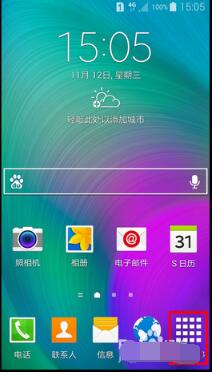
1. To obtain ROOT permissions on a Samsung mobile phone, first we need to turn on the "USB" debugging switch on the Samsung mobile phone: click the "Applications" button on the Samsung mobile phone desktop to enter.
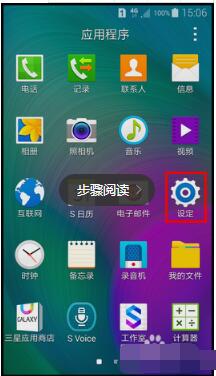
2. After opening the "Application List" interface, find the "Settings" button and click to enter. As shown in the picture:
3. Next, find the 'About Device' item in the 'Settings' interface and click to enter the detailed information interface.

4. After entering the "About Phone" interface, find the "Build Version Number" and click continuously to turn on the "Developer Options" function.


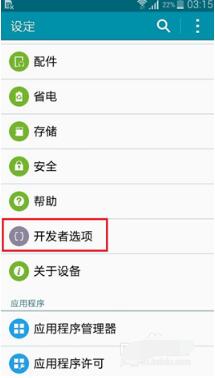
5. Finally, enter the “Developer Options” interface through the “Settings” interface. As shown in the picture:
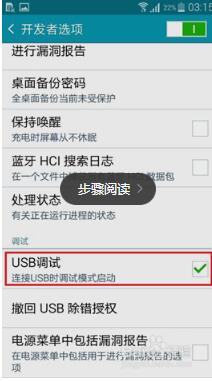
6. At this point you can see the "USB debugging" switch. Click the switch on the right to turn on the "USB debugging" function.
7. Next we need to use a third-party ROOT tool to obtain the ROOT permissions of the mobile phone, such as downloadingOne-click root master.
8. Download any ROOT tool here and install it. Connect the phone to the computer and run the ROOT tool. The phone driver will be automatically installed.
9. After the mobile phone driver is installed, directly click the "One-click ROOT" button and follow the software interface prompts to complete the operation of obtaining ROOT permissions for the mobile phone.
Which mobile phone data recovery software is the best?
1. Android Phone Recovery Master is an Android phone data recovery software with a simple program interface, easy operation and trial function.
2. Master Tu Android phone data recovery software is currently the only software that can truly recover Android phones. It supports file types that may be generated by Android phones. Even if the phone is re-flashed, formatted or deleted, the files can be recovered well.
3. BestRecoveryForPhone (mobile phone data recovery) is an efficient recovery program designed mainly for the problem of mobile phone data loss. The software analyzes the structure of the file system and the data structure of the mobile phone database through the bottom layer, and displays the lost files in the mobile phone and the lost (or deleted) database records in the software through a certain algorithm.
4. Haihai mobile phone data recovery software supports mobile phone SD card and TF card data recovery. The recovery success rate is high and the file scanning speed is fast.
5. Yishu mobile phone data recovery software is a software specially used for Android mobile phone data recovery. It supports the recovery of data lost from the mobile phone's SD card and the built-in memory of the phone. The software can easily retrieve data lost on Android phones due to formatting, accidental deletion, viruses, factory reset, flashing, etc. It supports the recovery of mobile phone photos, videos, phone recordings, music, documents, chat records, contacts and other data. The software uses the DiskGenius data recovery kernel to ensure satisfactory data recovery results. Yishu mobile phone recovery software adopts a wizard-style interface, and the operation method is extremely simple. With just a few clicks of the mouse, you can easily recover lost data on your mobile phone, and you will no longer have to worry about lost data on your mobile phone.
6. Samsung mobile phone data recovery software is a software that can recover deleted text messages, address books, and call records on Samsung series mobile phones. Photos, QQ chat history, and WeChat cannot be recovered by this software. You can contact our company to provide data recovery services. The interface is simple to operate and the software is easy to use.
Editor's summary: The above is the mobile phone data recovery software carefully prepared for everyone. You can choose according to your own needs. There will always be one that suits you.
Samsung mobile phone data recovery software updates
Further improve software functions and fix bugs.
|
Huajun editor recommends: Samsung mobile phone data recovery software has a friendly interface and simple operation. You no longer have to worry about deleted data not being recovered. Hurry up and download and use it. In addition, Huajun Software Park provides you with Xunlong hard drive data recovery software, Invincible hard drive data recovery software, one-click root master and other downloads. |







Useful
Useful
Useful