




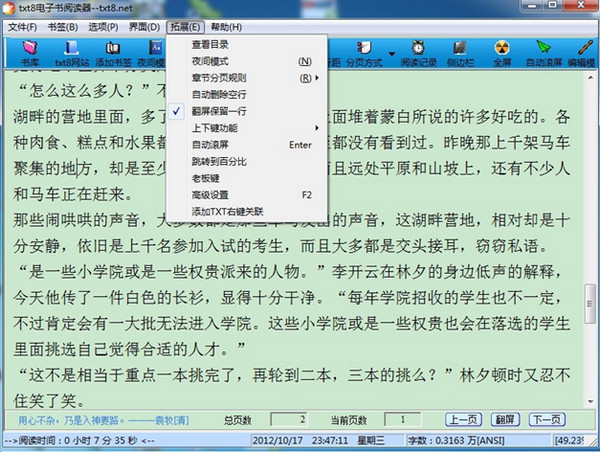
txt8 e-book reader software features
Paging by row is fast, paging by chapter is accurate, and it only takes 1 second to complete paging;
Supports opening folders to browse frequently used files;
Supports the addition and deletion of 9 bookmarks, and the recording of 5 recent folders;
txt8 e-book reader supports dragging txt files directly into the window to open them;
Completely customize settings such as font, line spacing, color and other parameters, and automatically save the last setting plan and last progress;
Prompt information: number of Chinese characters in the article, date, etc.
Quickly open large TXT files (more than 5M);
txt8 e-book reader supports full screen and sidebar closing.
Can display reading time and remind you to take a break every half hour!
txt8 e-book reader shortcut key introduction
'←' previous page, '→ ' next page
'F5' adds bookmarks, 'Enter' automatically scrolls, 'Ctrl+Enter/Esc' switches to full screen
'F1' closes the sidebar, 'F2' more settings, 'F3' reads time records
'Spacebar' scrolls down and automatically next page
'PageUp/ PageDown' Scroll up/down.
txt8 e-book reader update log
Added support for reading compressed files such as rar and zip (requires compression software to be installed);
txt8 e-book reader adds right-click association of txt files and directory toolbar;
Add USB portable path reading and turn off the reading reminder;
Improve reading progress prompts and remember the progress when switching paging modes;
Improved file positioning to be more accurate, improved mouse display;
Display txt encoding and hide the scroll bar when reading in full screen;
Quickly open large TXT files (more than 5M);
txt8 e-book reader supports opening folders to browse frequently used files;
Paging by lines is fast; paging by chapters is accurate, and it only takes 5 seconds for an average novel to be paged;
Supports dragging TXT files directly into the window to open them;
Completely customize settings such as font, line spacing, color and other parameters, and automatically save the last setting plan and last progress;
txt8 e-book reader supports the addition and deletion of 9 bookmarks, and the recording of 5 recent folders;
Can display reading time and remind you to take a break every half hour!
txt8 e-book reader supports full screen and sidebar closing.
Prompt information: number of Chinese characters in the article, date, etc.








Useful
Useful
Useful