If you are looking for software to use, go to Huajun Software Park! software release AI product list

Hello, if there is a need for software inclusion, please package the software and attach the software name, software introduction, software-related screenshots, software icon, soft copy, business license (if you do not have a business license, please provide the front and back of the corresponding developer ID card and a photo of yourself holding the ID card), and send it to email http://softwaredownload4.com/sbdm/user/login

Close >>

Send to email:news@onlinedown.net

Close >>

Location: Home pagePC softwareSystem softwarevirtual optical drive gBurner (disc burning tool)
gBurner (disc burning tool)

gBurner (disc burning tool) official version

QR code
  • Software licensing: shareware
  • Software size: 13.14MB
  • Software rating:
  • Software type: Domestic software
  • Update time: 2024-12-30
  • Application platform: WinAll
  • Software language: Simplified Chinese
  • Edition: Official version

Download the service agreement at the bottom of the page

Software introduction Related topics FAQ Download address

Recommended for you:- gBurner disc burning tool

Basic introduction
gBurner (disc burning tool) segment first LOGO
gBurner is a powerful and easy-to-use CD/DVD/BD burning software that allows you to create data, audio and video CDs, DVDs and Blu-ray Discs, create bootable discs, auto-run discs, create segmented burnable discs and more.

gBurner is also a disc image processing software that allows you to open, create, edit, extract, convert and burn disc image files.
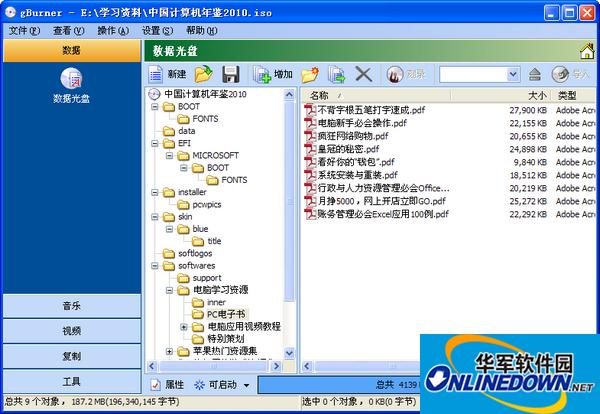
gBurner (disc burning tool) screenshot

Software features

Create data, audio and video discs. gBurner supports the following disc types: CD-R, CD-RW, DVD-R, DVD-RW, DVD-R DL, DVD+R, DVD+RW, DVD+R DL, DVD-RAM, BD-R, BD-R DL, BD-RE, BD-RE DL.

Create multisession discs.

Make a bootable data disc.

Copy CDs, DVDs and Blu-ray discs.

Erase rewritable discs.

Create a bootable USB drive.

Supports ISO 9660, Joliet and UDF file systems.

Support audio CD-TEXT.

Supports MP3, WMA, WAV, FLAC, APE and OGG audio formats.

Open, create, edit, extract, convert and burn disc image files. gBurner has automatically detected the engine, so gBurner can automatically analyze almost all disc image files (iso, bin, cue, mdf, mds, img, gbi, daa, uif, cif, nrg, gi, dmg, etc.).

Supports Unicode filenames.

Optimize file formats to save disk space.

Supports WIM, VMDK, VHD and VDI virtual disk image files.

Supports disk image file FAT/ NTFS/ EXT partition.

Simple and user-friendly. gBurner supports context menu, drag and drop, clipboard copy and paste…


FAQ

gBurner (disc burning tool)

gBurner (disc burning tool) official version

close