
If you are looking for software to use, go to Huajun Software Park! software release AI product list

Hello, if there is a need for software inclusion, please package the software and attach the software name, software introduction, software-related screenshots, software icon, soft copy, business license (if you do not have a business license, please provide the front and back of the corresponding developer ID card and a photo of yourself holding the ID card), and send it to email http://softwaredownload4.com/sbdm/user/login

Close >>

Send to email:news@onlinedown.net

Close >>

Location: Home pagePC softwareSystem softwarevirtual optical drive VirtualDVD (virtual optical drive)
VirtualDVD (virtual optical drive)

VirtualDVD (virtual optical drive) v7.6.0 Chinese free version

QR code
  • Software licensing: shareware
  • Software size: 3.78MB
  • Software rating:
  • Software type: Domestic software
  • Update time: 2024-12-30
  • Application platform: Win All
  • Software language: Simplified Chinese
  • Edition: v7.6.0 Chinese free version

Download the service agreement at the bottom of the page

Software introduction Related topics FAQ Download address

Recommended for you:- VirtualDVD virtual optical drive

Basic introduction
VirtualDVD (virtual optical drive) segment first LOGO
VirtualDVD is a free virtual optical drive tool. The interface is simple and powerful, and it supports CD/DVD/Blu-ray image formats.

Installation and usage tutorial:

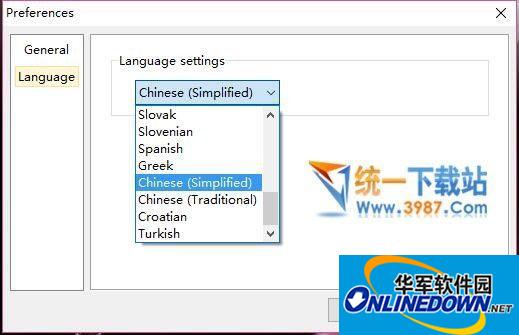
1. Download and install it, then there is a CD icon in the lower right corner of the desktop, right-click and select "Preferences", select Simplified Chinese, and restart.

2. Open it again in Chinese, click on the virtual device list, and add the files that need to be opened.
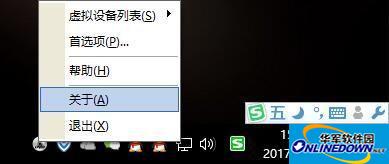
VirtualDVD (virtual optical drive) screenshot

VirtualDVD software features:

1. Support CD/DVD/Blu-ray image formats

CloneCD (CCD), CDRWIN (BIN), Tip Sheet (*. Tip), CDIMAGE (*. IMG), International Organization for Standardization (ISO), BlindRead (BWT), BlindWrite (*. B5T. b6t), Alcohol 120% Image (*. MDS; *. MDF), Disc Magic (CDI), Instant (PDI), CD/ DVD compression ISO (*.ISZ), Nero (NRG), CloneDVD (DVD), CDSpace6 (LCD).

2. Simulate all of up to 24 SCSI devices.

3. Install to local NTFS folder for image.

4. Customize virtual drive: change drive letter, DVD.

Related topics

  • Collection of full versions of virtual optical drive software-Virtual optical drive official latest version download-Virtual optical drive ranking list

    Collection of full versions of virtual optical drive software-Virtual optical drive official latest version download-Virtual optical drive ranking list

FAQ

VirtualDVD (virtual optical drive)

VirtualDVD (virtual optical drive) v7.6.0 Chinese free version

Close