




- Green versionView
- Green versionView
- Green versionView
- Green versionView
- Green versionView
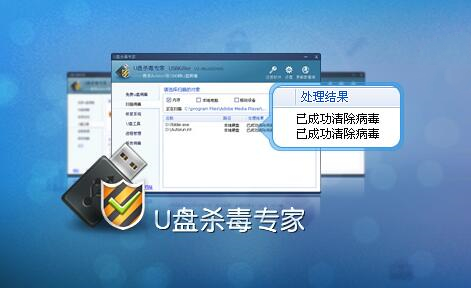
U disk antivirus expert related instructions
U disk antivirus expert has many functions. It can scan for viruses, scan system memory, local hard disks and mobile storage. It is equivalent to a small anti-virus software! USBKiller can detect and kill more than 1,200 U disk viruses such as exe viruses, auturun viruses, vbs viruses, hidden U disk folders, etc. It can also immunize U disks and automatically repair system configurations and files damaged by viruses. In addition, it also provides some other U disk auxiliary functions, such as U disk unlocking, process management, etc.
U disk antivirus expert function introduction
Efficient scanning and killing: Completely detect and kill thousands of U disk viruses such as folder viruses, autorun.inf, vbs viruses, exe viruses, etc.;
U disk immunity: Automatically detect and remove viruses inserted into the U disk to prevent viruses from infecting the computer through the U disk;
Automatic recovery: After killing the virus, it can automatically repair hidden files on the USB disk and restore system settings;
Unlock the USB flash drive: Unlock the USB flash drive and solve the problem of "unable to stop the device" when pulling it out;
Process management: allows you to quickly identify and terminate suspicious programs in the system;
Supported equipment: Supports mobile hard drives, mobile phone memory cards, MP3, MP4, U disk and other devices;
Compatible software: The USB flash drive anti-virus tool is compatible with other anti-virus software and can be used together.
Features of USB antivirus expert software
1. Easily and completely remove autorun viruses and folder exe viruses.
2. The built-in U disk immunity tool makes your U disk anti-virus.
3. Automatically restore hidden files on USB disk and solve the problem of folder turning into exe.
4. Easily delete the autorun.inf virus and folders.
5. Strengthen detection depth and increase antivirus efficiency by 50%.
U disk antivirus expert installation method
1. After downloading U disk anti-virus expert from Huajun Software Park, unzip it to the current folder, double-click the .exe file in the file to enter the software installation guide interface, and click [Next] to continue the installation.

2. Select the installation location of U disk anti-virus expert. You can click [Next], and the software will be installed automatically, or you can click [Browse]. In the pop-up installation location interface, you can choose the installation location of U disk anti-virus expert. Huajun editor recommends that users install it in the D drive. After selecting, click [Next].

3. Select the storage location of the USB antivirus expert shortcut, and click [Next] after completing the selection.

4. Choose whether to create a shortcut. You can check "Create a desktop shortcut" and click [Next] after completing the selection.

5. Prepare to install the U disk anti-virus expert software. You can check whether the installation location of the software is correct. If it is correct, click [Install]. If there is an error, click [Previous] to modify it.

6. U disk antivirus expert is being installed, you just need to wait patiently.

7. The installation of U Disk Antivirus Expert is completed. You can check "Run U Disk Antivirus Expert", click [Finish], and then you can open the software.

U disk antivirus expert tutorial
1. Run USBKiller, the USB antivirus expert.
2. Please insert the infected U disk into the computer, and then open the U disk anti-virus expert.

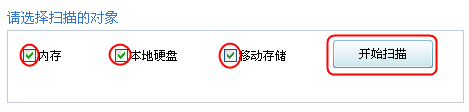
3. Select the object that needs to be scanned. There are three items: local hard disk, memory, and mobile storage device. It is recommended to select all of them, and then click "Start Scan":
4. After opening the main interface, click Repair System on the left, select "Select All", and click "Start Repair" to restore the files or data to their original settings. It can fix situations such as "Unable to display hidden files or folders", "Unable to open the disk by double-clicking" and "Unable to run anti-virus software on U disk".

5. After the repair is completed, the following prompt will appear:

Frequently Asked Questions by U Disk Antivirus Experts
Q: What is a USB flash drive virus?
Answer: When viruses can be transmitted through U disks (MP3, mobile phone memory cards, mobile hard drives), we collectively call them U disk viruses. When you insert a USB flash drive infected with this virus into your computer, once you open the USB flash drive, your computer will be infected with the virus. Similarly, when you insert a virus-free U disk into a computer infected with a U disk virus, the U disk will be immediately infected with the virus.
Q: Can USBKiller really remove viruses after registration?
Answer: Members of the USBKiller development team have many years of experience in virus analysis. They have developed a SuperClean antivirus engine with independent intellectual property rights, which can efficiently remove hundreds of stubborn U disk viruses, including viruses that cannot be removed by other antivirus software, reaching a detection rate of more than 95%. The software has been introduced and promoted in newspapers and magazines such as Computer News, Computer Application Digest, and Computer Enthusiasts. The software has been supported by a wide range of netizens in half a year. It has reached 200,000 downloads on well-known download websites such as Huajun, Sky, and Sina, and an astonishing 600,000 downloads on Duote and Green Software Alliance. Without everyone's trust and support, it would be difficult to achieve.
Question: Why can’t my genuine anti-virus software kill U disk viruses?
Answer: U disk virus is a new type of virus that has developed rapidly with the popularity of U disk. At present, due to the wide variety of viruses, it is impossible for anti-virus software manufacturers to analyze every type of virus in time, so genuine anti-virus software cannot detect and kill these viruses. USBKiller focuses on detecting and killing U disk viruses. It has a complete virus reporting mechanism and can receive virus samples in time and analyze them. As long as users update the virus database, they are guaranteed to be free from U disk viruses.
U disk antivirus expert update log
1. The details are more outstanding!
2. BUG gone without a trace
Huajun editor recommends:
After so many years of updates and optimizations, USB Antivirus Expert has become more humane and more technological. It is highly recommended to everyone and welcome to download. Those who are interested can also download91 Assistant,Certificate manager,Duobaoshi multimedia visual training system,PDFdo TXT To PDF,Reading and Writing Guest.








Useful
Useful
Useful