If you are looking for software to use, go to Huajun Software Park! software release AI product list

Hello, if there is a need for software inclusion, please package the software and attach the software name, software introduction, software-related screenshots, software icon, soft copy, business license (if you do not have a business license, please provide the front and back of the corresponding developer ID card and a photo of yourself holding the ID card), and send it to email http://softwaredownload4.com/sbdm/user/login

Close >>

Send to email:news@onlinedown.net

Close >>

Location: Home pagePC softwaredesktop softwaredesktop assistance directx uninstall wizard
directx uninstall wizard

directx uninstall wizard official version

QR code
  • Software licensing: free software
  • Software size: 0.22MB
  • Software rating:
  • Software type: Domestic software
  • Update time: 2024-12-30
  • Application platform: WinAll
  • Software language: Simplified Chinese
  • Edition: Official version

Download the service agreement at the bottom of the page

Software introduction Related topics FAQ Download address

Recommended for you:- DirectX

Basic introduction
directx uninstall wizard section first LOGO
BUE DirectX Uninstall Wizard is a garbage cleaning software specially launched for DirectX. You can use this DirectX to clean up the garbage left by DirectX software with one click. It is powerful and easy to use!

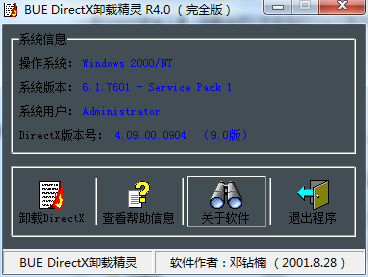
screenshot of directx uninstall wizard

Introduction to directx uninstall wizard software

BUE DirectX is a software that specializes in cleaning up DirectX garbage. After you upgrade DirectX, you can clean up the garbage left behind by the original DirectX. The software is simple to operate and can be cleaned with one click. Friends who need it can download it and use it.

How to uninstall directX?

BUE DirectX Uninstall Wizard is here to help. This is a DirectX security tool that supports uninstalling DirectX. The uninstall speed is 1.5 times faster than before. After the BUE DirectX Uninstall Wizard completes the uninstall operation, it will not leave any traces on the system. It is clean and has no residue, takes up little space, and is simple to operate. Because DirectX does not allow downgrading from a high version to a low version, so the BUE DirectX Uninstall Wizard appears!

directX uninstall wizard update content:

1. Switch to Delphi as the program editor, which is truly compatible with all Windows platforms.

2. Can run on WindowsXP platform.

3. The uninstall speed is 1.5 times faster than before.

4. Fixed the bug that caused the computer to be restarted manually after uninstalling.


5. Fixed the problem of "file error" occurring on some computers.
FAQ

directx uninstall wizard

directx uninstall wizard official version

close