




- Green versionView
- Green versionView
- Green versionView
- Green versionView

Desktop Baidu features
1. Easily get involved in stock investment
By searching on desktop BaidustocksName or code, follow a specific stock, and you can obtain stock-related information in real time.
2. Keep abreast of novel updatesDynamic
Search your favorites in desktop Baidunovel, and subscribe to update notifications, you will get the latest news about novel chapters as soon as possible.
3. Baidu knows that information is delivered in real time
After logging in to your desktop Baidu account, participate in questions or answers on Baidu, and relevant messages will be delivered to your account immediately.Account.
4. Intelligent prediction, attentive service without interruption
Provides a variety of quick operation options to improve ease of use.
Desktop Baidu Software Highlights
1. Popular application, convenient and practical
Covering vision, communication, hearing and dialogue, we deeply understand your interests and hobbies.

2. Lazy mode saves you every step
Lazy people shape the world, and Baidu understands your needs.
cityweatherInformation is available as soon as you search it, perfect fit, and smart startSearchfunctions, more potential is waiting for you to explore.
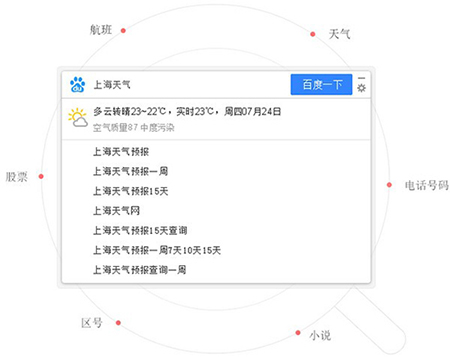
3. Local software, one-click startup
BaiduDesktop, simplifying the complex.
All software can be searched and launched to restore a clean space for you.
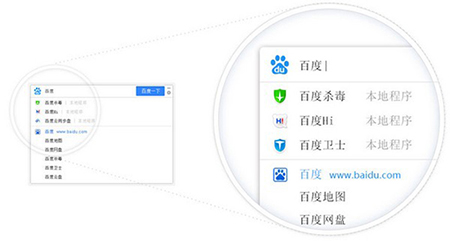
4. Breathe in and out as you please
Drag freely, hide the edges, and use Alt+Spacebar to achieve seamless switching.

Desktop Baidu installation method
1. Please download the desktop on this platformBaidusoftpackage, unzip it and double-click the "Baidu_Setup_3.3.0.3153.exe" program to start the installation process. Then please click to view the user license agreement and choose to agree to the terms. After that, click the settings icon to enter the installation configuration interface.

2. The default installation path of the software is "C:/Users/Administrator/AppData/Local/Baidu/BaiduClient/". If you need to change the installation location, you can click the folder icon to select another path.

3. Based on personal needs, decide whether to check to add the software to the quick launch bar, and click "Install Now" after confirmation.
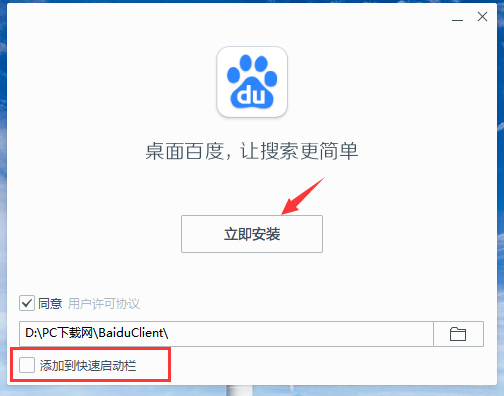
4. The software is being installed, please wait patiently.

5. The software installation is successfully completed.
How to use desktop Baidu
1. After the software is installed, Baidu will appear on the taskbar.search box
2. Users can directly enter the content they want to search in the search box.
3. The search results will appear directly
Desktop Baidu FAQ
If the desktop Baidu search box interferes with yourBrowseexperience, you can hide the search box by clicking the minimize button in the upper right corner of the search box.
If you need to quickly call Baidu search function through shortcut keys, the default setting of desktop Baidu isShortcut keysIt is Alt+space. If this shortcut key conflicts with your existing shortcut key settings, Baidu desktop also provides other optional shortcut keys for you to choose from.
Regarding setting the backend browser, you can enter the "Settings Center" and select your preferred browser type in the browsing settings options. The default browser options will use the default settings currently set on your computer.Browser; Baidu Browser has become a recommended option due to its fast, smart, concise features, as well as rich plug-ins and applications; the exclusive browser is a lightweight browser customized for desktop Baidu, aiming to provide a fast and efficient browsing experience. After selecting, click Confirm to complete the setting.
If you need to modify the shortcut key settings, you can click Baidu on the desktopsearch boxMenu button, select "Settings Center" to enter the basic settings page. In the shortcut key setting section, you can select the appropriate shortcut key combination from the drop-down menu and click Confirm to save the changes.
Baidu client update log:
1. Optimized some functions
2. Solved many unbearable bugs
Huajun editor recommends:
Baidu client is free software, download it if you need it! This site also hasFirefox Enterprise,Google Chrome,GooSeeker browser,Google Chrome,Maxthon Cloud Browser, available for you to download!


















Useful
it works
Useful