



The official version of the LED badge editing software (MiniLED Display HID) is suitable for LED badge editing tools used in many industries. MiniLED Display In HID, users can directly enter relevant LED display text in the software window and click Send to display the desired display content on the LED screen. LED badge editing software (MiniLED Display HID) can also add special effects to the LED display screen, control the display speed and other operations.Huajun Software Park provides you with free download of LED badge editing software (MiniLED Display HID) 2024. Friends who like LED badge editing software (MiniLED Display HID) come to Huajun Software Park to download and experience it!

LED badge editing software (MiniLED Display HID) software functions
1. Users can directly enter the relevant LED display text in the software window and click Send to display the required display content on the LED screen.
2. Users can also add special effects to the LED display screen, control the display speed, etc.
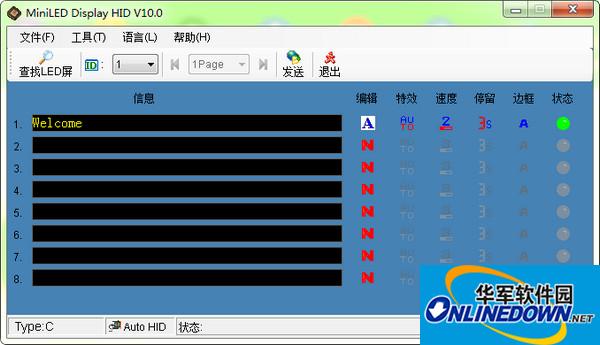
3. You can enter 8 different contents, and you can choose the speed of special effects, etc.
4. During the editing process, if the user encounters a red status, it means not sending, and green means sending.
5. Turn on the badge switch first and then connect the charger, otherwise it will not charge.
6. When the content exceeds the total capacity, please delete some programs before continuing.
LED badge editing software (MiniLED Display HID) software features
1. Modifying content is also convenient and easy to use
2. The software is green, non-toxic and has no advertisements
3. No complicated plug-in installation
4. The software is safe and users can download and use it with confidence
5. A very practical LED badge editing software
6. Simple and practical, you can directly enter it and display it directly.
LED badge editing software (MiniLED Display HID) installation steps
1. Download the LED badge editing software (MiniLED Display HID) from the Huajun Software Park, unzip it to the current folder, and click on MiniLED Display HID V10.0.exe application, enter the installation wizard interface, and then click Next.

2. Select the software installation location interface. Huajun editor recommends that users install it on the D drive, select the installation location and click Next.

3. The LED badge editing software (MiniLED Display HID) is installed, click Finish.

How to use LED badge editing software (MiniLED Display HID)
Open the program, connect the LED to the computer, and then click Find LED
Click Edit to enter text
Addition of special effects
Speed adjustment
You can also set the dwell time/whether there is a border
After editing, click Send

Instructions for use of LED badge editing software (MiniLED Display HID)
Type the text you want to display in the edit box and click Send. You can enter 8 different contents, and you can select the special effects speed, etc. later. Red status means not sending, green means sending. Turn on the badge switch first and then connect the charger, otherwise it will not charge. When the content exceeds the total capacity value, please delete some programs before continuing.
LED badge editing software (MiniLED Display HID) FAQs
Question: How to uninstall the LED badge editing software (MiniLED Display HID)?
Answer: Method 1: Install and open the computer housekeeper software, select the software management option, click the uninstall option, and find the LED badge editing software (MiniLED Display) in the list HID), click to uninstall

Method 2: Install and open360 software manager, find the LED badge editing software (MiniLED Display HID) in the list of uninstall options, and click to uninstall it.

Comparison of similar software
led name badge driverAfter installing the universal LED badge USB driver, you can easily type your text in the edit box of the badge, change the color and size of the font, add special effects to the LED display screen, control the display speed and other operations.
LEDEasyShow multimedia player softwareIt is a special software designed and developed for LED electronic display screens, which facilitates the editing of images, videos, and text content for playback on the LED display screens.
Huajun editor recommends:
In the LED badge editing software (MiniLED Display HID), users can directly enter the relevant LED display text in the software window and click send to display the required display content on the LED screen. Stable performance, no bundling, green and safe, truly a conscientious software!






Useful
Useful
Useful