





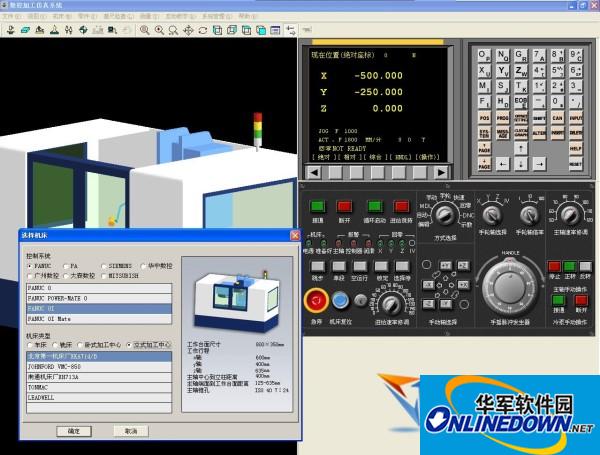
Introduction to the functions of Machining CNC milling machine simulation software
Whole process simulation of machine tool operation:
CNC program automatic, MDI manual input, manual, editing and other operating modes
: back for the benchmark tool setting, edge finder tool setting, tool installation, machine tool programming and manual operation
Setting of system parameters such as tool compensation and coordinate system settings
Blank selection, including cylindrical blanks and cubic blanks
The interpolation operations supported by the CNC simulation system include arc interpolation and linear interpolation.
Processing and operation full environment simulation:
During processing, the collision detection between the tool and the workpiece is carried out in real time and an alarm is generated, and the overtravel alarm of each axis of the machine tool is
Machine tool coolant simulation
Real-time cutting and chip simulation of 3D workpieces
Display of three-dimensional tool path
Machine tool processing sound effect simulation
CNC program processing:
CNC machining G-Code analysis and validity inspection
Supports the import of CNC machining codes generated by other software
The CNC machining center machining tools supported by the CNC simulation system are:
Drill bits, boring tools, ball nose cutters, end mills, face milling cutters
Machining CNC milling machine simulation software installation method
1. After downloading, unzip it and open GMachiningSetup.exe
2. Select language
3. Click Next to continue and select the installation directory.
4. Reading completed
Machining CNC milling machine simulation software update log
1. Modify the problem of incorrect shape of workpiece cut by drill bit
2. The problem of incorrect orientation of the boring tool spindle in the fixed cycle
3. Modify the problem of only recognizing END1 but not END01
4. Modify the problem that IF GOTO cannot exit if it is nested in WHILE
5.Add an error message when END does not have a serial number
6. Modify the positive and negative feed directions of the handwheel
7. Modify the problem caused by canceling polar coordinates in the subroutine
8. Modify the problem of returning to reference point instructions in other planes
9. Modify known issues
Huajun editor recommends:
The editor guarantees that as long as you use Machining CNC milling machine simulation software, if you don't like it, you can come and hit me! The editor has also prepared for youFastCAM automatic programming nesting software,Hanwen production planning and scheduling software,Material weight calculation,Green apple weighing software,Machining process quota calculator













Useful
Useful
Useful