




Bangren after-sales service management software description
The software interface is beautiful and elegant, and the operation is simple and convenient. It is very suitable for the sales and maintenance of IT hardware, the sales and maintenance of medical equipment, factory production equipment, household appliances, etc., greatly improving work efficiency.
When a customer calls, the computer will query the customer information in the database and pop up the customer information on the computer screen when the phone rings for the second time. Related purchase records and services will also be quickly presented, speeding up customer response and improving customer satisfaction.
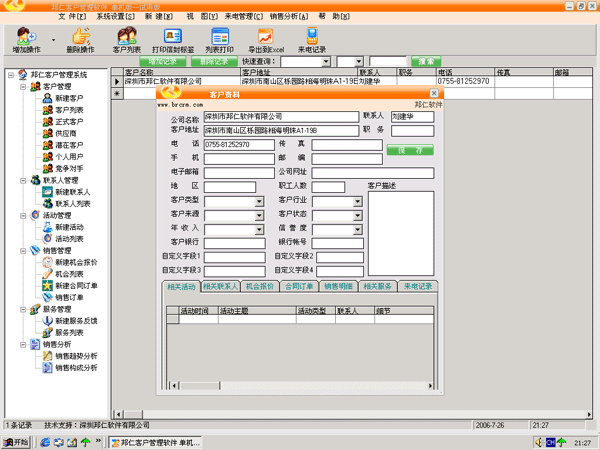
Bangren after-sales service management software software features
1. It is a small CallCenter system, which is an integration of a small call center and a customer management system;
2. Supports two incoming call formats: FSK and DTFM
3. Humanized design interface, easy to operate and practical functions
4. Cheap price
5. Supports multi-user collaborative work. It can be run on a single machine or set up as a server or workstation. Multiple machines support multi-purpose network collaborative work;
6. Supports call recording (please specify when purchasing, default sales do not include recording)
Introduction to the functions of Bangren after-sales service management software
Customer information pops up when calling Registered customers' customer details will pop up directly, and records related to the customer will also appear accordingly; unknown customers will display the customer's call number and calling area, and mobile phone calls will display the home location. It supports all number segments of China Unicom 130~133, China Mobile 134~139, and more than 400 city information.
Pop up customer details
Customer management helps you manage all customer information. Customers can be managed in groups. Grouping is customized by the user and is divided into individual customers and group customers by default: customer fields include customer name, address, main contact, phone number, fax, customer description, etc., supporting fast fuzzy query.
Software main interface
Each customer can manage multiple contacts, and each contact can have multiple contact numbers. This way, it can be easily managed regardless of how many customers there are or how many phone calls each person has;
Customer interaction records It can manage the status of interactions between users and customers, including the content of the interaction, the time of the interaction, the method (consultation, return visit, etc.), and the priority of the response. The software has the function of setting the reminder time and reminding you to reply when the time comes;
Contact records
Sales records Used to manage customers' sales records; provide the product name, serial number, repair or maintenance instructions, service start time, service end time, maintenance interval, and the software will automatically remind you every time the service interval is set, etc.
Sales records
Quotation management, the system can manage product quotations. When customers are inquiring about products and have purchase intentions, they can link the quotations to the system;
After-sales service management Log in each service record and associate it with customer information. You can record the start time of each service, yes/no end, end time, service type (maintenance, repair, upgrade, etc.), service products, etc.;
Service records
来电记录 记录客户的每次来电和电话内容;平时软件可以像QQ一样托盘运行,客户来电时,会自动弹出客户的详细信息,来电记录可以管理每天的电话记录
Multi-angle analysis report: You can select any time period to analyze sales records by year, month, or day to quickly generate reports;
Supports data import and export operations
System settings provide flexible software customization functions
Customer type settings: Custom customer grouping
Customer source settings:
Customer industry settings:
Contact type settings:
Product management: You can add products for sale by yourself, and call sales and quotations directly
Reminder settings: You can set whether the system will remind you and how often you will be reminded.
Working mode setting: Set the local software to run on a stand-alone machine or on a server or workstation
User permission settings: Multi-user operations can be set up. Each user can have different operation permissions for each module, and the operation records can also be different from user to user.
Trial version login Username: system Password: empty
Applicable objects of Bangren after-sales service management software
IT hardware sales and maintenance, medical equipment, factory production equipment maintenance, household appliances maintenance or repair and other related fields.
Bangren after-sales service management software update log
1.Fix several bugs;
2. Optimize detailed issues;
Huajun editor recommends:
The editor of Bangren after-sales service management software personally inspected it, and it is clear that no one can be deceived! There are similar software on this siteIC card management system,Xingjian Power Free Customer Management System,Free customer management system,Xingde Auto Repair Management Software,Delivery note printing, welcome to click to download and experience!











Useful
Useful
Useful