





- Green versionView
- Green versionView
- Green versionView
- Green versionView
- Green versionView

National Computer Level 2Exam simulation software MS Office software functions
1. Comprehensive functions: The software has the functions of synchronous training, chapter tests, and simulated examinations. Each test question has detailed analysis, and the operation questions have detailed operation steps.
2. Real-time interaction: You can get real-time feedback on your training, testing, and simulation exam results, overcoming the shortcomings of learning from books without feedback.
3. Simple operation: The software interface is clear and simple to operate. Each operation has corresponding prompts, making it easy for you to use.
Advantages of National Computer Level 2 Examination Simulation Software MS Office Software
The first reason: Examination points, comprehensive coverage
This software covers all question types and test points (knowledge points) required for the exam. All test questions are written by front-line teachers and proposition experts with rich teaching experience, and include past exam questions. As long as candidates master all the test questions in the software, there is generally no problem in passing the exam.
The second reason: online download, no CD required
After purchasing the software, you can download it directly from the Internet to register and activate it. There is no need to go to a bookstore to buy or mail-order CDs, which saves time and speed.
The third reason: two versions, choose one
The official version of this software is designed in two versions: comprehensive practice version and mock exam version.
Comprehensive practice version: suitable for candidates with no or poor foundation. It includes three parts: synchronous training, test analysis, and mock examination. Synchronous training can be used in conjunction with the teaching materials for simultaneous learning. Test analysis can be used for self-testing after learning each chapter. Mock examination can be conducted after learning all the content of the teaching materials.
Mock exam version: Suitable for candidates with good foundation or a certain foundation. The mock test part includes 40 sets of real and simulated test questions, which are basically the same as the test questions in the test question bank. As long as candidates master all the test questions, they can generally pass the exam.
The fourth reason: various payment methods
Users can purchase this software through a variety of payment methods, including: online banking, bank wire transfer, Alipay, mobile phone recharge cards, Q coins, game points, etc. For online payment and mobile phone text payment, after the payment is successful, the website backend will automatically reply immediately, so the user does not have to wait.
The fifth reason: online customer service, instant reply
If users encounter difficult problems when downloading software, purchasing software, or using software, they can consult us through E-mail, QQ, this website’s online customer service, telephone, etc., and we will respond to customers immediately.
National Computer Level 2 Exam Simulation Software MS Office Installation Steps
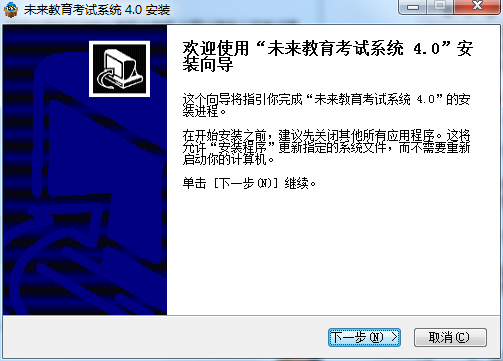
1. The National Computer Level 2 Examination Simulation Software MS will be installed in the Huajun Software Park Download Office and unzip it to the current folder. Click the Future Education Examination System V4.0.exe application to enter the installation wizard interface, and then click Next.
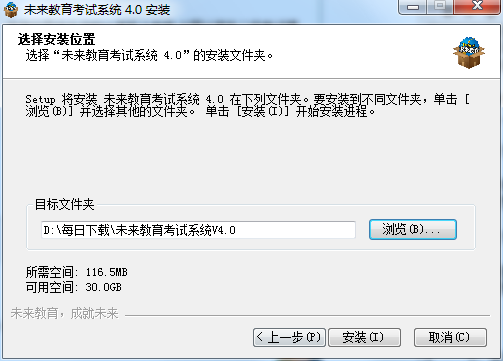
2. Select the software installation location interface. Huajun editor recommends that users install it in the D drive, select the installation location and click Install.
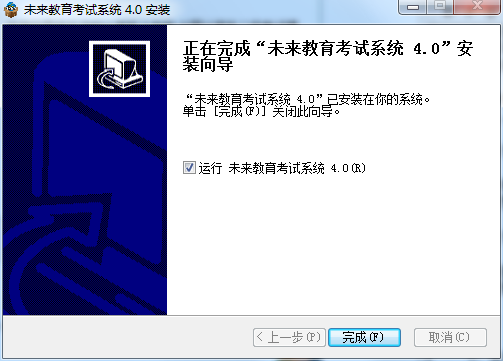
3. The installation of the National Computer Level 2 Exam Simulation Software MS Office is completed, click Finish.
National Computer Level 2 Examination Simulation Software MS Office Instructions for Use
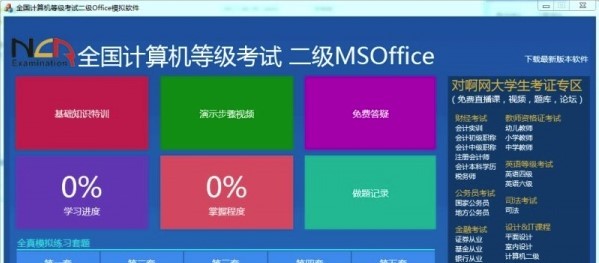
- Comprehensive exercises: questions are presented in sets, and candidates can view test question analysis and operation demonstrations.
-Special exercises: Questions are presented according to knowledge points, so candidates can strengthen weak knowledge points.
- Full simulation: Full simulation of the real exam environment, so that candidates are no longer unfamiliar with grade exams.
- Previous examination questions: Contains real examination questions from previous examinations, with a rich amount of questions and closely following the syllabus. The difficulty of the test questions is the same as that of the official examination questions.
- Free trial: Each subject can try the first set of comprehensive exercises for free.
- Intelligent scoring: Automatic scoring to determine whether the answer is correct.
- Operation demonstration: Detailed demonstration of all steps of computer questions, making it easier for candidates to learn.
- Detailed analysis: Detailed analysis makes it easier for candidates to study.
-Redo wrong questions: Automatically record wrong questions, strengthen practice for wrong questions, stimulate repeatedly, and deepen the impression.
- View notes: Add notes during exercises. Notes are the wealth accumulated in learning and will play a big role in sprint review before exams.
- My Collection: Practice the collected topics repeatedly to strengthen your memory.
-Ability assessment: Based on the candidates’ practice, personal data analysis results are presented.
- Study handouts: A summary of exam techniques and knowledge points is updated from time to time for reference.
National Computer Level 2 Examination Simulation Software MS Office Frequently Asked Questions
Question: How to uninstall the National Computer Level 2 Exam Simulation Software MS Office software?
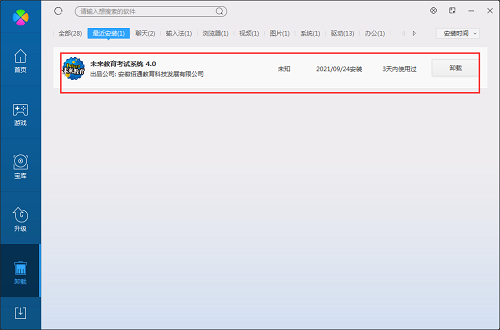
Answer: Method 1: Install and open the computer housekeeper software, select the software management option, click the uninstall option, and find the National Computer Level 2 Examination Simulation Software MS in the list Office software, click to uninstall
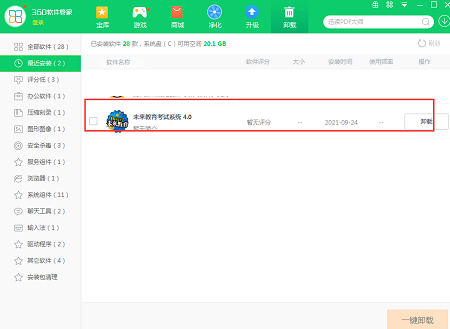
Method 2: Install and open360 software manager, find the National Computer Level 2 Exam Simulation Software MS Office software in the list of uninstall options, and click to uninstall.
Comparison of similar software
Second-level MS in Future Education Office paperless exam simulation softwareIt is an examination system launched by the Future Education Research Center. The future education examination system includes various test questions such as computer level examinations, English level examinations, medical examinations, Japanese language examinations, etc., and provides candidates with the latest examination information, examination dynamics, registration scores, simulated examination questions, online consultation, and the latest examination question bank.
Black Bean Driver Test Simulation SystemIt is a very excellent professional driving test simulation software. The latest version of the Black Bean driver test simulation system has powerful functions and has a large number of driving test questions, which can help users quickly simulate the driver's license test. The Black Bean driver test simulation system is convenient and easy to use, making you confident when taking the driving test.
National Computer Level 2 Exam Simulation Software MS Office Update Log:
1. Optimized some functions
2. Solved many intolerable bugs
Huajun editor recommends:
The editor of the National Computer Level 2 Examination Simulation Software MS Office personally tested this software. The various functions are very simple and easy to operate. Even a new user like the editor can master it quickly. I highly praise it! There are similar software on this siteToday's goal,Hanwang Attendance Management System,WPS Office,NTKO large file upload control,Kuai Dao Ke platform software, recommend everyone to download!









Useful
Useful
Useful