



Duoduo Market Official PC Version Software Introduction
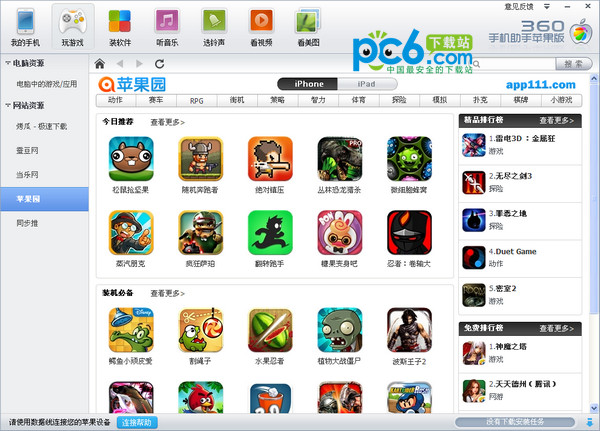
Duoduo Market (Duoduo Apple Store) supports the free download and installation of IOS applications for iPhone, iPad, and iPod touch. After the Duoduo Market software is downloaded and installed on the PC, the user can connect the mobile phone to the PC via a data cable and then download a large number of domestic and foreign applications and games through the PC version of the Duoduo Market.
Features of Duoduo Market official PC version software
Massive applications: more than 500,000 domestic and foreign APPs, the latest versions kept in sync with the Apple Store
Completely free: All APPs are permanently free, never waste a penny
It is easier to avoid jailbreaking: the system is stable and does not need to be jailbroken, which is more suitable for the downloading experience of Chinese people
How to use the official PC version of Duoduo Market
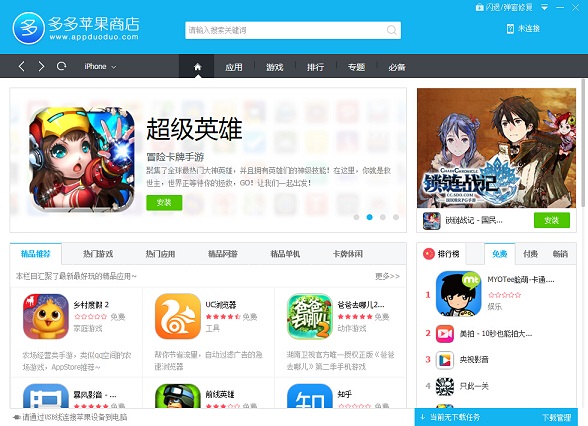
1. When there is no device connected, click the Duoduo icon, and the application game will appear directly when you open it.
2. After connecting the device, the software will automatically recognize the device. Click My Device to check whether the device has been successfully connected to Duoduo and the basic information of the device.
3. Return to the home page, find the software you want to download, move the mouse to the software you want to download, and an installation button will appear. Click the install button.
4. Check the download management and check the download status at any time.
5. After the download is completed, the APP will be automatically installed on the device.
6. The APP is successfully installed on the device.
Frequently Asked Questions about Duoduo Market Official PC Version
1. What is Duoduo Market? What can I do with it?
Answer: "Duoduo Market" is an IOS application download and installation tool that fully supports iPhone, iPad, and iPod touch. It is not only easy to operate, safe to use, and fast to download, but also allows you to install and use a large number of genuine applications for free without jailbreaking. Its content is also synchronized with the Apple Store, allowing users to discover fun and interesting applications at any time, making it a thoughtful assistant for Apple fans!
2. Is there any charge for downloading application software from Duoduo Market?
Answer: Totally free! There are more than 500,000 APP applications, and they are updated simultaneously with the Apple Store. Humanized application classification makes it easy to find the application you want. Wonderful recommendations combined with rich topics will bring you a super high user experience. Get the latest and most fun apps for free at any time. A very small number of applications require a wish. After you make a wish, we will quickly arrange for someone to purchase the genuine version, and then you can use it for free.
3. Does Duoduo Market need to register an Apple ID?
Answer: You do not need to register an Apple ID account, which saves complicated operations and is more convenient. Moreover, all listed resources are official, so there is no need to worry about account leaks and jailbreak failures.
4. Does Duoduo Market require manual operation of identification equipment?
Answer: The system automatically identifies the terminal device, no manual operation is required, and the application can be easily installed.
5. Does Duoduo Market occupy a lot of system resources?
Answer: The software is only a little over 3MB in size, can be downloaded and installed quickly, and takes up very little system memory. Ensure the smooth operation of the system.
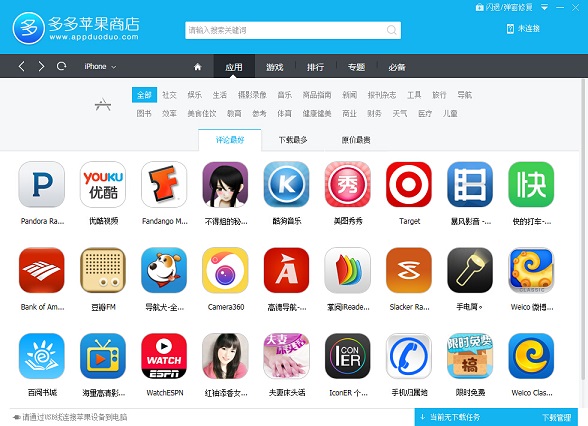
6. Which platforms are available for trial use in Duoduo Market?
Answer: Duoduo market applicable platforms: Windows operating system (Win 7, Win 8 (PC), Windows XP, Windows vista) 32-bit and 64-bit compatible.
7. Duoduo market iOS version support
Answer: Support iOS 6.0 and above.
8. What devices does Duoduo Market support?
Answer: Duoduo Market currently supports iPhone, iPad, and iPod Touch.
9. After the device is connected with a data cable, Duoduo Assistant cannot recognize it. What should I do?
Answer: Please try restarting the software and plugging and unplugging devices. If the problem still persists, you can join our QQ group and our customer service will serve you individually!
10. My device is not jailbroken, can I use Duoduo Market to install software?
Answer: You can install genuine software regardless of jailbreak or not.
11. Is it safe to use Duoduo Market to install software?
Answer: The mechanism of installing software on Duoduo Market is completely consistent with the technology of installing software on Apple’s official iTunes, so it is absolutely safe and reliable to install software on Duoduo Market.
12. What should I do if an application installed on the Duoduo Market crashes after running, or a pop-up window appears asking for a password and account?
①Crash repair, in the upper right corner of the Duoduo market software, as shown below:
②Enter the repair interface and click "Start Repair"
③After a few seconds, the repair was successful! You can then play the game as you like!















Useful
Useful
Useful