
If you are looking for software to use, go to Huajun Software Park! software release AI product list

Hello, if there is a need for software inclusion, please package the software and attach the software name, software introduction, software-related screenshots, software icon, soft copy, business license (if you do not have a business license, please provide the front and back of the corresponding developer ID card and a photo of yourself holding the ID card), and send it to email http://softwaredownload4.com/sbdm/user/login

Close >>

Send to email:news@onlinedown.net

Close >>

Location: Home pageAndroid softwareApplicationsystem tools NetEase mailbox

98.80%

1.20%
QR code

Scan the QR code to access the mobile version

Permissions: View

The following important permissions need to be called
uses-permission:'android.permission.INTERNET', allows the program to access the network connection, which may generate GPRS traffic
uses-permission:'android.permission.CHANGE_NETWORK_STATE', allows the program to change the network status, such as whether it is connected to the Internet
uses-permission:'android.permission.WRITE_SETTINGS', allows the program to read or write system settings
uses-permission:'android.permission.POST_NOTIFICATIONS'
uses-permission:'android.permission.READ_MEDIA_IMAGES'
uses-permission:'android.permission.READ_EXTERNAL_STORAGE', the program can read files in the device's external storage space (built-in SDcard and external SDCard)
uses-permission:'android.permission.WRITE_EXTERNAL_STORAGE', allows the program to write to external storage, such as writing files on the SD card
uses-permission:'android.permission.CAMERA', allows the program to access the camera to take pictures
uses-permission:'android.permission.VIBRATE', allows the program to vibrate
uses-permission:'android.permission.REQUEST_INSTALL_PACKAGES', allows access to installed applications from unknown sources
uses-permission:'android.permission.READ_CALENDAR', allows the program to read the user's schedule information
uses-permission:'android.permission.WRITE_CALENDAR', allows the program to write to the schedule, but not read it
uses-permission:'android.permission.WAKE_LOCK', allows the background process to still run after the phone screen is turned off
uses-permission:'android.permission.RECORD_AUDIO', allows the program to record sound through the microphone of the phone or headset
uses-permission:'android.permission.RECEIVE_BOOT_COMPLETED', allows the program to run automatically after booting
uses-permission:'com.android.launcher.permission.INSTALL_SHORTCUT', create a shortcut
uses-permission:'android.permission.FOREGROUND_SERVICE'
uses-permission:'com.netease.mobimail.openadsdk.permission.TT_PANGOLIN'
uses-permission:'com.asus.msa.SupplementaryDID.ACCESS'
uses-permission:'android.permission.ACCESS_NETWORK_STATE', allows the program to obtain network information status, such as whether the current network connection is valid
uses-permission:'android.permission.SYSTEM_ALERT_WINDOW', allows the program to display the system window
uses-permission:'android.permission.ACCESS_WIFI_STATE', allows the program to obtain the current WiFi access status and WLAN hotspot information
uses-permission:'android.permission.CHANGE_WIFI_STATE', allows the program to change the WiFi state
uses-permission:'android.permission.READ_PHONE_STATE', allows the program to access the phone state
uses-permission:'com.google.android.gms.permission.AD_ID'
uses-permission:'android.permission.QUERY_ALL_PACKAGES'
uses-permission:'android.permission.REORDER_TASKS', allows the program to reorder the running tasks of the system Z axis
uses-permission:'freemme.permission.msa'
uses-permission:'freemme.permission.msa.SECURITY_ACCESS'
uses-permission:'oplus.permission.settings.LAUNCH_FOR_EXPORT'
uses-permission:'com.vivo.identifier.permission.OAID_STATE_DIALOG'
uses-permission:'android.permission.USE_FINGERPRINT'
uses-permission:'com.netease.mobimail.permission.MIPUSH_RECEIVE'
uses-permission:'com.huawei.android.launcher.permission.CHANGE_BADGE'
uses-permission:'com.vivo.notification.permission.BADGE_ICON'
uses-permission:'com.netease.mobimail.permission.PROCESS_PUSH_MSG'
uses-permission:'com.netease.mobimail.permission.PUSH_PROVIDER'
uses-permission:'com.huawei.appmarket.service.commondata.permission.GET_COMMON_DATA'
uses-permission:'com.hihonor.push.permission.READ_PUSH_NOTIFICATION_INFO'
uses-permission:'com.asus.permission.READ_SDID_PROVIDER'

NetEase Mailbox 7.24.5

Special area
Software size:174.93 MB
software language:Simplified Chinese
Software rating:
Software type:Domestic software
Software licensing:free software
Update time:2025-11-04
Application platform:Android
Software classification:system tools
version:7.24.5
Registration number:Guangdong B2-20090191-55A
Software vendor:Guangzhou NetEase Computer Systems Co., Ltd.

Software introduction Related topics FAQ Other versions Download address

Basic introduction
NetEase mailbox first LOGO
NetEase mailboxDeveloped by NetEase, it is a free-to-use email sending and receiving software. In addition to 163 addresses, NetEase email also supports other types of brand email addresses:qq, hotmail, gmail and corporate email, etc.NetEase mailboxIt supports the client to send and receive emails, download attachments at high speed, send and receive real-time reminders and other functions. It is convenient and easy to use. Students in need can come to Huajun Software Park to download it!
Screenshot of NetEase mailbox

Frequently Asked Questions about NetEase Mailbox Use

1. How to set up a signature on NetEase mailbox

After logging in to your NetEase email account, find “signature”, make modifications in the signature area, and you can set the signature format according to your professional needs.

2. How to set the sender name in NetEase mailbox

To modify the sender name, you need to go to the web versionEmail, in [Settings] - [Account and Email Center] - [Modify Personal Information], you can modify the sender name.

3. How to set up new email reminder in NetEase mailbox

NetEase Mailbox currently turns on new email reminders by default. Find [New Email Reminders] in [Settings] to turn off this function.
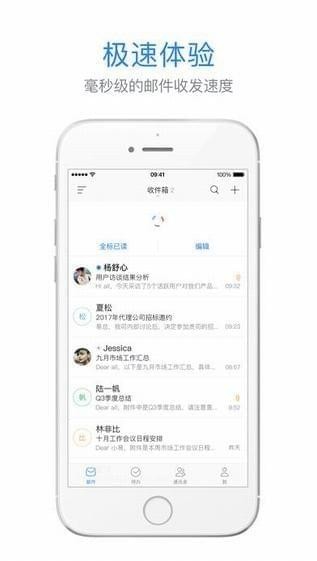
Screenshot of NetEase mailbox

NetEase mailbox software features

    1. Support multiple email addresses

NetEase mailbox is currently compatible with qq, 126, hotmail, gmail and other email addresses in addition to the 163 address. It also has a centralized login management function for multiple email accounts, making it convenient for users to manage their own email in batches in one stop.

    2. Powerful segmentation function

In addition to being compatible with multiple email addresses, NetEase Mailbox also has functions such as real-time email sending and receiving reminders, email classification settings, and email sending schedule settings, making users' business processes more efficient, more accurate, convenient and easy to use.

    3. Ensure privacy and security

NetEase Mailbox has Level 2 security certification from the China Information Security Evaluation Center, fully ensuring user privacy and security. In addition, users can set a fingerprint password or gesture password to prevent non-users from logging in to emails.

    4. Traffic saving mode

NetEase Mailbox's intelligent collection technology can significantly save traffic, and NetEase Mailbox supports one-click compression of image attachments and "zero traffic" attachment forwarding functions.
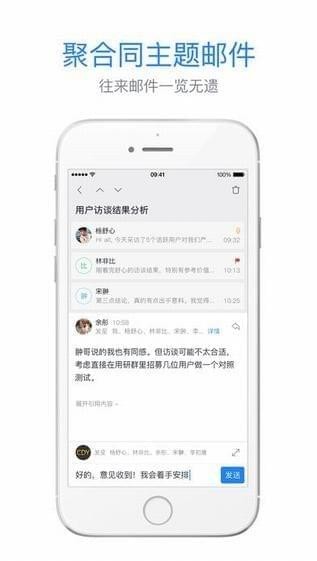
Screenshot of NetEase mailbox

Comparison between QQ mailbox and NetEase mailbox

      Advantages of NetEase mailbox

​ ​ 1. You can register your email directly with your mobile phone number or letter combination.

​ ​ 2. The interface is clear, the user operation steps are short, and it is easy to use.

​​ 3. Supports multi-address email login and helps users save traffic.

      Advantages of QQ mailbox

​ ​ 1. Provide a file transfer station function to temporarily store attachment data.

​ ​ 2. Email sending can be associated with QQ, making mass email faster.

QQ email download address:http://softwaredownload4.com/soft/489731.htm
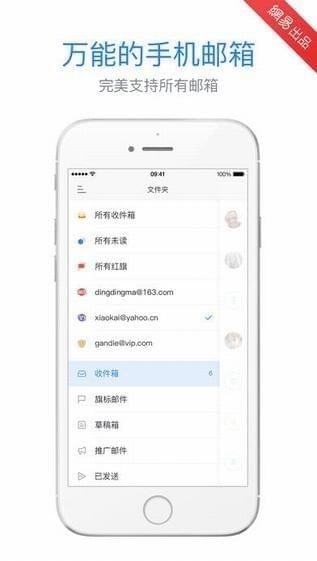
Screenshot of NetEase mailbox

NetEase mailbox update log

In accordance with relevant laws and regulations and based on the actual situation of the product, the "NetEase Privacy Policy" has been updated

​​Fixed previous bugs

      更新会员账号所享权益:

-Bind email and log in across devices

​​​​-Save your address book in the cloud

Huajun editor recommends:

NetEase Mailbox is a very good system tool software. I secretly tell you that I also use this software, and I don’t tell others about it! Powerful, green and safe. Huajun Software Park also provides you withQuickShortcutMaker,Hero Creative,Bipbip,Deep Recovery Master,Korean drama TVWaiting for you to download.


Related topics

  • NetEase mailbox login software

    NetEase mailbox login software

  • Email login tool download

    Email login tool download

  • Email login software download

    Email login software download

FAQ

Associated version