






Baicizhan computer versionSoftware introduction
"Baicizhan" is a newly launched online word memorization website. It is an effective and loving English word killer specially prepared for the majority of English exam takers. Contains vocabulary lists for major exams, There are more than 15,000 word cards, equipped with full-scenario graphical memories and examples read aloud by real foreigners.
Baicizhan computer versionSoftware features
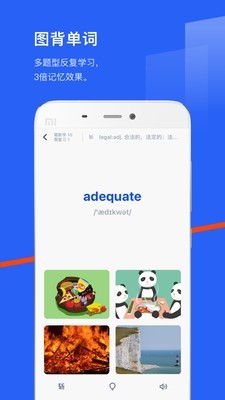
visual mnemonics
Core mechanism: Each word is equipped with original illustrations and bilingual examples, and graphics are used to establish a connection between the word and the real environment. Neuroscience research shows that image memory is 3-5 times more efficient than pure text memory ("Nature Neuroscience" 2017).
Scenario-based learning: Integrate words into life scenes through the "word pictures + example sentence dubbing + scene application" mode. For example, when learning "apple", the illustration may show a person biting an apple, and the example sentence is "I eat an apple every day" with real-life pronunciation.
personalized learning system
Intelligent review algorithm: uses a spaced repetition algorithm to dynamically adjust the review frequency according to the user's memory curve. The system has a built-in "word cutting" function that can automatically filter the vocabulary you have mastered, improving learning efficiency by 40%.
Exclusive learning plan: Diagnose user vocabulary through initial testing and generate a personalized plan. The daily tasks adopt a ratio of "15 new words + 30 old words", and use the error book to mark error-prone words.
Gamified learning mechanism
Friend battle mode: supports real-time PK between 3 people and consolidates vocabulary through gamified competition. For example, users can invite friends to participate in "70-second word PK", and the system will automatically match opponents with similar difficulty.
Learning community incentives: The official community "Zhanjia Forum" gathers 3 million active users and provides 24-hour online Q&A. Users can share learning experiences or form teams to check in.
Multi-dimensional learning resources
Video course: The special "TV version of word course" produces 6,000+ core vocabulary into 5-minute short videos, analyzing root affixes through sitcoms. For example, use the plot of "Detective Solving a Case" to explain the root relationship between "detect" and "detective".
Audio mode: The "Word Radio" function converts learning content into audio, suitable for commuting scenarios. Users can listen to the pronunciation of example sentences offline to strengthen their listening memory.
Baicizhan PC version softwareFunction
Full stage vocabulary coverage
Contains 34 lexicon databases from primary school to GRE, and fully includes vocabulary from authoritative textbooks such as "New Curriculum Standards" and "Cambridge English". For those taking exams abroad, we have developed the "IELTS True Vocabulary" and "TOEFL High-Frequency Vocabulary", which collect high-frequency vocabulary and synonymous substitutions from previous exam questions.
Expansion of workplace scenarios: In 2022, the "Workplace Business English" module will be added, covering practical scenario vocabulary such as email writing, meeting negotiation, etc., such as "negotiation" (negotiation), "deadline" (deadline), etc.
AI intelligent assisted learning
AI composition correction: A function launched in 2023 that uses natural language processing technology to score the use of vocabulary in writing and provide optimization suggestions. For example, when the user repeatedly uses "important" in his writing, AI will suggest replacing it with synonyms such as "crucial" and "vital".
AI intelligent coach: The latest version introduces a large language model to achieve personalized learning dialogue. Users can simulate the IELTS speaking test scenario and conduct real-time interactive exercises with the AI coach.
Differentiated version adaptation requirements
Student version: supports textbook synchronization vocabulary, built-in "High School Entrance Examination High Frequency Word Prediction" function, and predicts key vocabulary words based on previous years' real test questions.
Workplace Edition: Focuses on business English scenarios, including resume writing, conference calls and other special modules. For example, practical sentence patterns such as "How to describe project progress in English" are provided.
Overseas version: Provides big data analysis of computer vocabulary to accurately predict the key points of the exam. For example, before the IELTS test, the system will push academic words that have appeared frequently recently, such as "hypothesis" (hypothesis) and "methodology" (methodology).

Frequently Asked Questions about Baicizhan Computer Version
How to set the number of words in Baicizhan?
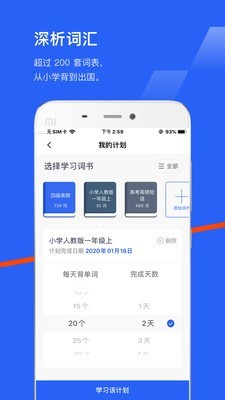
1. Open the Baicizhan software, click the options at the bottom, then click to select the "Word" option, and then click the "Adjust Plan" option.
2. On the "My Plan" page, select the word book you want to learn.
3. On the page, you can see two options: "Memorize words every day" and "Number of days to complete." Click with the mouse on the word memorized every day, and then slide up and down to adjust the number to the size you need.
4. Click the number under the number of days to complete and drag to change the number of days to the number of days you need. The previous number of words memorized per day will also change accordingly.
5. After the settings are completed, click the "Learn the Plan" option at the bottom of the page.
6. Finally, return to the homepage of Baicizhan. You can see that the number of words and the number of days have been changed. Click the "Start Memorizing Words" option below to start learning.
Installation steps
Special note: The installation package provided by Huajun Software Park contains the Android emulator and software APK files. For the computer version, you need to install the emulator first and then install the APK file.
1. First download the installation package from Huajun Software Park. The software package contains an Android emulator exe installation program and an APK file and unzip it. First click on the exe program to install the lightning simulator.

2. Double-click "Lightning simulator.exe" file to enter the installation interface. Users can click "Quick Installation" to select the system's default installation address for installation, or click "Custom Installation" to choose the installation path. Custom installation is recommended here.

3. WaitingLightning simulatorAfter the installation is complete, click "Try Now" to open the emulator.

4. Enter the main interface of the lightning simulator and clickRight column APK iconSelect the "Local APK Install" button.

5. In the pop-up window, click on the decompressed APK file, and then click to open.

6. After that, the software will enter the installation process. You need to wait for a moment. After the software installation is completed, it will appear in my software list. Click the icon and double-click to open it. 
Recommendations of the same type as the PC version of Baicizhan
TED English Speech app is an English learning software. The TED English Speech app allows you to learn English no matter where you are. The software also supports oral English practice, allowing you to know your English level so that you can prescribe the right medicine to learn the English language more thoroughly.
Download address:http://softwaredownload4.com/soft/10130110.htm
Baicizhan PC version update log
1. Small learning classes support small program sharing formats
2. Optimize the result page of adding device to word machine
3. Optimized details and smoother experience
Huajun editor recommends:
The editor of Huajun Software Park has compiled and collected software that you may like, such as:Homework Help 2021,Homework Help 2021,Seewo College,Master of Laws Postgraduate Entrance Examination,Driving school test subject oneYou can download it from this site.













Useful
Useful
Useful