





NetEase Cloud ReadingIntroduction
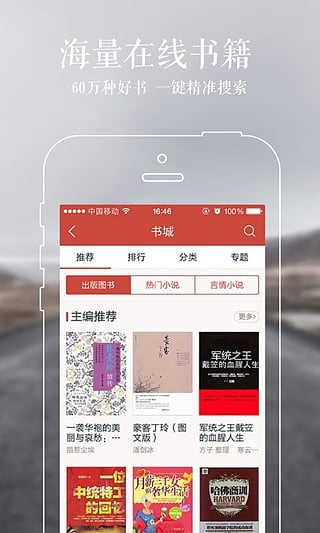
: 600,000 volumes of massive books, high-quality literature and film and television IP incubation platform, dozens of stars and writers jointly recommend reading products with attitude.
【Comprehensive digital publishing platform】Encounter a large number of best-selling books, exciting original novels, and spicy information and opinions. 【600,000 good books】are gathered together to search for your favorite books with one click.
[IP Incubation Platform] Exclusive original novels "Witch Notes", "School Beauty and Wild Rental", "Young Boxing Saint" online movies and online dramas of the same name will be launched soon, and novels of the same name for super popular games such as "The Overlord of Western Chu" and "Fighting on the West" will be exclusively launched, striving to create full copyright ecological strategies such as film and television and gamification of native IP
【Popular film and television original works】"Ode to Joy", "Summer Trees Looking to Heaven", "The Translator", "Murder in Time" and other popular film and television original works are available for preview.
【Exquisite Bookmark】The first electronic dynamic bookmark, bringing thoughtful dynamic companionship to one's quiet reading time.
【Reading with Attitude】Dozens of celebrities and writers expressed their attitudes towards reading. Hai Qing, Zhang Xinyi, Yi Zhongtian and Yu Qiuyu jointly recommended reading platforms with attitude.
Download NetEase Cloud Reading and use your fingertips to have close contact with text to express your reading attitude.

Features of NetEase Cloud Reading Software
Massive content and multiple reception channels
Rich content: Provides 100,000+ e-books and 3,000+ content sources, covering all media content such as books, magazines, newspapers, information, Weibo, blogs, communities, games, pictures, videos, etc.
Multi-platform support: It has six major client versions including iPad, iPhone, Android, and Windows Phone to achieve seamless reading across devices.
Social reading: Supports one-click subscription to social homepages such as Weibo, blog, QQ space, etc. Users can publish personal magazines to create a personalized reading experience.
Open platform and ecological co-construction
Content creator friendly: It is free and open to content providers, original authors, and self-media people, and all profits belong to the content owners, which is unique in the industry.
New book launches and original works of popular dramas: We undertake the exclusive launch of many new books, such as works by famous artists such as Yi Zhongtian and Yu Qiuyu, and simultaneously launch popular original film and television works such as "Why is the Shengxiao Silent" and "All Things Grow".
Personalized and intelligent services
Intelligent recommendation: Push personalized content based on user interests to ensure that all important information is not missed.
Cloud synchronization: Reading progress, highlighted notes and other data are synchronized across devices in real time, allowing you to continue reading anytime and anywhere.
NetEase Cloud Reading Software Functions
One-stop reading experience
Multi-format support: Supports reading of all media formats such as e-books, digital magazines, Internet information, and social content.
Personalized subscription: Users can freely subscribe to content sources of interest and create exclusive reading lists.
Social and interactive features
Reading Circle: Add friends, share reading experiences, and build a community of pure book friends.
Personal magazine publishing: Users can integrate subscription content into personal magazines and share them on social platforms with one click.
Convenient purchase and reading management
Flexible purchasing options:
Whole Book Purchase: Buy the entire book at once and read it forever.
Purchase by chapter: Purchase by volume/chapter in batches, priced per thousand words.
Automatic subscription: Serial works automatically purchase new chapters, and you need to recharge when the balance is insufficient.
Virtual currency "Reading Points": Supports obtaining reading points through recharge, which can be used to purchase paid content.
Cross-device synchronization and cloud storage
Synchronization of six major platforms: books, original works, information, comics and other content are synchronized to all devices in real time.
Cloud backup: Reading progress, bookmarks, notes and other data are stored securely to avoid loss.
NetEase Cloud Reading Software Frequently Asked Questions
Unable to read after purchasing
Reasons: network problems, insufficient account balance, book copyright changes.
Solution:
Check your network connection to make sure your device can access the Internet.
Confirm that the account balance is sufficient, or replenish points through the "Recharge" portal.
Contact customer service (tel: 0571-89853801 or email: reader@188.com) to confirm the status of the book.
Installation steps
Special note: The installation package provided by Huajun Software Park contains the Android emulator and software APK files. For the computer version, you need to install the emulator first and then install the APK file.
1. First download the installation package from Huajun Software Park. The software package contains an Android emulator exe installation program and an APK file and unzip it. First click on the exe program to install the lightning simulator.

2. Double-click "Lightning simulator.exe" file to enter the installation interface. Users can click "Quick Installation" to select the system's default installation address for installation, or click "Custom Installation" to choose the installation path. Custom installation is recommended here.

3. WaitingLightning simulatorAfter the installation is complete, click "Try Now" to open the emulator.

4. Enter the main interface of the lightning simulator and clickRight column APK iconSelect the "Local APK Install" button.

5. In the pop-up window, click on the decompressed APK file, and then click to open.

6. After that, the software will enter the installation process. You need to wait for a moment. After the software installation is completed, it will appear in my software list. Click the icon and double-click to open it. 
NetEase Cloud Reading update log:
Sweep the bug out and carry it out to the end
Optimize user feedback issues and improve detailed experience
Huajun editor recommends:
After you use NetEase Cloud to read, I think you may also needHomework Help 2021,Homework Help 2021,Master of Laws Postgraduate Entrance Examination,Driving school test subject one,Chinese Examination Online SchoolWaiting for software, come to Huajun Software Park to download and use it!










Your comment needs to be reviewed before it can be displayed