



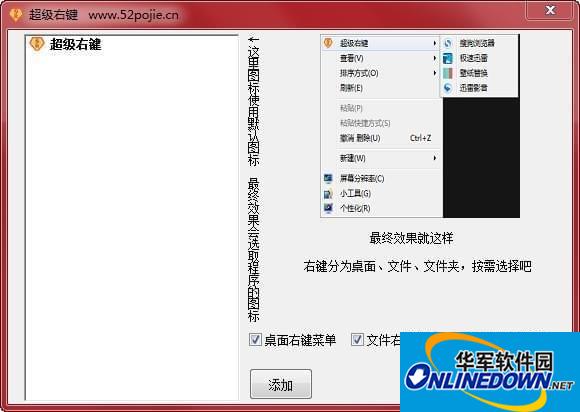
Basic introduction
Super right-click is a personalized right-click menu enhancement software. You can freely add the right-click menu you need and delete unnecessary right-click menus to improve work efficiency and make your right-click menu unique.
This software is free software and can be copied and disseminated. There is no need to reversely modify it. Modifications may cause inexplicable problems.
How to use
1. After downloading, do not run the software in the compressed package and use it directly. Unzip it first;
2 The software supports both 32-bit and 64-bit operating environments;
3. Do not turn off the computer power during the installation process;
4. If the software cannot be opened normally, please right-click and run in administrator mode.
Change log
1 Add the newly developed "My Menu" plug-in, which can be integrated into the desktop right-click menu. Quickly open specified folders, files, programs and websites. Supports executing programs with parameters.
2 Enhance the right-click cleaning function and list more right-click menus. With backup function, unnecessary menus can be disabled directly and enabled when needed. Provides advanced functions such as "Delete Menu", "Online Search", "Locate Registry", "Locate File" and "File Properties".







Useful
Useful
Useful