






Installation dog software introduction
Installer Dog USB boot disk creation tool is a simple and practical U disk boot disk creation software. It can be said to be one of the best software among U disk boot disk creation tools. It can teach you how to install the system with one click U disk! The software has columns such as U disk creation, ISO file creation, personal settings, software collection, FAQ, etc., allowing you to reinstall the system. Related things have become very simple. Installation Dog can also perfectly identify various types of hard drives, support Ghost installation system and original system installation, and can help users automatically install the system with one click. It is the best system maintenance software for individuals and maintenance personnel. Installation Dog is powerful, supports almost 100% of all U disks, is compatible with multiple models, and can easily reinstall the system in just a few minutes.
Installation dog software function
1. No need for computer CD-ROM drive
: Overcoming English language barriers and heavy CD-ROM drives, novices can easily play on the computer and automatically create with one click, realizing universal computer technology for everyone.
2. One plate for dual purposes
There is no need to repartition the removable disk. It can be installed to the system partition with one click. It is usually used as a computer hard drive and can be used as a repair disk when necessary. It runs faster.
3.U disk installation
U disk is one of the basic methods of transmission. The installation dog boot disk uses load protection technology to completely disconnect the virus mode.
4.Loading and maintenance
Two years ago, optical drives replaced floppy drives for installing and maintaining system software; now as optical drives withdraw from the market, U disks and hard drives have become popular tools for installing systems.
Installation steps of installation dog
1. Download the installation package of the official version of the installation dog in Huajun Software Park. After unzipping, double-click the exe program to enter the installation interface.

2. Click "Browse" to select the installation path, and click to start the installation
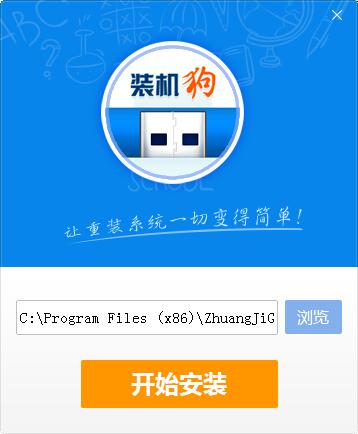
3. Wait for the installation file to be released and the installation will be successful.

Frequently Asked Questions about Installation Dog
1. When using the Installer USB boot disk creation tool to create a system, an error code 0xc000000f appears when restarting the computer. What should I do?
1) After entering the pe system, click the "System Boot Repair" tool and select the location of the repair system disk. After repairing it, restarting will be ok.
2) Open the MBR boot repair of the installation dog pe desktop
3) Select the drive letter where the Windows system is located (here the editor is on the C drive, so I chose C)
4) After selecting, select Start Repair, wait for it to complete, and the MBR boot repair will be successful!
5) After the repair is successful, restart the computer.
Installation dog update log
1. Sweep the bug out and carry it out to the end
2. The most stable version ever
Huajun editor recommends:
Of course, in addition to a very convenient system setting software like Installer Dog, our Huajun Software Park also hasWin10 one-click system reinstallation,Veteran Win10 Upgrade Assistant,super right click,Actual Transparent Window,RegShotRelated software is available for download. If you need it, please click to download and use it.











Useful
Useful
Useful