




Tencent Computer Manager new features
Tencent Computer Manager’s new function Document Guardian: blackmailer virus first aid, document time machine, accidentally deleted document retrieval

Features of Tencent Computer Manager
1. Integrated detection and killing: antivirus + management, two functions in one, Trojan detection and killing upgraded to professional antivirus.
2. System optimization: System cleaning capability is increased by 3 times, and computer acceleration capability is increased by 40%.
3. One-click clearing: The software uninstallation has a new "powerful clearing" function, making the uninstallation more thorough.
4. Security protection: 16 layers of real-time protection to protect your security when surfing the Internet and downloading.
5. Computer Clinic: The new powerful repair tool directly addresses the most common computer problems you encounter and easily solves them with one click.
6. Software management: Software management has been revised, with a new download and installation experience.
Tencent Computer Manager installation method
1. Open the Tencent Computer Manager installation package downloaded from this site, you can see the installation interface, click "Custom Installation" in the lower left corner.

2. Click the Browse button to select the installation directory. It is recommended not to select the C drive. Check the box before joining the virus cloud scanning and killing plan, and then click "Take me flying".

3. Installation is in progress. Users need to wait for a period of time for the installation to be completed.

4. When the situation below appears, it proves that Tencent Computer Manager has been installed, click to start again.

How to use Tencent Computer Manager
How to set startup items in Tencent Computer Manager?
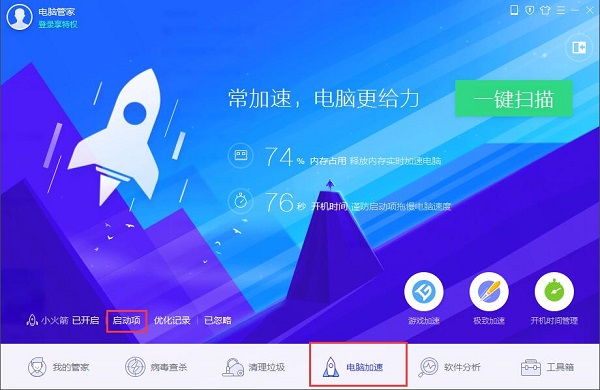
1. First open Tencent Computer Manager, click "Computer Acceleration" below, and then click the "Startup Items" button.
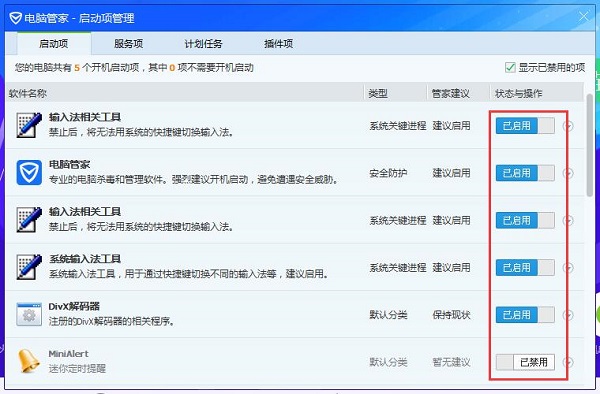
2. The startup item management window will pop up, and then all the startup items will appear. You can see whether they are enabled in the status and operations behind. If you need to turn it on or off, just click it.
Tencent Computer Manager FAQ
How to check computer speed in Tencent Computer Manager?
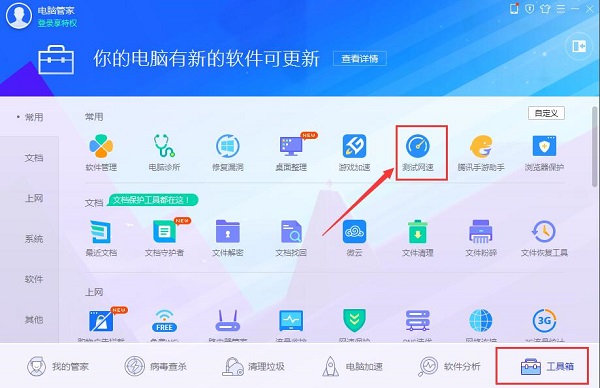
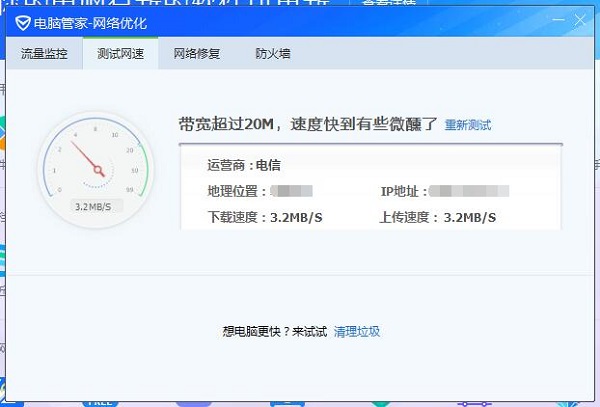
1. Open Tencent Computer Manager, click on the "Toolbox" at the bottom, and then click on the "Test Network Speed" function.
2. At this time, the window for testing the network speed will pop up, and the network speed test will be automatically performed. You need to wait for a while.
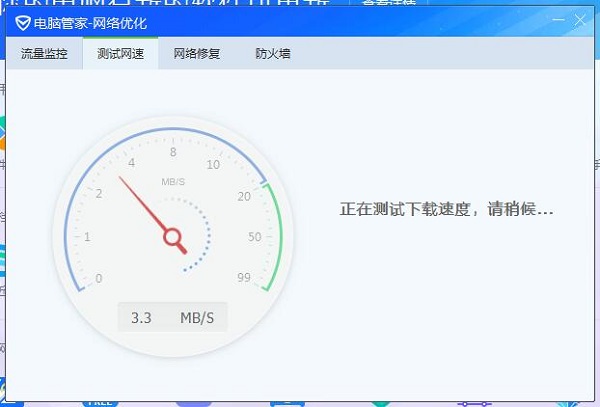
3. After the test is completed, the situation shown in the picture below will appear, and some information and network speed will appear.
How to set the default browser in Tencent Computer Manager?
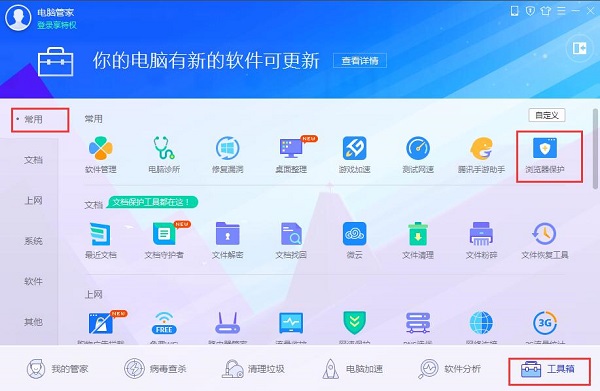
1. Open Tencent Computer Manager, click "Toolbox" on the toolbar below, and in "Common", click the "Browser Protection" function as shown in the picture.
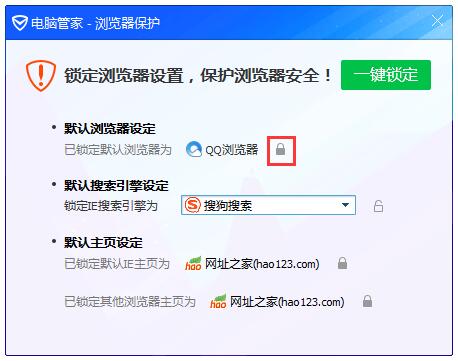
2. The browser protection window will pop up. At this time, the browser has been set by default. We can click the lock button at the back.
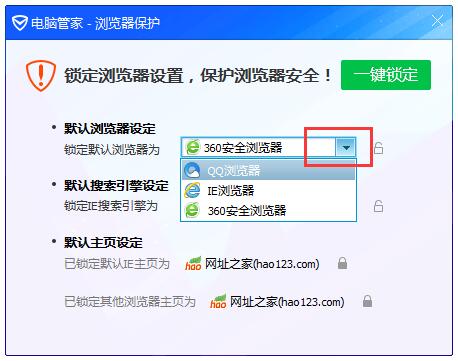
3. After clicking, you can select the browser. Click the drop-down button to select the default browser that needs to be set. After selecting, stop playing and click the lock button to lock the default browser.
Which one is better, Tencent Computer Manager or 360 Guard?
1. Function comparison
360 Security GuardBoth are computer protection and security software like Tencent Computer Manager, and their functions are almost the same. They can detect viruses and clean up garbage, etc.
2. Comparison of the functions of the attached toolbox
Both softwares have toolbox functions, but the 360 Security Guard toolbox has more tools than Tencent Computer Manager and is more complete in function.
3. Scanning speed comparison
Both software can scan for viruses and junk, and their scanning speeds are almost the same.
Both computer security protection software are relatively good. Users can choose to download and use them according to their own preferences and habits. The 360 Security Guard download address is:http://softwaredownload4.com/soft/50671.htm
Tencent Computer Manager FAQ
How to test internet speed?
Open Tencent Computer Manager and click the "Toolbox" option on the left navigation.
Click the "Test Network Speed" option on the toolbox interface and wait for the speed test to be completed to view the current network speed.
Tencent Computer Manager update log
1. Tencent Computer Manager has a cleaner interface and the computer status is clear at a glance
2. Tencent Computer Manager’s security capabilities have been upgraded, and viruses can be seamlessly entered
3. Windows 10 Setup Assistant, restore win7 habits
4. Desktop organization: A refreshing life starts with organizing the desktop
5. Tencent Computer Butler Little Rocket receives QQ offline messages, no longer worrying about missing important friend information
6. Time Assistant: Calendar and weather subscription information is at hand
Huajun editor recommends:
Tencent Computer Manager is a computer security manager produced by Tencent. It has complete functions, such as physical examination, anti-virus, garbage cleaning, acceleration, etc. It also has a toolbox with small tools that are more convenient. If you do not have security software on your computer, you might want to try this one. The editor has also carefully prepared for youKaba 365 online rescue,Symantec Antivirus,Shell folder EXE virus detection and repair tool,Kingsoft drug tyrant 11,360 antivirus software























Useful
Useful
Useful