




Software features
Minimum size: TraditionalanimationEach frame of image needs to be provided. Spine animation only saves the animation data of bones, which takes up very little space and can provide unique animation for your game.
Art requirements: Spine animation requires fewer art resources, which can save you more manpower and material resources to better invest in game development.
Smoothness: Spine animation uses a difference algorithm to calculate intermediate frames, which allows your animation to always maintain a smooth effect.
Equipment accessories: Pictures are bound to bones to achieve animation. If you need, you can easily change the character's equipment to meet different needs. Even change the appearance of the character to achieve the effect of animation reuse.
Mixing: Animations can be mixed between each other. For example, a character can shoot, walk, run, jump or swim at the same time.
Procedural animation: You can control the skeleton through code. For example, you can follow the mouse to shoot, watch the enemy, or lean forward when going uphill.
Function introduction
Photography sheet
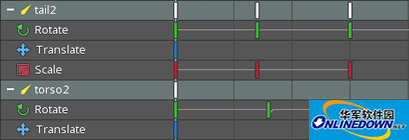
In the animation production process, the dope sheet is the most important place. All the important details are included here to create animations and fine-tune the timeline.
Grid
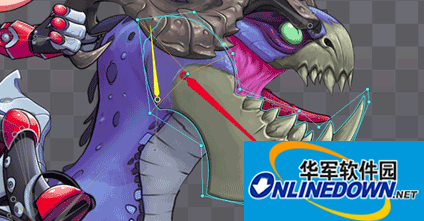
Allows you to customize polygons within rectangular boundaries. This will improve the space usage of the final texture atlas because pixels outside the polygon will be ignored. This optimization is especially important for mobile devices. Another feature of the mesh is to support free deformation and skinning.
Curve Editor
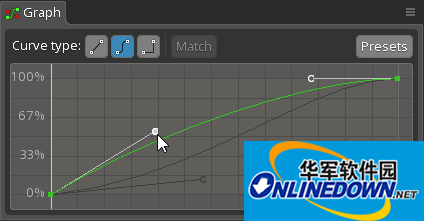
In the curve editor, you can control the difference between two frames by adjusting the Bezier curve to achieve lifelike animation effects.
Free deformation
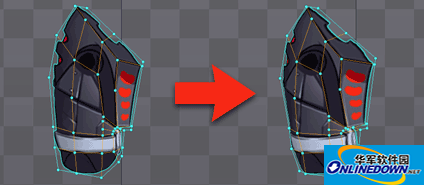
Free deformation, also known as FFD, is the abbreviation of Free-Form Deformation, which allows you to deform pictures by moving grid points. FFD can realize mesh stretching, extrusion, bending, rebound, and other functions that cannot be achieved by rectangular images.
skin
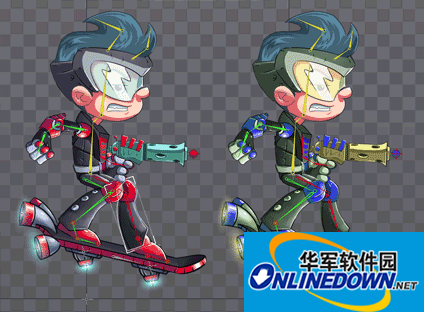
Skins can switch picture materials for finished animations. Reuse animations by changing the image attached to the skeleton.
Bounding box
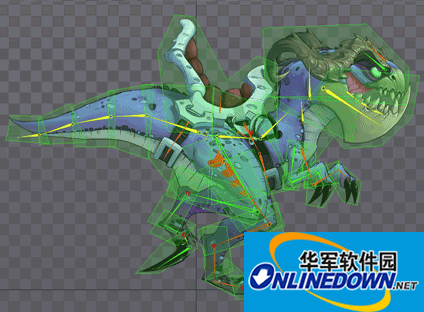
Bounding boxes can be attached to bones and move with them. It is mainly used for collision detection and physics integration.
Texture packaging
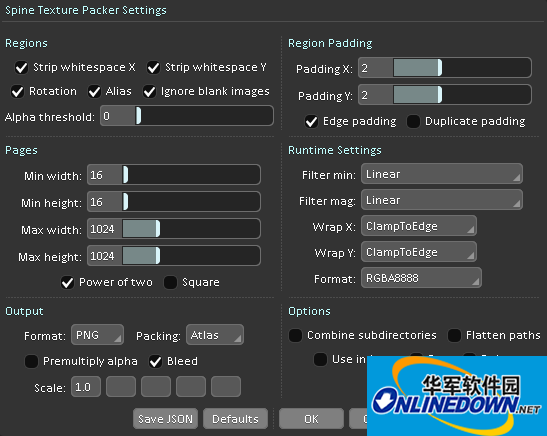
Spine can package images into texture atlases, which can improve your rendering efficiency in games. Spine's texture map packaging tool has many functions such as stripping blank areas, rotation, automatic scaling, etc... (the main purpose is to make full use of space)
Software Highlights
1. Linear
Linear is the default curve type, linearly interpolating between keyframe values. This means that when the time axis position moves from the first keyframe to the second keyframe, the value changes at a constant rate
2. Bessel
The Bezier curve type uses Bezier curves to interpolate between keyframe values. A Bezier curve has two handles that can be dragged to customize the rate at which the value changes between keyframes.
3. Ladder
Step curves do not use interpolation at all. The value remains unchanged until the next frame.
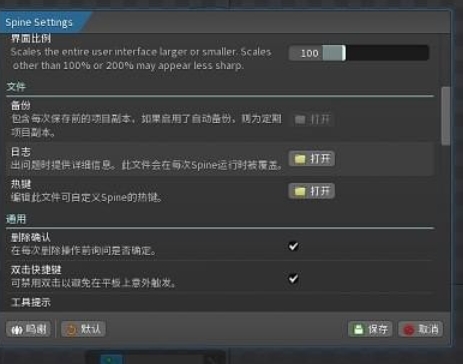
Spine update log:
1. Modify user-submitted bugs
2.Add new features
Huajun editor recommends:
Spine is a software that does not require learning to use. It is a very simple tool. Users in need can download and use it in the Huajun Software Park. You are guaranteed to be satisfied. In addition, there are many similar software of the same type available for download, such as:SWiSHmax,Animation expert,Three-dimensional character production software (Ulead COOL 3D),Wancai Animation Master,Flash toolsWait.








![3D animation video production software [Aurora 3D Presentation 2012]](http://softwaredownload4.com/sbdm/src/d/file/p/2020-06-10/6745ba10fd64095e6d659746a3ea0359.jpg)
![3D animation video production software [Aurora 3D Presentation 2013]](http://softwaredownload4.com/sbdm/src/supply/pc_20161227/logo/1454382291274702.jpg)







Useful
Useful
Useful