





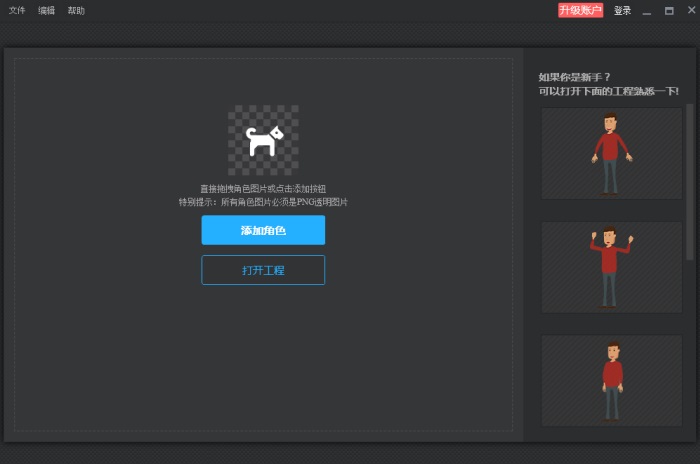
Highlights of Wancai Skeleton Master software
Easy to operate, zero-based and friendly
The interface is simple and intuitive, and the operation logic is clear. Users can complete bone binding and action editing through simple operations such as dragging and clicking. Even if you have no animation production experience, you can quickly get started and achieve high-quality animation effects.
Rich templates, efficient creation
It has built-in skeleton templates and character models for a large number of commonly used actions, which users can apply directly to quickly generate animated characters. Supports searching for characters and actions through keywords to improve creative efficiency.
Details control, texture upgrade
It provides advanced functions such as inverse kinematics (IK) constraints and weight brushes to achieve the natural connection of joint motion and the real contraction effect of muscle tissue. Supports 3D bone mapping, mapping 2D bone animation to simple 3D models to achieve pseudo 3D effects.
Cloud collaboration, team sharing
Provides a team shared project space, supports real-time editing and version management by multiple people, and facilitates team collaboration and content sharing.
Features of Wancai Skeleton Master
Easy to operate:
The interface is simple and intuitive, and the operation logic is clear. Users can complete bone binding and action editing through simple operations such as dragging and clicking.
Even if you have no animation production experience, you can quickly get started and achieve high-quality animation effects.
Unlimited creations:
Supports custom uploaded characters, or uses AI to select style templates and intelligently generate characters with text descriptions.
Users can select multiple favorite actions from action templates and export a set of animations in batches with one click, making character animation production more efficient.
Intelligent assistance:
Provides intelligent layer recognition function to automatically distinguish different elements in complex PSD files, reducing manual adjustment costs.
Supports searching for characters and actions through keywords to improve creative efficiency.
Wancai Skeleton Master software functions
Bone addition and control:
Supports adding bones to static images in PNG or PSD format, and controlling the bones to achieve character movement, rotation, jumping and other actions.
Provides curve bone function to make the character's curve changes smoother and enhance the animation effect.
Supports inverse dynamics (IK) constraints to achieve bottom-up driving, making character animation movement more natural and smooth.
Templates and materials:
It has built-in 500+ character templates and 500+ action templates, covering a variety of styles and types, such as normal proportion characters, Q version characters, double wings, etc.
It provides a large number of genuine and commercially available materials. Users can freely replace character layers, adjust layer color and size, add watermarks to characters, and create unique animated characters.
Animation production and editing:
Supports keyframe settings, users can customize skeletal motion trajectories and design detailed actions such as blinking, smiling, waving, etc.
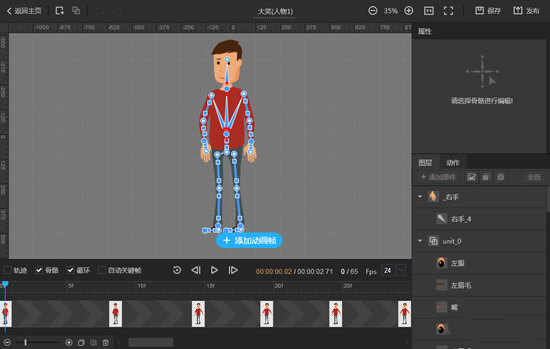
Provides a timeline function to clearly display the frame rate of animation frames, making it easy for users to adjust the character animation frame rate and animation frames.
Supports simultaneous editing of multiple pictures, you can freely switch layer order, adjust graphic display ratio, and change character expressions by replacing layers.
Output and share:
Supports the output of multiple formats, including MP4, MOV, GIF, PNG, etc., adapting to various scenarios such as videos, web pages, games, and presentations.
Provides a team shared project space, supports real-time editing and version management by multiple people, and facilitates team collaboration and content sharing.
Wancai Bone Master Instructions for Use
1. Add pictures
? or click the add button to add a PNG transparent image or PSD format image for editing? You can also view the sample project first to see the skeletal animation effect.
2. Define bones
After importing the picture material, start adding bones to customize the animation of the picture. Note: If you add a picture in PSD format (multi-layer), you only need to add bones directly.
1. Add bones. Simply click on the picture to add bones, and add bones appropriately according to the desired effect. If you need different parts of the picture to achieve different actions (rotation, movement, etc.), you can add multiple bones to different parts of the picture.
2. Add curve bones: It can make the curve changes of the picture more natural and smooth. Here you only add bones, and you cannot edit animations.
3. Insertion: Adding a node is also a control point in a certain bone.
3. Edit skeletal animation
The software has a variety of built-in preset skeletal animations for users to choose from. Users only need to apply the preset skeletal animations to pictures.
1. Select the appropriate time point (the default is 1 second = 24 frames) and click to add animation frames.
2. Then in the selected animation frame, adjust the position and deformation of the picture through bones and nodes. When customizing actions, pay attention to the motion trajectory of the picture to add animation frames appropriately.
(1) Rotate the corresponding part of the picture through the bones. Select any bone and use the node at the thick end of the bone as the center to rotate the corresponding part of the picture at any angle.
By selecting a bone, you can also set the IK constraints and the curve radius of the bone:
1) IK constraints: If a bone has IK set, then when its end node moves, the length of the bone will be ensured to remain unchanged. In order to ensure that the length of the bone remains unchanged, its start node may be moved, and feedback will go up layer by layer.
2) Bending radius: It is used to adjust the degree of bending at the connection between two bones. When curved bones do not support IK constraints, you can add bones and set the bending radius of the bones to achieve bending changes in arms, legs, etc. (such as squatting, jumping, etc.).
(2) Use joint points to move and rotate the corresponding part of the picture: Select the joint point to move or rotate the corresponding part of the picture at any angle.
For example, if a character wants to jump, the jumping action will not happen all at once, but there will be some other actions in between. To make the animation more consistent, you can add multiple animation frames within the frame rate.
(3) Preview animation action effects, you can view/hide picture bones and movement trajectories. If the animation is inconsistent, adjust the animation frames and animation actions again. Looping refers to looping animation effects; automatic key frames: automatically adding animation frames when adjusting the picture action.
4. Output animation effects
1. Currently, 4 publishing formats are provided: transparent mov, MP4, multiple PNG images, and output GIF.
2. In addition to the 3 preset video sizes, you can also customize the video size. You can also choose whether to publish the background color according to your needs.
Wancai Skeleton Master FAQ
Animation cannot be played after exporting
Reason:
The export format is incompatible (eg not MP4/GIF).
The export path contains Chinese or special characters.
Solution:
Select a supported video format (such as MP4) or image sequence format (such as PNG sequence).
Change the export path to a plain English path.
Wancai Skeleton Master update log
1: Brand new interface, refreshing, simple and efficient
2: Performance is getting better and better
Huajun editor recommends:
Say goodbye to junk software, Wancai Skeleton Master is a green and safe software, the editor has personally tested it! Our Huajun Software Park serves you wholeheartedly. There are alsoSWiSHmax,SketchBook2015,Animation expert,Three-dimensional character production software (Ulead COOL 3D),Flash tools, available for you to download!




Useful
Useful
Useful