If you are looking for software to use, go to Huajun Software Park! software release AI product list

Hello, if there is a need for software inclusion, please package the software and attach the software name, software introduction, software-related screenshots, software icon, soft copy, business license (if you do not have a business license, please provide the front and back of the corresponding developer ID card and a photo of yourself holding the ID card), and send it to email http://softwaredownload4.com/sbdm/user/login

Close >>

Send to email:news@onlinedown.net

Close >>

Location: Home pagePC softwaregraphic imagePicture viewing software CAD viewing plug-in CADView for Total Commander
CAD viewing plug-in CADView for Total Commander

Total Commander's CAD viewing plug-in CADView Green version 32-bit_64-bit

QR code
  • Software licensing: free software
  • Software size: 9.3MB
  • Software rating:
  • Software type: Domestic software
  • Update time: 2024-12-30
  • Application platform: Win All
  • Software language: Simplified Chinese
  • Edition: Green version 32-bit_64-bit

Download the service agreement at the bottom of the page

Software introduction Related topics FAQ Download address

Recommended for you:- Total Commander

Basic introduction
Total Commander's CAD viewing plug-in CADView segment first LOGO
CAD View Plug-in for Total Commander CADView is a CAD file preview tool plug-in. The CAD View Plug-in for Total Commander allows viewing of AutoCAD® DWG, DXF; DWF; Hewlett-Packard HPGL/HPGL2; SVG and CGM files in TC Lister and exporting them to JPEG and TIFF. Both 32-bit and 64-bit versions are available. The plugin is easy to install and register.

Instructions for use

*Please use the genuine version if funds permit!

Features

Supported formats: AutoCAD® DWG, DXF, DWF, Hewlett-Packard HPGL/HPGL2, SVG and CGM.

Export formats: The plugin can save supported files as BMP, WMF, EMF, JPG, GIF and DXF.

Print: Use the plugin to print the selected file or just show its view area!

Viewing options: Change background color, manage layers, hide line weights, rotate and scale graphics for easier viewing.

More features: ABViewer has more features. This is a browser, converter and editor that supports over 30 raster and vector formats.

How to use CADVIEW 12?

1. Download this software at the bottom of this page

2. After downloading the file, delete the txt suffix.

3. Double-click to install directly in TC (no need to decompress), please correspond to the corresponding system version

4. The original file has been replaced and you can run the test.

5. Delete redundant language files in the original version and keep only Chinese, English and file packages.
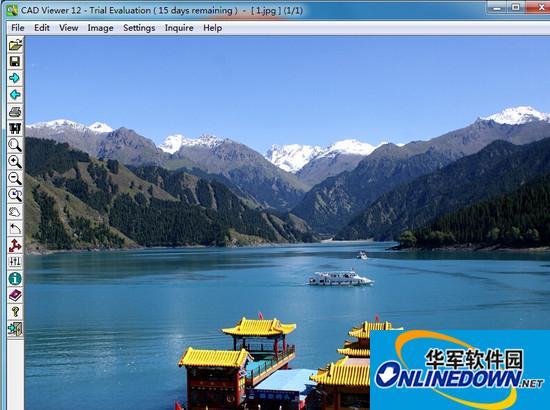

Screenshot of Total Commander's CAD viewing plug-in CADView

FAQ

CAD viewing plug-in CADView for Total Commander

Total Commander's CAD viewing plug-in CADView green version 32-bit_64-bit

Close