





At the same time, a Vibrance slider is added to increase saturation and improve images that are not saturated enough. Some functions in Lightroom have also been added to Photoshop. Adobe Bridge cs4, Adobe Photoshop cs3, and Adobe Camera Raw 4.0 form a perfect combination and are an indispensable sword for quality-conscious photographers when processing RAW.
Adobe Camera Raw Features
Convenient and easy to use
The Adobe Camera Raw Chinese version plug-in can help you quickly process RWA files, and can process different RAW files generated by different digital cameras. It can be said to be an essential plug-in tool for photoshop.
Fully functional
Some functions in Lightroom have also been added to Photoshop. Adobe Bridge cs4, Adobe Photoshop cs3, and Adobe Camera Raw 4.0 form a perfect combination.
How to use Adobe Camera Raw
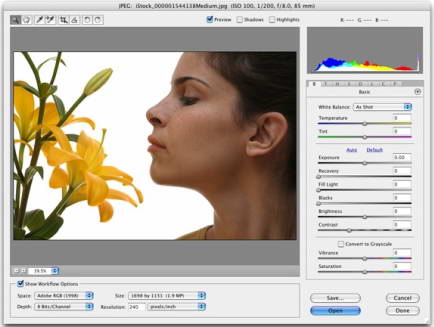
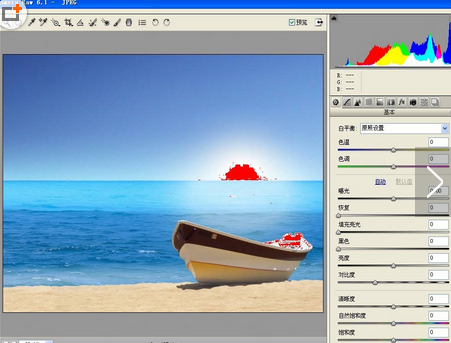
Execute the file - open as, the "Open as" dialog box will appear, select the corresponding image that needs to be processed, then select camera raw, click "Open", the camera raw interface will appear.

The camera raw interface is shown below:
Adobe Camera Raw FAQ
What are the benefits of using RAW format?
1.RAW format is a lossless recording that retains the original information.
2. Not limited by white balance, contrast, color space, color saturation, sharpening, etc.
3. There is a large space for post-processing. RAW has the color and level details of 12-bit and 16-bit data, which is very beneficial for adjusting the details of highlight and shadow areas.
Comparison of similar software to Adobe Camera Raw
Adobe Camera Raw:
Adobe Camera Raw is a powerful RAW file editing tool. The RAW files generated by different digital cameras are also very different, but Adobe Camera Raw supports almost all models and can easily help you process RAW files. People in the photography industry or enthusiasts should not miss this useful software.
Beautiful pictures show:
Meitu Xiu Xiu is a very easy-to-use image processing software. Meitu Xiuxiu is simple and easy to use. Compared with other image processing tools, Meitu Xiuxiu is more suitable for the general public. Even computer novices can play with Meitu Xiuxiu. They can create studio-level photos in one minute. Various online functions are free to download and use, including beautiful pictures, puzzles, borders, accessories and other functions. Meitu Xiuxiu also supports one-click sharing to social platforms such as Sina Weibo, Renren, and Tencent Weibo. Huajun Software Park provides the official download of MeituXiuXiu. What are you waiting for? Come and download it quickly.
Editor’s summary: Both can process raw files, but the former is more professional. If you need it, hurry up and download it. If you are interested in Meitu Xiuxiu, you can click the following address to download and experience it:http://softwaredownload4.com/soft/74160.htm
Adobe Camera Raw update log:
1. Fixed BUG, the new version has a better experience
2. Some pages have been changed
What Huajun Software Park provides you isAdobe Camera RawDownload the latest official version, please feel free to use it.
Huajun editor recommends:
Adobe Camera Raw software feels really good! The editor specially tested it for this purpose, and it works really well.2345KantuKing software,View pictures quickly,Qinbaby PC Assistant,ACDSee v5.0.1.0006,Glodon PDF Quick Picture ViewingThese are all very good software tested by the editor, come and choose the one that suits you!












Useful
Useful
Useful