





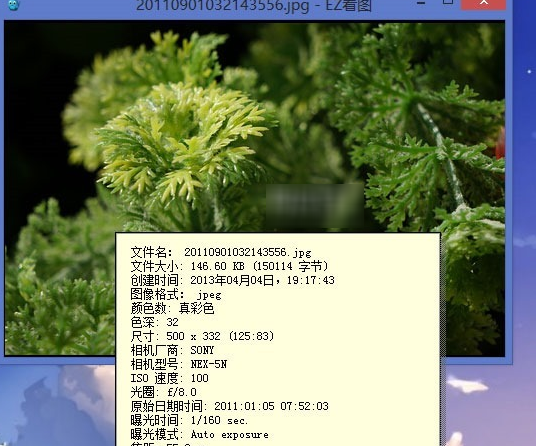
EzViewer software introduction
The latest version of EzViewer is a very pure picture browser. The interface of the latest version of EzViewer is very light and thin. You can hardly see any interface. It is purely for viewing pictures without any extra functions. If you don’t like the image browser that comes with Windows, you can download this software and try it.
EzViewer software features
The latest version of EzViewer is a very simple, pure and clean image browser, originally designed to solve It was developed because Windows' built-in picture viewing program does not support gif animation.
There is no picture library management, no beautification and editing functions, and no complicated settings. The starting point of everything is to purely view pictures, and it can support almost all common picture formats.
In short, simplicity and speed are its biggest features.
It is an excellent alternative to the Windows built-in image viewing software. Basically, except RAW, all commonly used image formats are supported.
There are no complicated elements on the EzViewer interface. EzViewer It is simple and clean, mainly because it is easy to operate and the interface is not complicated, but this does not mean that the function is poor, because as mentioned above, the most important feature of the software is anti-aliasing rendering, which is used by default when enlarging images. (It is strongly recommended to set it to always use, otherwise when viewing large-resolution pictures, they will be reduced and still have aliasing). The rendering effect is very good for some lower-quality pictures.
EzViewer FAQ
No response on startup
Problem description: After double-clicking the EzViewer icon, the program fails to start or becomes unresponsive after startup.
Solution:
Try restarting your computer, which can sometimes resolve unresponsive program startup issues.
Check the system resource usage to ensure that there are enough memory and processor resources for EzViewer to use.
If the problem persists, try uninstalling and reinstalling EzViewer.
EzViewer update log
1. Fixed other bugs;
2. Optimized software compatibility.
Huajun editor recommends:
EzViewer software takes up little memory, has stable performance, is free of any bundles, is green and safe, and is truly a conscientious software! This site also has2345KantuKing software,Free Photo Viewer,Qinbaby PC Assistant,ACDSee v5.0.1.0006,Glodon PDF Quick Picture Viewing, available for you to download!




Useful
Useful
Useful