






Software introduction
Xueyoudao is a smart campus management platform developed by Chongqing Xueyoudao Technology Co., Ltd., focusing on providing one-stop digital solutions for schools. Its core goal is to optimize campus management processes through technical means, covering multiple scenarios such as administrative offices, education and teaching, logistics services, home-school interaction, etc., and build an efficient and transparent campus ecosystem.
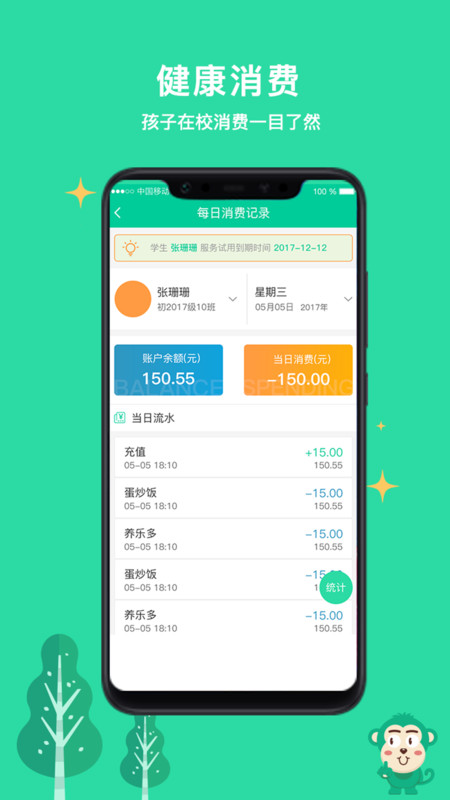
Xueyoudao computer versionHighlights
1. You can sign in directly online, or check the enrollment status in the school library;
2. Online borrowed book records can be queried online to facilitate timely return of borrowed books;
3. Parents can check their children's homework online and help their children complete their homework in real time at home.
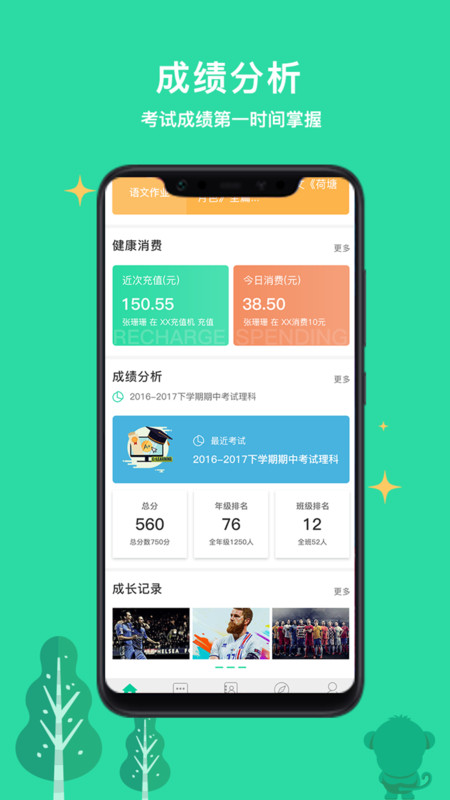
Xueyoudao computer versionGuide
Enter the personal center of the app to bind students to conveniently view school information.
You can view the latest notification information on the home page of the software to keep informed of campus news.
If you want to know how your child’s academic performance is, you can check it directly in the app
By organizing test scores, you can easily know the learning status of each subject
Lexue Youdao is a software that the editor strongly recommends to parents. Through this software, parents can pay attention to their children's learning situation in real time. Parents can also quickly know the notifications from the school. Friends who like it, please download the Lexue Youdao software!
Xueyoudao computer versionAdvantages
Export student school roster information data from the student identity management system to realize online registration, online admission, information interaction, enrollment statistics, and shift management;
Including family-school interaction, online learning, online homework, online exams and other main functional modules, many practical functions can be used in real time through different permissions;
Building a comprehensive application platform, users can quickly log in to meetings, obtain more class management permissions, quickly query books in the school library on their mobile phones, and achieve quick borrowing and return services.
Reasons for recommending the Xueyoudao app: Interact with school teachers through mobile phones and log in online by name to realize the application of education and teaching management, which is more trouble-free and time-saving, and more effective;
Provide parents with information on student test scores and rankings of various subjects and stages, provide parents with information on students’ entry and exit in school, life dynamics, and strengthen dormitory management;
It can train children's independent learning ability and feel the joy of learning. Online course-based learning can avoid unexpected troubles when going out. You can avoid everything at home, accompanied by parents.
Xueyoudao computer version functions
Core management functions
Student management: student status information registration, attendance statistics, consumption record inquiry (such as canteen, library consumption).
Teacher management: teacher evaluation system, teaching plan submission and approval, and teaching resource library sharing.
Administrative office: notice and announcement release, official document circulation (supports customized approval process), meeting management (sign-in, minutes archiving).
Home-school interactive function
Real-time communication: Parents can communicate one-on-one with teachers through the APP and receive school notifications.
Study supervision: View student homework completion status, test scores and fluctuation analysis, and obtain personalized study suggestions.
Participation in campus life: Understand students’ library borrowing records and participation in club activities.
Online learning tools
Course live broadcast and recording: Supports 1.5/2x speed playback and offline caching to facilitate students to flexibly arrange their study time.
Intelligent homework correction: Objective questions are automatically corrected, and subjective questions support online annotation by teachers to generate a set of wrong questions.
Learning resource library: integrates school-based resources, open class videos, question banks, etc., and supports teachers to upload shared teaching materials.
Admissions and Logistics Services
Enrollment management: online registration, admission result inquiry, class placement information announcement.
Logistics services: library book inquiry and reservation, campus card consumption record analysis.
Frequently Asked Questions about Xueyoudao Computer Version
System compatibility and performance issues
Problem: Some users reported that the mobile app freezes or crashes.
Solution: Make sure the system version is upgraded to Android 9.0 or above, clear the cache or restart the device; if the problem persists, contact customer service to obtain the compatibility test version.
Account and permission issues
Problem: You need to log in again after switching accounts, or you may not be able to access specific functional modules.
Solution: Check the account permission settings to confirm whether it is an administrator authorized role; log out of the account and completely close the APP and log in again.
Installation steps
Special note: The installation package provided by Huajun Software Park contains the Android emulator and software APK files. For the computer version, you need to install the emulator first and then install the APK file.
1. First download the installation package from Huajun Software Park. The software package contains an Android emulator exe installation program and an APK file and unzip it. First click on the exe program to install the lightning simulator.

2. Double-click "Lightning simulator.exe" file to enter the installation interface. Users can click "Quick Installation" to select the system's default installation address for installation, or click "Custom Installation" to choose the installation path. Custom installation is recommended here.

3. WaitingLightning simulatorAfter the installation is complete, click "Try Now" to open the emulator.

4. Enter the main interface of the lightning simulator and clickRight column APK iconSelect the "Local APK Install" button.

5. In the pop-up window, click on the decompressed APK file, and then click to open.

6. After that, the software will enter the installation process. You need to wait for a moment. After the software installation is completed, it will appear in my software list. Click the icon and double-click to open it. 
Xueyoudao PC version update log:
1. Fixed other bugs;
2. Optimized software compatibility.
Huajun editor recommends:
Of course, in addition to the very convenient educational and teaching software Xueyoudao PC version, our Huajun Software Park also hasHomework Help 2021,Homework Help 2021,Master of Laws Postgraduate Entrance Examination,Driving school test subject one,Chinese Examination Online SchoolRelated software is available for download. If you need it, please click to download and use it.




Your comment needs to be reviewed before it can be displayed