




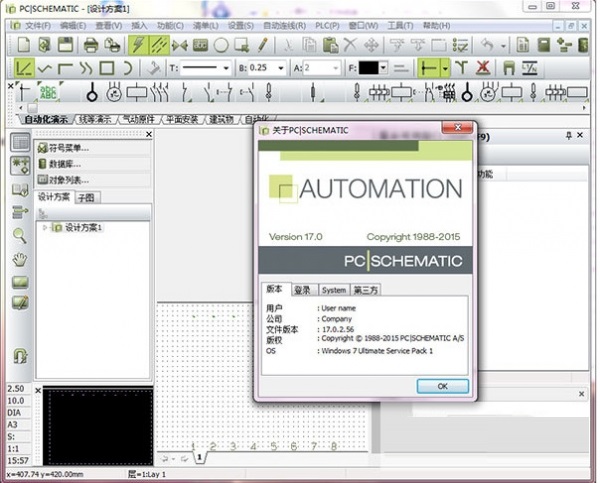
Features of electrical CAD drawing software
PCSchematic is a CAD program based on a Windows environment, its purpose is to generate plans and designs for electronic and electrical installation projects. This is a project-oriented program, which means that all parts related to the project are contained in the same file: Electrical Block Diagram diagrams), mechanical layouts, tables of contents, parts lists lists), terminal equipment lists (terminals lists), programmable logic unit lists (PLC lists), etc., as well as various other types of lists. If several projects exist at the same time, you can copy between projects.
Introduction to electrical CAD drawing software functions
1. A large number of IEC standard symbols
The green version of the electrical CAD drawing software uses standard IEC symbols for drawing automation, installation, fluid mechanics/pneumatics and flow diagrams. In addition, there are many PLC, sensors, transmitters, smart building installation, computers and communications, alarm installation and floor plan symbols. You can also easily create some custom symbols, which will be automatically added to the symbol library.
2. Pcschematic component database
In Pcschematic, you can create your own component database. Some of the industry's leading component suppliers have established their own component databases in the software, which include EAN numbers, descriptions, suppliers and prices. Each component in these databases has its electrical and cosmetic symbols. With these databases, schematics and installation layouts can be drawn easily and securely, as well as lists. Pcschematic has its own database. You can also use software such as Oracle or Access to establish a connection with PCSCHEMATIC Automation because it uses the ODBC (Open Database Connectivity) interface. These databases can be integrated as part of the corporate database.
3. Sub-picture functions, modules and automatically generated projects
You can easily create sub-diagrams containing independent design data. At the same time, you can easily drag sub-pictures into the project. When dragging a subgraph, you can select the symbol data to be imported. This feature is called model and block dragging. Based on this sub-diagram function you can automatically create projects with thousands of pages.
4. Automatically update all lists
In Pcschematic Automation, you can design your own parts or component lists, terminal lists, PLC lists, cable lists, labels, connection lists and catalog lists. These lists are updated automatically and each item is part of the project. These lists can be available as pages for the project or as user-defined files. They can be easily exported to other systems, for example as procurement documents.
5. Intelligent reference instructions
In Pcschematic Automation, device reference numbers can be automatically assigned to projects, pages, areas and symbols. When a symbol is placed on a page or area, it is automatically assigned a reference number and a device reference list can be automatically generated.
After editing the device reference number, the program will rearrange the reference numbers in order. Even after copying the symbol in the area or page, the device reference number will be automatically renamed.
6. Intelligent project structure
You can create a corresponding project structure for each project. Tables and list contents in the project can be created separately, or all previous project structures can be copied.
7. Import and export of AutoCAD files DWG/DXF
You can import or export DWG/DXF format files. Of course, only parts that can be processed by both programs can be exchanged with each other.
8. Insert OLE object
OLE objects can be inserted into the project page, so you can process data in OLE objects in the same way as Word or Excel.
9. PLC interface tools
Can establish communication connections with PLC and measurement tools. When the data from the PLC changes, the relevant data in the chart is updated in real time. PC|SCHEMATIC is completely open, making it easy to design your own application environment.
10. Network
Considering the actual work needs of many users, Pcschematic has expanded the software's network functions. For example, file security and network authorization flexibility have been enhanced.
Supports various languages and characters. Currently, this software has multiple language versions, such as Chinese Simplified, Chinese Traditional, English, Danish, German, etc. The corresponding electronic manual is also available. The software also supports many other character sets, such as Russian, Portuguese, and Baltic characters. In addition, the software also has the function of converting project text. New language characters can be easily added if needed.
11. Avoid repetitive operations
In order to reduce the use of the mouse and make work more convenient and faster, Pcschematic also includes an advanced mouse chasing system (Mouse Chasing System). Shortcut keys can be set to single keys, for example "s" for "Symbols".
Introduction to new features
The editor brings you a PDF document describing the new functions of Pcschematic 17, in which you can find information about menu settings, component wizards, PCSCHEMATIC panel router, etc.
The following is a table of contents of new feature information:
1. Setting menu
11 Delete unused data fields in design data and page data
12 Pointer/Screen – Reference Point
13 Database settings, changes and new locations
14 Basic Menu
141 Colors
142 system colors
143 Custom colors
144 Use basic colors, custom colors and other colors
2. Readability
21 Reference points and their visibility
211 Reference points in the toolbar
212 Shortcut keys for viewing reference points
213 Thin lines in mechanical page
214 grid points
215 Terminal block external markings
3. Component Wizard
31 component types
32 Create Jumpers
33 Create wires
34 Creating wire troughs
35 Creating Cables
351 Cable Accessories
36 Can enter data/edit all selected data fields
37 You can use the Symbol Generator to create schematic symbols
38 Access SQL to implement multiple edits in the database
4. Database
41 new data fields
42 Enter new syntax in the database
43 Database Settings – Attachments in separate tabs
44 Database Settings – Other fields in the Component Wizard
45 Search for components in database
46 Automatically import database updates
5. Update symbols on the mechanical page
6. Component accessories
61 attachments from three categories
611 Fixed accessories
612 Optional mechanical accessories
613 Optional electrical accessories
614 The syntax of attachments in the database
62 Add attachments to components
621 Add mechanical accessories
622 Mechanical accessories in the Mechanical page
623 If the attachment also has attachments
624 Add electrical accessories
625 Electrical accessories in the Mechanical page
626 Extended Listing Standards
7. Reference instructions
71 View all references in the design
72 How to use reference instructions
721 Settings
73 Create reference instructions
731 Add additional instructions
732 Enter new instructions
733 Import reference instructions
74 tree structure
741 display components
75 Select option modules
8. New function of exporting to DWG format
9. New installation mode for installation and updates
10. Software License
11. Others
111 Version 17 Not tested on Windows XP
112 Direct access to edit symbol mode from the symbol generator
113 More options in the printer dialog box
114 Data list added to chapter page
115 Active layers and layer groupings
116 Select Name – now also appears in online commands
117 Lines with data in the object list
118 Display the current path in the editing symbol
119 Set the user’s initial view
Join the signal is in the right-click menu
1111 Additional options for printing labels from the template creator
12. New products of Pcschematic A/S
121 Pcschematic Services
122 Pcschematic Panelrouter
Electrical CAD Drawing Update Log
Developer GG said there are really no bugs this time~
Huajun editor recommends:
The installation of electrical CAD drawing software is very simple, powerful, and has no installation garbage. It is specially recommended to everyone. Everyone is welcome to download it! This site also hasYaochuang CAD,Huiyi CAD,vray for 3dmax2015,CAD Viewer,Quick CAD viewing software, available for you to download!




Useful
Useful
Useful