





- Green versionView
- Green versionView
- Green versionView
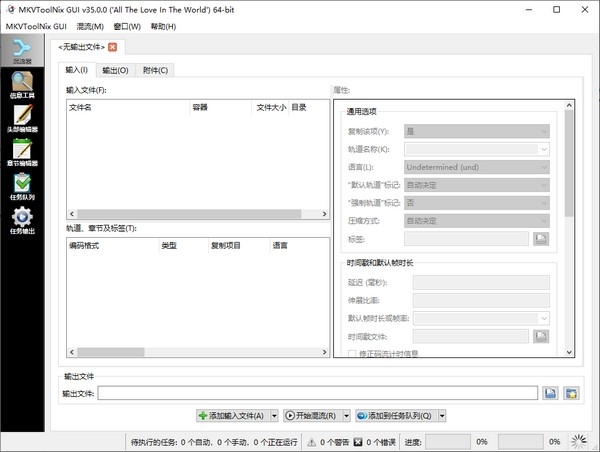
Highlights of mkvtoolnix subtitle extraction software
Video editing and production
Multi-Audio Track Management: Add multi-language audio tracks or director's commentary tracks to your movies.
Subtitle integration: Encapsulate external subtitles into embedded subtitles to improve playback compatibility.
Media management and storage
Large file splitting: Split 4K videos into multiple clips for easy storage or transfer.
Format Conversion: Convert formats like MP4, AVI, etc. to MKV and take advantage of its high compression rate and flexibility.
Fixes and optimizations
Corrupt File Repair: Recover unplayable MKV files.
Metadata editing: Modify the file title, author information, or cover image.
mkvtoolnix subtitle extraction software function
Encapsulation and merging
mkvmerge: Encapsulates multimedia tracks such as video, audio, and subtitles into a single MKV file, supporting the merging of more than 16 audio tracks/subtitles.
Batch processing: Automate operations from the command line or scripts, such as adding subtitles in batches, adjusting the order of audio tracks, or merging multiple files.
Orbit extraction
mkvextract: Extract video, audio and subtitle tracks from MKV files and restore them to their original formats (e.g. video to H.264, audio to AAC).
MKVExtractGUI: Provides a graphical interface to simplify the extraction process and is suitable for non-technical users.
Property editing
mkvpropedit: Directly modify the properties of existing MKV files (such as title, language, default audio track, etc.) without repackaging.
Tag management: Supports adding or modifying global tags (such as director, actor information) and track-level tags (such as audio track language, subtitle format).
file splitting
Split by size or time: Split large files into multiple smaller files to meet storage media limitations (such as CD/DVD) or network transmission needs.
Lossless segmentation: Preserve original video quality without re-encoding.
Information view
mkvinfo: Output detailed information of MKV files, including track list, codec type, packaging structure, etc.
Log and preview: Provide real-time log and preview functions during the operation to help users confirm the editing effect.
mkvtoolnix subtitle extraction software tool
mkvmerge:Encapsulate, merge, and mix multimedia files into MKV files;
mkvinfo:Output MKV file components and encoding information;
mkvextract:Extract video, audio and subtitle tracks from MKV files;
mkvpropedit:Directly modify properties of existing MKV files without remixing the stream;
mmg:mkvmerge GUI, including chapter editor and header editor
Frequently Asked Questions about Extracting Subtitles with mkvtoolnix
How to extract tracks or metadata from MKV files?
Use the mkvextract tool:
mkvextract tracks input.mkv 0:video.h264 1:audio.aac # Extract video and audio tracks
mkvextract chapters input.mkv > chapters.xml # Extract chapter information
mkvtoolnix extracts subtitles update log
1. The details are more outstanding!
2.BUG gone without a trace
Huajun editor recommends:
A very good video editing software. The editor also uses this software. It is powerful, green and safe. This site also providesAquaSoft Stages,Video clip format factory,Real file repairer,EV screen recording,Video watermark removal tool (Remove Logo from Video) v1.0Waiting for you to download.




Your comment needs to be reviewed before it can be displayed