





- Green versionView
- Green versionView
- Green versionView
- Green versionView
- Green versionView

Features of Microsoft OfficePLUS software
Microsoft OfficePLUSGather work summary/ Job report/Academic defense/Marketing planning/Job competition and other diversified templates, support matching PPT templates according to industry and purpose, one-click application, 0 learning cost, including PDF export, one-click beautification and other functions, making PPT production easier(Massive templates,0 learning cost, enjoy AIPersonalized production).
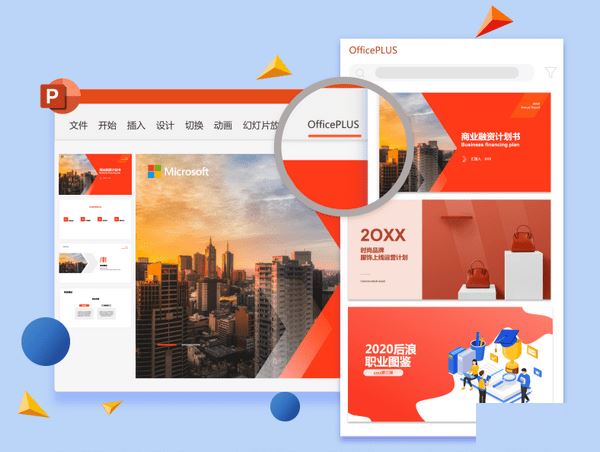
Introduction to Microsoft OfficePLUS functions
1. Provide various materials and contents of Officeplus.cn to facilitate users to plug and play when making PPT. Clicking on the template library will pop up the official template library content column on the right. You can choose to insert the required template in the entire set or on a single page.
2. Help users quickly solve difficult PPT layout problems.
3. Can be exported to various formats to facilitate social sharing on different occasions.
4. The export function temporarily provides the ability to export images and PDFs as a whole or in pages.


Microsoft OfficePLUS FAQ
"Plug-in installation failed or could not be loaded"
Common reasons:
Office version is not compatible: the plug-in requires Microsoft 365 or Office 2019 and above (some older versions such as 2016 require manual activation of the COM add-in).
System environment conflict: .NET Framework 4.8+ is not installed on Windows 7/8.1, or the Mac version of Office is not installed through Microsoft’s official channels.
Security software interception: 360/Tinder and other software falsely report plug-ins as "unknown programs".
Solution:
Version check: Open PowerPoint → File → Account → Confirm the version number (such as "Microsoft 365 Subscription Edition" or "2021 MSO").
Manually enable: File → Options → Add-ins → Manage "COM Add-ins" → Check "OfficePLUS" → OK.
Security settings: Temporarily turn off the anti-virus software, or add the plug-in directory (C:Program FilesMicrosoft OfficePLUS) to the whitelist.
How to use Microsoft OfficePLUS
1. Download and execute the OfficePLUS installer.
2. After the installation is complete, open the PowerPoint software.
3. Find the [OfficePLUS] menu and start using it.
|
Huajun editor recommends: Microsoft OfficePLUSWe provide you with various high-quality PPT templates, practical PPT modules, Word resumes, Excel charts, picture materials and other resources, serving as a refueling station for your workplace and life.In addition, Huajun Software Park has more useful software:Microsoft VisioRecommended to everyone, welcome to download and use. |










Your comment needs to be reviewed before it can be displayed