





Highlights of Jinan Renrentong Space Software
Online teaching support
During the period of "Learning without Stopping Classes", functions such as live teaching, homework management, and learning data analysis are provided, covering the entire process of pre-class preview, in-class learning, and post-class consolidation.
Home-school interactive bridge
Through functions such as class circles and private message communication, we build bridges for communication between families and schools, parents and teachers, and realize "trinity" collaborative education.
Personalized learning path
Based on academic analysis, personalized learning resources and exercises are recommended for students to facilitate precise teaching and independent learning.
Educational resource sharing
Covering all district and county schools in Jinan City, urban and rural students can access high-quality educational resources (for example, students in mountainous areas can simultaneously learn the courses of famous teachers of the Provincial Experimental Middle School through the platform).

Features of Jinan Renrentong Space Software
High concurrency and stability
Using distributed architecture and cloud storage technology, it supports tens of thousands of people learning online at the same time, ensuring a smooth experience.
Multi-terminal adaptation
Supports access from PCs, mobile phones, tablets, smart TVs and other devices to meet learning needs in different scenarios.
Security protection
It has passed Level 3 certification and uses technologies such as data encryption, access control, and behavioral auditing to ensure platform security.
AI empowerment
Introduce intelligent speech recognition, image recognition, natural language processing and other technologies to optimize homework correction, academic analysis and other aspects.
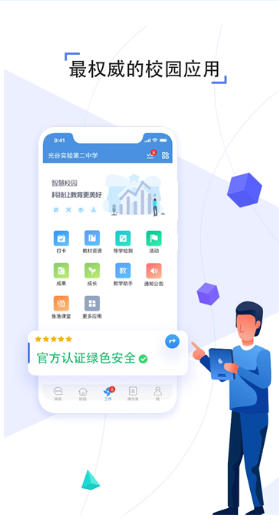
Jinan Renrentong Space Software Functions
Resource Center
Curriculum resources: covering all K12 subjects and synchronous course videos, micro-courses, courseware and exercise library for all academic stages, supporting accurate retrieval by textbook version, grade, and subject.
Special resources: Provide special special contents such as moral education, mental health, safety education, technological innovation, etc. to help the development of quality education.
Localized resources: Combining local textbooks and teaching needs in Jinan, develop special courses (such as spring water culture, Qilu history, etc.).
Live class
It supports real-time audio and video interaction, screen sharing, electronic whiteboard, raising hands to speak and other functions, simulating real classroom scenes and breaking the limitations of "one-way output" of traditional online teaching.
Job management
Teachers can assign and correct homework online, and support automatic correction of objective questions and voice comments on subjective questions.
Students can submit multimedia assignments such as pictures and videos, and parents can view assignment completion status and teacher comments.
Q&A community
Students can ask questions at any time, and teachers or classmates can answer them online, forming a mutual-help learning ecosystem.
Academic analysis
Use big data to record students' learning behaviors (such as viewing time, assignment accuracy, test scores, etc.), generate personalized learning reports, provide teachers with accurate teaching basis, and recommend personalized learning paths for students.
Wrong question book
Automatically collect students' wrong questions and recommend intensive exercises for similar question types to help identify and fill in gaps.
Growth trajectory
Record students' classroom performance, awards, comprehensive quality evaluation, etc. to form a digital growth file.
Parental functions
Support parents to view their children's learning data, receive school notifications, communicate with teachers via private messages, and participate in home-school interactive activities.
Provide family education guidance courses to help parents improve their scientific parenting skills.
data cockpit
Real-time display of teaching data for regions, schools, and classes (such as online rate, homework completion rate, resource usage rate, etc.) to assist management decision-making.

FAQ
What should I do if I don’t have an account password?
Student accounts are usually issued by the class teacher. If you have not received it, please consult the class teacher to obtain it.
If the parent account has not been registered, you can download the Renrentong Space App, click "Parent Registration" on the login page, and fill in the information as prompted to complete the registration.
What should I do if I can’t log in with my account and password?
Students: If you forget your password, parents or class teachers can reset it. After parents log in to their account, go to "Personal Center" → "My Children" → select the corresponding child → "Edit Information" → change the password. The class teacher can also reset through the management background.
Parents: If you forget your password, click "Forgot Password" on the login page and reset it through mobile phone number verification. The initial password is usually "pw + the last six digits of the mobile phone number" (for example, the mobile phone number is 138****8888, and the initial password is pw888888).
Installation steps
Special note: The installation package provided by Huajun Software Park contains the Android emulator and software APK files. For the computer version, you need to install the emulator first and then install the APK file.
1. First download the installation package from Huajun Software Park. The software package contains an Android emulator exe installation program and an APK file and unzip it. First click on the exe program to install the lightning simulator.

2. Double-click "Lightning simulator.exe" file to enter the installation interface. Users can click "Quick Installation" to select the system's default installation address for installation, or click "Custom Installation" to choose the installation path. Custom installation is recommended here.

3. WaitingLightning simulatorAfter the installation is complete, click "Try Now" to open the emulator.

4. Enter the main interface of the lightning simulator and clickRight column APK iconSelect the "Local APK Install" button.

5. In the pop-up window, click on the decompressed APK file, and then click to open.

6. After that, the software will enter the installation process. You need to wait for a moment. After the software installation is completed, it will appear in my software list. Click the icon and double-click to open it. 
Jinan Renrentong Space Update Log
Resolved some known issues.
Improve product safety and stability.
Huajun editor recommends:
Say goodbye to junk software, Jinan Renrentong Space PC version is a green and safe software, the editor has personally tested it! Our Huajun Software Park serves you wholeheartedly. There are alsoHomework Help 2021,Homework Help 2021,Seewo College,Master of Laws Postgraduate Entrance Examination,Driving school test subject one, available for you to download!




Useful
Useful
Useful