






Frequently Asked Questions about Piovan Invoicing Software Tax Control Disk Version
How to upgrade Baiwang Jinfu invoicing software
1. Automatic software upgrade
Open the software and automatically detect the [Online Upgrade] prompt (or manually click Help-Check for Updates)
Close the invoicing software;
Click [Start Upgrade] and the system will start detecting the upgrade;
After the download is successful, the upgrade installation will begin. To install the software, you need to manually click Next. After the installation is complete, you will be prompted: You have successfully upgraded to the latest version. Click [Upgrade Complete].
After the upgrade is completed, log in to the invoicing software to check whether the data is lost. If the data is lost, restore the backup data; if it is not lost, keep the backup data and use the invoicing software normally.
2. Manually download software upgrades
Log in to Baiwang.com, Baiwang call center website or the official website of your local Baiwang service unit to download the latest version of the invoicing software, unzip the program and follow the prompts to complete the installation.

Introduction to the functions of Piovan invoicing software tax control disk version
1. Exclusive for value-added taxinvoice
2. Ordinary VAT invoice
3. Unified invoice for motor vehicle sales
4.used motor vehicleinvoice
Features of Piovan invoicing software tax control disk version software
1. Quickness
Scan the QR code with your mobile phone and enter the invoice header in seconds
Multi-person invoicing, multiple mobile phones can issue invoices at the same time
High-speed printing and extremely fast printing are available immediately
2. Supportability
Supports VAT roll-based invoices and electronic invoices
3. Flexibility
Scan the QR code with your mobile phone for quick invoicing
Intelligent POS invoicing
PC browser invoicing
Remote cloud independent invoicing
4. Applicability
Wholesale, retail, catering, entertainment, accommodation, business services, resident services and other industries
Piovan invoicing software tax control disk version installation steps
1. Download the installation package of the tax control disk version of the Wang invoicing software from Huajun Software Park. After unzipping, double-click the exe program to enter the installation wizard and click Next

2. Click "Browse" to select the installation folder. Generally, it is installed on the C drive of the computer by default. It is recommended to install on the D drive. Click Next.
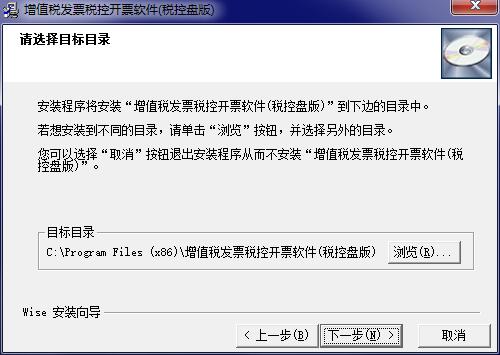
3. The installation program is ready, click Next to install

4. The software is being installed, please wait patiently.

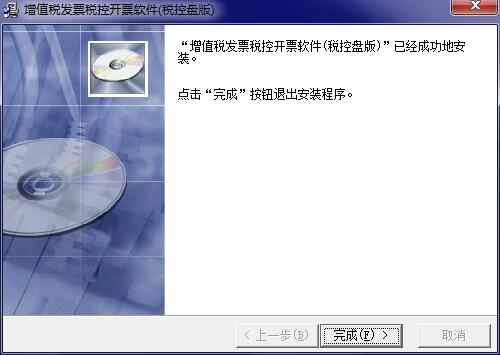
5. The installation of the tax control disk version of Wang invoicing software is completed, click Finish to exit the installation wizard
Frequently Asked Questions about Piovan Invoicing Software Tax Control Disk Version
What should I do if it prompts a device password verification error when logging into the UK tax invoicing software?
The general password is 12345678. If you have successfully logged in before, you can try to retrieve the password through the invoicing log. It is recommended to set the password to a simple and easy-to-remember number combination, such as 12345678.
Piovan invoicing software tax control disk version update log
1. Add the name of the competent tax authority and the code of the competent tax authority
2. Cloud header fuzzy matching content is displayed in a list
3. New tax control service evaluation
4. Display the version number of the General Administration and the tax classification code version
5. The red letter information table for controlling network status can only be imported and issued.
6. When the red-letter ticket sales order fails to pass, the software will prompt
Special instructions:
Hello, the software you are about to use is an auxiliary tool and may be intercepted and checked by major anti-virus software. This software may have risks, please pay attention to avoid it. If you want to continue using it, it is recommended to close various anti-virus software before use.
Attached is the software package decompression password: softwaredownload4.com
Huajun editor recommends:
It is one of the best in financial management. With its comprehensive functions and simple operation, it has won unanimous praise from users. Come and download it and give it a try. The editor has also prepared for youYujia Accounting,Smart Accounting and Taxation Assistant,Zhuo Zhang Financial Software,A good boss sells and sells goods,Shangyi Financial Software









Useful
Useful
Useful