




How to use the financial software of Jinbook Village Collective Economic Organization
1. Choose the corresponding accounting system: Choose the accounting system of the collective economic organization, and check the required accounts according to the needs of the unit. However, the current period's surplus and surplus distribution accounts must be selected.
2. Enter the unit name: that is, the name of the account set. The same computer cannot have the same account set name;
3. Starting year: that is, the year from which the data is entered; starting month, that is, the month from which the data is entered;
4. Account set path: Which drive letter should the account set be saved under? The default is on the F drive of the computer. If there is no F drive, it will be placed on the D drive or E drive. Generally, it cannot be placed on the C drive.
5. In the next step, you can select it by default or modify it as needed.
6. Accounts Manager: You can enter the three characters of Accounts Manager, or you can enter your own name. After completion, you can still add and modify it.
7: After the new account set is completed, enter the initial password 9999 to open the account set
8: After opening the account set--->click system settings first-->then click accounting accounts: Click the accounting account in the list on the left, then right-click, click Add, then click Add detailed account. You need to manually add detailed accounts with data according to the account balance table.
9: After adding the detailed accounts, open the opening data, click to enter the opening number of the account, double-click the cell, and after it turns green, enter the opening data. You only need to enter the last level of detailed accounts, and the upper-level accounts will be automatically summarized layer by layer;
10: After recording the opening data, click Smooth in the upper left corner to see if the recording is flat. You can also calculate the balance sheet to see if it is flat. If there is no opening data, you do not need to enter it.
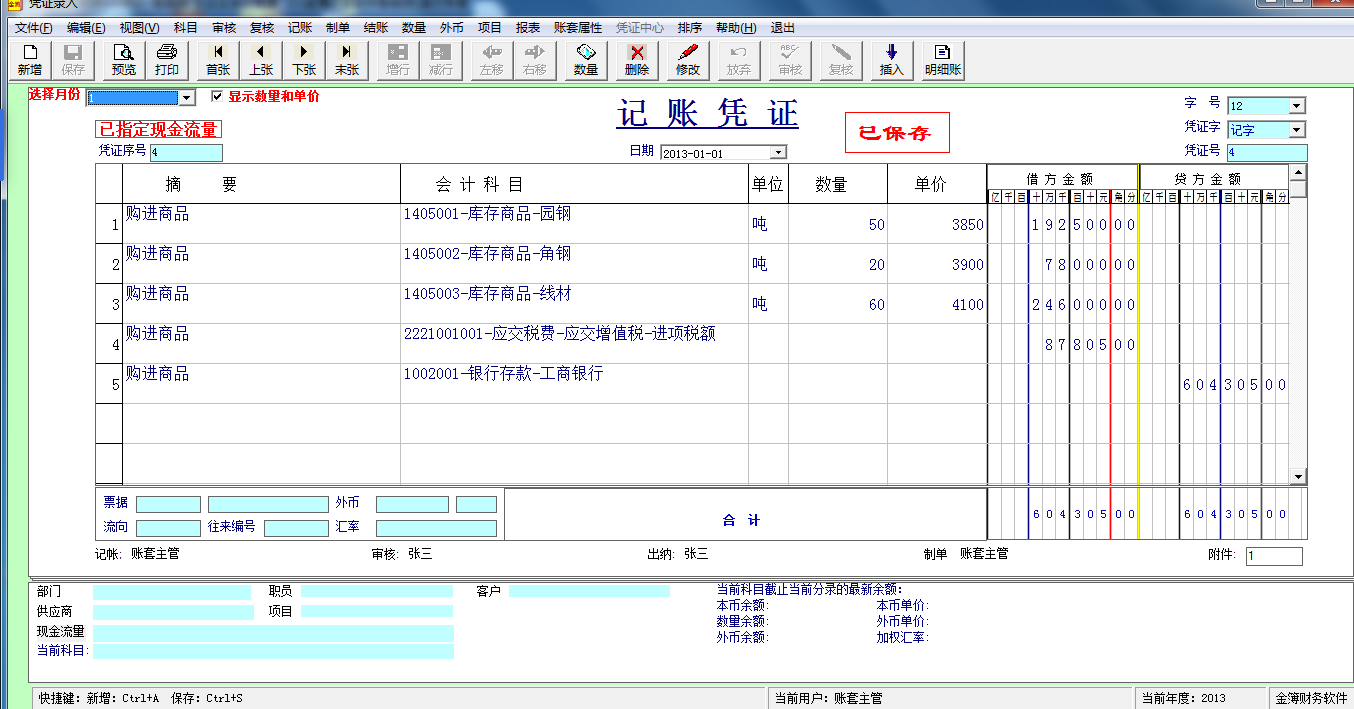
11. After recording the opening data, you can enter the voucher. Click Voucher Management, click Voucher Entry, in the upper left corner, click New, enter the voucher again, and then save.
12. At the end of a month, it is generally necessary to carry forward the income and expenditure first, and then settle the accounts. After the accounts are settled, the voucher for the next month can be entered. At any time, only the first unsettled month can be entered into the voucher.
Jinbook Village collective economic organization financial software operation process
1. Open voucher management, click voucher entry, first select January, then click New in the upper left corner of the voucher, then select the corresponding date and voucher number, and then enter the corresponding summary, account, and number of loans and debits. Only at least two entries can be saved.
2. After recording the normal vouchers, depreciation will be charged at the end of the month, and then the carryover of profits and losses will be processed at the end of the month, and the incurred amounts of the revenue and expenditure accounts will be carried forward to the current period's surplus.
3. Account book query: Open the account book management and you can query the general ledger, journal, detailed ledger and other commonly used account tables.
4. Month-end settlement, after the profit and loss is carried forward, it is processed at the end of the period, and the month-end settlement is completed. After settlement, the voucher for the next month can be entered.
5. Report generation: Open report management, open common reports, and calculate the balance sheet, earnings statement and earnings distribution statement.
6. Month-end settlement. After each month is completed, process it at the end of the period. Click month-end settlement. After settling the current month's accounts, you can enter the voucher for the next month.
7. Carry forward to next year: Once completed in December, you can carry it forward to the next year and process it at the end of the period. Click Carry forward to next year, and the system will automatically generate the accounts for the next year.
Jinbook Village collective economic organization financial software installation capture
Installation is simple. After downloading, unzip it and double-click the executable file of the financial software of Jinbook Village Collective Organization to enter the installation. The default installation path is on the C drive. The user can modify it to the desired installation address. The installation package has a small capacity and can also be installed on a mobile disk or U disk. When used, it can be opened and used by plugging it into a registered computer.
Jinbook Village Collective Economic Organization financial software update log:
1. Fixed several bugs;
2. Optimize details;
Huajun editor recommends:
Don’t miss it when you pass by. If you miss the financial software of Jinbook Village Collective Economic Organization, you will never experience such good service again. This site also recommends to youYujia Accounting,Bank of Communications Online Banking Guide,Smart Accounting and Taxation Assistant,Zhuo Zhang Financial Software,A good boss sells and sells goods




Useful
Useful
Useful