




- Green versionView
- Green versionView
- Green versionView
- Green versionView
- Green versionView
Highlights of WPS Office Campus Edition
Teaching collaboration tools
Online smart document: supports real-time collaborative editing by multiple people, can insert graphics, videos, calendars, meetings and other elements, and is suitable for event promotion, scientific research exchanges and other scenarios.
Smart tables and forms:
Smart form: multiple people can collaboratively process teaching/management data and support the construction of small applications for course data.
Smart forms: Create forms for event registration, questionnaires, exams, etc. with one click, efficiently collect information and automatically analyze data.
Flow chart/mind map: Draw paper ideas, course notes, and creative ideas online to improve logical expression skills.
Education-specific template library
Provides 60,000+ free templates, covering text, tables, presentations, covering ideological and political themes, campus activities, graduation defense and other scenarios, reducing design time.
Security and permission management
Use multiple encryption technologies to ensure document security, and support setting viewing, editing, and deletion permissions for different users to prevent data leakage and misoperation.
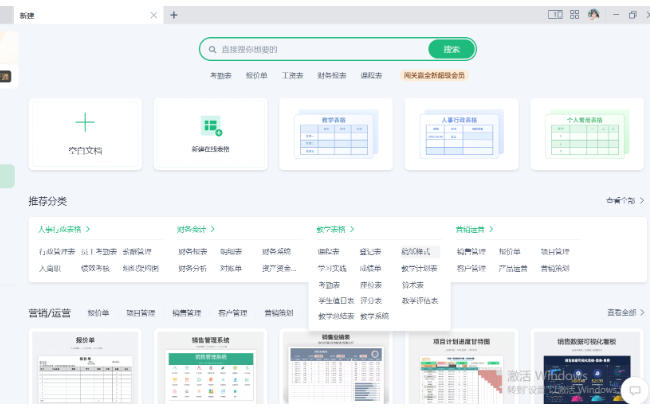
WPS Office Campus Edition Features
Basic office three-piece set
Word processing: supports paper formatting, intelligent proofreading, multi-language translation, and provides tools such as visual paragraph layout and long document title style application to help you write papers and reports efficiently.
Table analysis: Built-in pivot tables and chart tools support intelligent filling, data comparison, and function display in Chinese, making it easy to handle data tasks such as performance analysis and market research.
Demonstration production: Provides one-click beautification, universal color selection, batch image editing functions, supports file packaging to prevent font running, and quickly generates professional courseware and defense materials.
PDF professional processing
Supports PDF reading, annotation, editing, and format conversion (such as PDF to Word/Excel) to meet the processing needs of public documents, notices, journals, etc.
Cloud document synchronization with multiple devices
Learning materials are automatically synchronized to the cloud and can be accessed from computers, mobile phones, and tablets to avoid version confusion and data loss.
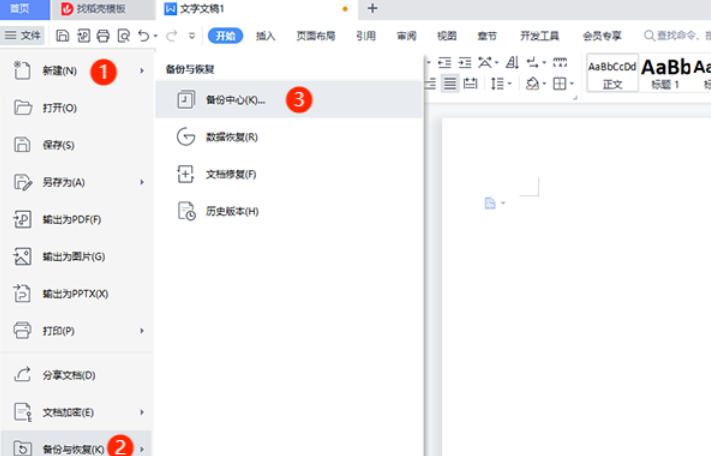
Highlights of WPS Office Campus Edition
Price concessions
Provide affordable prices and even free membership services for student groups to reduce financial burden.
Large capacity cloud storage
The per capita cloud space is 1TB to 2TB (for example, the Peking University version provides 2TB), which supports real-time synchronization of computer and mobile phone data to meet large data storage needs.
Video conferencing and instant messaging
Video conference: no time limit, supports 500 people joining the conference at the same time, uploads to-do documents before the meeting, shares and edits documents during the meeting, and automatically generates AI minutes after the meeting.
Instant messaging: built-in campus address book, supports message expediting, one-click reminder, and permanent synchronization of chat records to improve collaboration efficiency.
AI auxiliary tools
WPS AI: supports intelligent writing, one-click PPT generation, data processing analysis, and PDF intelligent Q&A, assisting all aspects of learning and work.
Design tool: Provides simple and easy-to-use picture design functions, which can be used to create event posters and promotional materials.

WPS Office Campus Edition FAQ
Document opening/saving failed
Problem: "Insufficient Permissions" or "File Corruption" prompts when trying to open or save a document.
Answer:
Check whether the file is occupied by other programs, close it and try again.
Confirm whether the saving path has write permission (for example, a shared folder on a campus network requires administrator authorization).
Try saving the file in another format (such as .docx to .pdf), or use the "Repair Tool" to repair the damaged file.
WPS Office Campus Edition update log:
1. Fixed BUG, the new version has a better experience
2. Some pages have been changed
Huajun editor recommends:
WPS Office Campus Edition is professional, simple to operate, and powerful. It is one of the leaders in the software industry. You are welcome to download it. This site also providesToday's goal,Hanwang Attendance Management System,WPS Office,NTKO large file upload control,Kuai Dao Ke platform softwareWaiting for you to download.












Useful
Useful
Useful