




- Green versionView
- Green versionView
- Green versionView
- Green versionView
- Green versionView
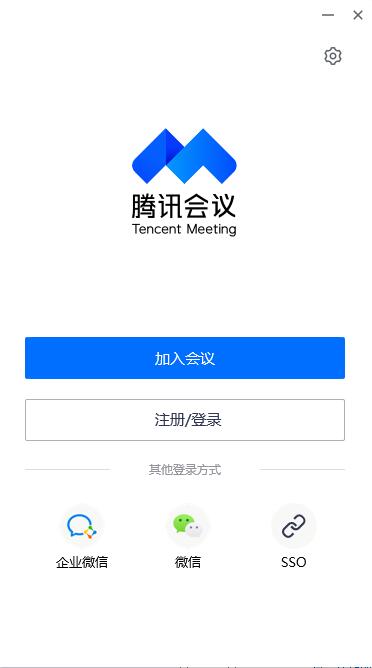
Introduction to Tencent Meeting Personal Edition Software
Tencent Meeting Personal Edition is a software suitable for individual PC client users. It provides users with high-definition and smooth video cloud conferencing functions. The software’s video service is excellent and can achieve zero delay, allowing employees to communicate in meetings without barriers. Tencent Meeting also provides some recording and collaboration functions. The content of the meeting can be recorded during the meeting, which greatly improves the efficiency of the meeting. The software can schedule scheduled meetings with one click and notify all employees to attend the meeting when the time is up.
Tencent Meeting Personal Edition Software Functions
【Stable and reliable】
Tencent Cloud’s global network deployment supports massive concurrency of meetings;
Audio and video are highly resistant to packet loss and video anti-jitter.
【Simple and easy to use】
The interface is refreshing and concise, and you can reserve, initiate and join meetings with one click;
Online document collaboration and quick activation of discussions;
Real-time screen sharing makes remote presentations feel like being there;
Strong meeting management and control, the host manages the meeting in an orderly manner;
【High definition and smooth】
High-definition image quality, video beauty, background blur;
Intelligently eliminates ambient sounds and keyboard sounds, and perfectly restores human voices.
Features of Tencent Meeting Personal Edition software
Whole network encryption security defense
Tencent Cloud’s seven major security laboratories escort and protect user privacy and security ai+web application firewall, dynamic and static scanning, effectively resisting threats and attacks on business data, management mechanisms, network equipment, access policies and other multiple protections
Global deployment is stable and reliable
腾讯云全球1300+节点部署,会议时延最低可至80ms视频抗抖动,丢包70%情况下画面仍不花屏、不卡顿高品质清晰语音,丢包80%情况下仍享自然流畅语音
Convenient and easy to use for orderly meetings
One-click reservation, initiation, and joining of meetings, synchronization of meeting agendas across multiple terminal devices, comprehensive meeting management and control capabilities, assisting the host in orderly management and conduct of meetings, one-click start recording during the meeting, and the video is automatically encrypted and stored in a dedicated cloud space
Tencent Meeting Personal Edition Installation Steps
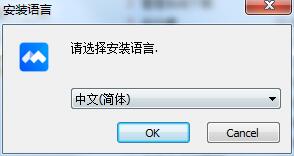
1. Download the installation package of Tencent Conference Personal Edition from Huajun Software Park. After unzipping, double-click the exe program, select the language, and click OK
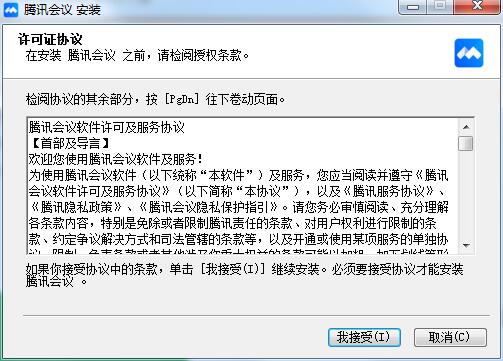
2. Read the license agreement, click "I accept", and click Next
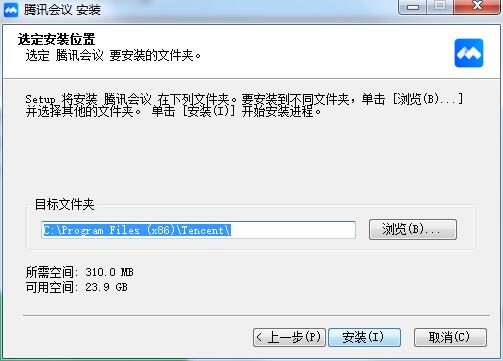
3. Click "Browse" to select the installation folder. Generally, it is installed on the C drive of the computer by default. It is recommended to install on the D drive. Click Install.
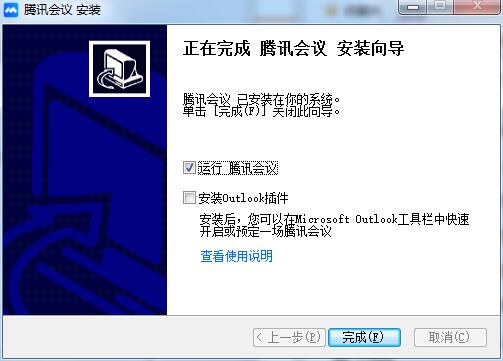
4. The installation of Tencent Meeting Personal Edition is completed, click Finish to exit the installation wizard
Tencent Meeting Personal Edition Frequently Asked Questions
How to turn on the beauty function?
Click the "Settings" button in the menu bar at the bottom of the screen, click "Beta Lab", drag the "Beauty" effect bar to adjust the degree of beautification independently.
I'm having an important meeting, but the background is cluttered, what should I do?
Click the "Settings" button in the menu bar at the bottom of the screen, click "Beta Lab", and turn on "Background Blur" to blur the background behind you and highlight the participants.
I have been muted by the moderator, how do I apply to unmute?
App or PC users: Click "Microphone" and select "Apply to speak" and wait for the moderator to pass. Call-in users: After being muted, press the "1" key and then press the "#" key to apply to speak, and wait for the moderator to approve.
Sound lags, sometimes fast and sometimes slow, etc. during the meeting
会议中通话声音存在卡顿、快进、慢放等现象,大概率是网路连接问题,导致该问题的可能性原因包括:设备网卡不正常,系统存在其他占数据带宽应用,上行发包网络连接差、网络抖动拥塞等等。 For specific solutions, please refer to the following steps:
1) First, please refer to question 6 to rule out the possibility that the environment and equipment may cause abnormal sound.
2) At this time, first check whether the Wi-Fi or 4G signal strength is normal. If the network condition is poor, it is recommended to change to a better quality network. In this case, you can join the meeting by calling pstn instead.
3) If the device network card is uncertain, you can try to use other software such as WeChat and QQ to test whether the communication is normal.
4) If after the above steps, the problem still exists. To ensure smooth meetings, it is recommended to turn off high-bandwidth-consuming functions such as video and screen sharing, and prioritize voice call quality.
Tencent Meeting Personal Edition update log
1. Modify user-submitted bugs
2.Add new features
Huajun editor recommends:
Tencent Conference Personal Edition has always been a commonly used office software for most netizens. Its dominant position in the minds of netizens can be seen. It is strongly recommended that users download Tencent Conference Personal Edition and use it. Come to Huajun Software Park to download it. In addition, there areHanwang Attendance Management System,Aimo mind map,WPS Office,NTKO large file upload control,Kuai Dao Ke platform softwareAvailable for download.











Useful
Useful
Useful