If you are looking for software to use, go to Huajun Software Park! software release AI product list

Hello, if there is a need for software inclusion, please package the software and attach the software name, software introduction, software-related screenshots, software icon, soft copy, business license (if you do not have a business license, please provide the front and back of the corresponding developer ID card and a photo of yourself holding the ID card), and send it to email http://softwaredownload4.com/sbdm/user/login

Close >>

Send to email:news@onlinedown.net

Close >>

Location: Home pagePC softwaremedia toolsaudio editing Audio processing software (XRecode II)
Audio processing software (XRecode II)

Audio processing software (XRecode II) v1.0.226 Chinese version

QR code
  • Software licensing: free software
  • Software size: 9MB
  • Software rating:
  • Software type: Domestic software
  • Update time: 2024-12-30
  • Application platform: winall
  • Software language: Simplified Chinese
  • Edition: v1.0.226 Chinese version

Download the service agreement at the bottom of the page

Software introduction Related topics FAQ Download address

Basic introduction
Audio processing software (XRecode II) segment first LOGO
If you often need to process audio files, such as format conversion, CD ripping, audio extraction, etc., then this powerful XRecode II is a good choice. It supports conversion of common MP3, WMA, WAV and other formats. It can convert mp3, mp2, wma, ogg, flac, wav, mp4, aac and other audio files into m4a, alac, ape, flac, mp3, mp4, ogg, raw, wav, wma, WavPack, mpc, mp2, Speex, ofr, ac3 and other formats.
Similar software
Release Notes
Software address

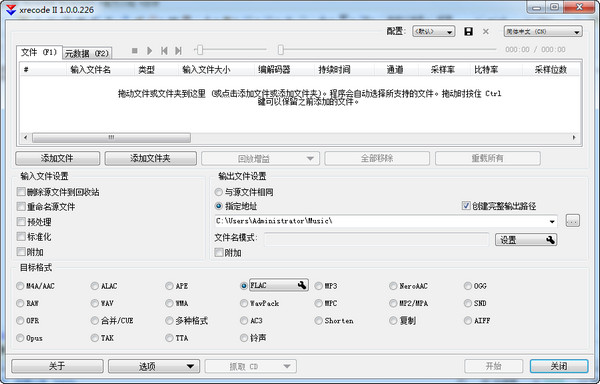
Audio processing software (XRecode II) screenshots

Basic introduction

The software interface is simple and very easy to use. Just drag the files you need to convert into the conversion list and select the target conversion format. XRecode II can also extract audio information from video files, that is, save the background music or dialogue in the video as an audio file independently. This feature is also quite attractive.
Users who have higher requirements for conversion may have discovered that when you select the target format, a Settings button will appear next to the corresponding format. Click to enter to see rich parameter settings. You can even save customized settings for easy recall later.
In addition, XRecode also provides some useful audio tools. For example, after you finish ripping CD tracks, the software will automatically search and download album-related information from the Internet; support batch conversion; built-in Metadata editor; support file merging; and so on.

The following formats are supported

Import: mp3, mp2 ,wma, cda, ogg, flac, ape, cue, ac3, wv, mpc, cue ,tta, tak, wav, dts, m4a, m4b, mp4, ra, rm, aac, avi, mpg, vob, mkv, flv, swf, mov, ofr, wmv, divx, m4v, spx, 3gp, 3g2, m2v, m4v, ts, m2ts, adts, shn, tak, xm, mod, s3m, it, mtm, umx
Export: m4a, alac, ape, flac, mp3, mp4, ogg, raw, wav, wma, WavPack, mpc, mp2, Speex, ofr, ac3

Chinese settings

The software defaults to an English interface. After entering the interface, find the language option in the upper right corner and select Chinese, as shown in the picture.


Audio processing software (XRecode II) screenshots

Related topics

  • Audio processing software area

    Audio processing software area

  • Photo processing software collection

    Photo processing software collection

FAQ

Audio processing software (XRecode II)

Audio processing software (XRecode II) v1.0.226 Chinese version

close