




Features of intelligent Wubi input method
The more practical Chenqiao Pinyin (increased stroke input) has many very practical and unique technologies such as intelligent prompts, sentence input, sentence prompts and simplified input, intelligent word selection, etc.
Intelligent Wubi input method supports traditional Chinese character output, various symbol output, and Big Five Chinese character output
The intelligent Wubi input method contains a rich vocabulary and powerful vocabulary management functions
The flexible and powerful parameter setting function enables most people to use this software satisfactorily
It can implement mixed input of characters, words and sentences, and has more powerful intelligent processing functions than intelligent Wubi
Intelligent Wubi input method installation method
1. Download the compressed package, decompress it, and execute install.exe. The installer will quickly install Smart Wubi on your machine.
2. Click the input method icon in the Windows taskbar.
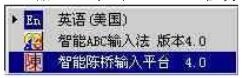
3. There is an additional item "Smart Chenqiao Input Platform 4.0" in the input method. After selecting it, the input method switches to the smart Wubi input method state. The initial window of the smart Wubi is as follows:

4. The window of Smart Wubi does not look much different from other input methods. During the input process, use "Shift+Spacebar" to switch between full-width and half-width, and use "Caps Lock" to switch between Chinese and English input. The difference is that the shortcut keys for Smart Wubi when selecting duplicate codes to turn pages are "Shift+<" and "Shift+>". The area where the Intelligent Wubi version number and author are displayed on the first line of the window is the input area, and the area where the author's email and website address are displayed on the second line is the output area. The small button in the upper right corner of the window is the screen word acquisition button. The window type of Smart Wubi can be set. Right-click anywhere in the window.
5. Click the "Parameter Settings" option in the pop-up window to pop up the parameter setting window.

Comparison of similar software for intelligent Wubi input method
Which one is better, Jidian Wubi or Smart Chenqiao Wubi? What are the differences?
极点五笔输入法能够进行五笔拼音的互查户换,为用户五笔输入法的学习带来了帮助,而且还可以进行五笔和拼音的混合输入打字
Intelligent Chenqiao Wubi supports traditional Chinese character output, various symbol output, and Big Five Chinese character output. It contains a rich vocabulary and powerful vocabulary management functions. It can output Wubi with more than 27,000 Chinese character codes and the novel and practical Chenqiao Pinyin and adds stroke input.
Smart Wubi Input Method Frequently Asked Questions
How to switch to the intelligent Wubi input method?
1. All input methods in the computer can be found in the typing input method icon in the lower right corner of the desktop. You can see all input methods with one click.
2. You can also use shortcut keys to switch input methods by pressing Shift and Ctrl at the same time.
How to set the smart Wubi input method as the input method to be switched first?
1. Right-click "Input Method" on the "Taskbar", in the "General" tab of the pop-up dialog box, select the input method you want to modify, and adjust its position by "Move Up" or "Move Down". .
In English:
After adjusting to "Chinese (Simplified) - American keyboard", press shift+ctrl on the left to switch
Adjust the position to behind all input methods, press shift+ctrl on the right to switch
2. In the state of Wubi input method, use ctrl+space bar to switch between Chinese and English.
What should I do if I can’t switch between Sogou Pinyin input method and Wubi input method?
Reset the shortcut keys once, right-click on the language bar, settings, key settings or advanced key settings, change the key sequence
Chenqiao Intelligent Wubi update log:
1. Fixed BUG, the new version has a better experience
2. Some pages have been changed
Huajun editor recommends:
Chenqiao Intelligent Wubi has the same complete functions as the official product, the interface is more beautiful and elegant, and the design is more complete. It continuously meets the needs of users. Welcome to download. Those who are interested can also downloadHappy Wubi Input Method,Sogou Wubi Input Method For Mac,Fine five strokes,Smooth five strokes,One and five code input method








Useful
Useful
Useful