




Sogou Wubi input method function introduction
Efficient thesaurus
It inherits the powerful vocabulary of Wubi input method and fully supports GBK vocabulary. With the support of a large number of high-quality lexicon, your Wubi input will be as powerful and accurate as ever.

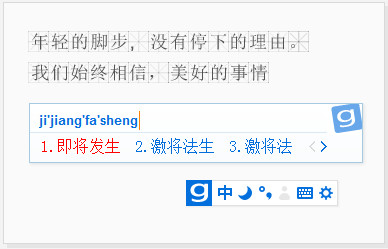
Mixed input
You can have your cake and eat it too, cross-border collaboration is as simple as that. Wubi + Pinyin mixed input brings you a more convenient input method, you can switch at any time and choose as you like.
Stylish and powerful
光给力还不达目的。 Compatible with the ever-changing Sogou input method skin library, with powerful input, stylish appearance, and elegant appearance, this is the Wubi input method worth sticking to.
Sogou Wubi input method installation tutorial
Tutorial on installing Sogou Wubi input method on Mac
Please double-click the "Install Sogou Wubi Input Method" icon and follow the prompts. Since the input method is a special OS X program, you need to enter the system login password during the installation process. If you are asked to log out when the input method is installed, be sure to log out and log in again to the system so that the input method can work normally.
In most cases, the Sogou Wubi input method icon will automatically appear in the status bar at the top of the screen (as shown below). Click the input method icon or press command+spacebar to switch between different input methods.

If you cannot switch out the Sogou Wubi input method, please click System Preferences → Keyboard → Input Source, select "+", and then find Sogou Wubi in "Chinese (Simplified Chinese)" (as shown below):
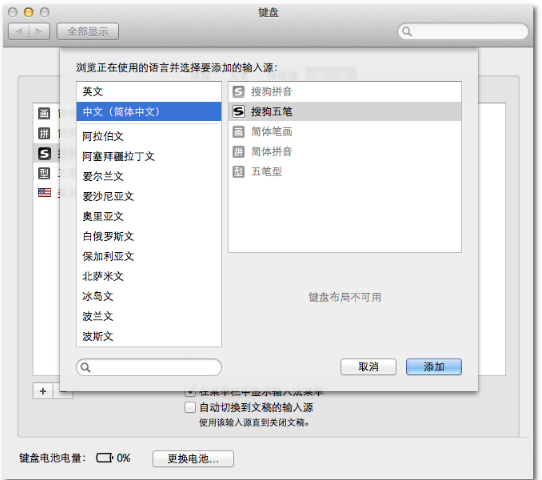

Note: This is for 10.9 system. For systems before 10.9, search in System Preferences → Language and Text.
Quickly switch between Chinese and English
Press shift to switch between Chinese/English input status.
Quickly input English
When entering Chinese, enter a string of letters and press the return/enter key to quickly enter English.
The above is the detailed introduction of installing Sogou Wubi input method on Mac brought by the editor. Do you all know it?
Sogou Wubi Input Method For Mac FAQ
Does Sogou Wubi Input Method for Mac support Pinyin input?
support. Users can choose to use Wubi Pinyin mixed input mode or pure Pinyin mode for pinyin input in the right-click menu or settings page.
Sogou Wubi Input Method For Mac update log:
1. Optimized some functions
2. Solved many unbearable bugs
Huajun editor recommends:
Of course, in addition to Sogou Wubi Input Method For Mac, a very convenient Wubi input software, our Huajun Software Park also hasHappy Wubi Input Method,Fine five strokes,Microsoft Wangma Wubi Input Method 86&98,Smooth five strokes,One and five code input methodRelated software is available for download. If you need it, please click to download and use it.



















Useful
Useful
Useful