




Features of Microsoft Wangma Wubi input method software
There are 6 code elements and the rules are simple; if you can write Chinese characters, you can input them! You can input both simplified and traditional Chinese characters and vocabulary. Millions of new and old users of Wangma can learn it by themselves! After transplantation, it will be widely used in various computers, mobile phones, cash registers, and various digital products at home and abroad. It can input simplified and traditional Chinese characters, punctuation marks, English upper and lower case letters, numbers, etc. from multiple character sets; according to needs, it can also be expanded to handle 27,533 simplified and traditional Chinese characters of the GB18030 character set and an unlimited number of vocabulary.
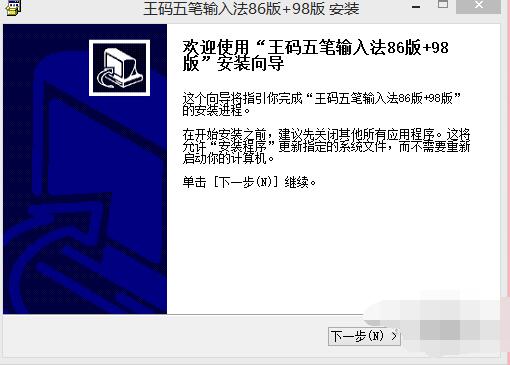
Microsoft Wangma Wubi Input Method installation steps:
1. Open the downloaded installation package and select the [Next] button in the pop-up window.
2. Check the components you want to install and click the [Install] button.

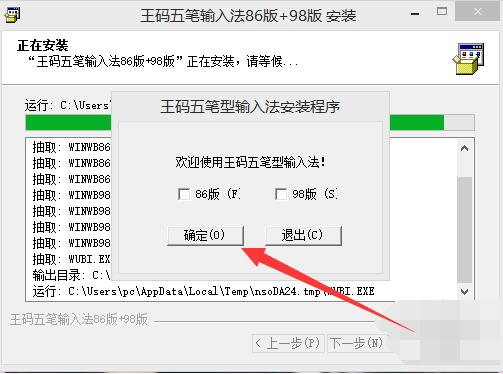
3. Check [Version 86] and click the [OK] button.
How to use Microsoft Wangma Wubi input method:
1. Brief description of Microsoft Wubi
1. The first section---special font---the same letter;
2. The second section---transitional font---account registration + single stroke;
3. The third section---normal font---adding the radicals.
2. Microsoft Wubi font identification code rules
1. The identification code of the left and right characters is: one times the root corresponding to the last stroke (i.e.: Y point, G horizontal, H vertical, T apostrophe, N fold);
2. The identification code of upper and lower characters is: double the root corresponding to the last stroke (i.e.: U dot, F horizontal, J vertical, R left, B fold);
3. The identification code of hybrid characters is: three times the root corresponding to the last stroke (i.e.: I dot dot dot, D horizontal horizontal horizontal horizontal, K vertical vertical vertical, E left and right, V fold and fold)
Microsoft Wangma Wubi Input Method FAQ:
1. How to quickly master Wubi typing skills?
1. If you want to learn Wubi typing quickly, don’t spend time memorizing the root characters. Find a better typing software and memorize the root characters while practicing them.
2. Generally speaking, when learning Wubi, you don’t need to memorize the root keymaps. You can just try typing directly on the keyboard. After a few days, unconscious conditioned reflexes will naturally form and you will press where you should press without realizing it.
2. What should I do if the input words are obscured by the input subtitle prompt?
1. Cancel the check mark of cursor following. Right-click the [Wubi Input Method] icon.
2. Cancel cursor following in the options.
Comparison of similar software:
Is the ultimate Wubi better than the Wangma Wubi?
Wangma Wubi is adaptable to a variety of operating systems and has good general performance. The interface of Best Wubi is simple, pure and focused on the input experience. Its characteristic is that Wubi beginners can get started quickly.
Microsoft Wangma Wubi Input Method update log:
1: Optimized performance
2: We are serious about solving bug problems
Huajun editor recommends:
It is highly recommended to download the Microsoft Wangma Wubi input method. Who knows who uses it? Anyway, I have already used it. In addition,Happy Wubi Input Method,Fine five strokes,Microsoft Wangma Wubi Input Method 86&98,Smooth five strokes,One and five code input methodIt is also a good software. Welcome to click to download and experience it!













Useful
Useful
Useful