





Software features
Full touch screen operation interface
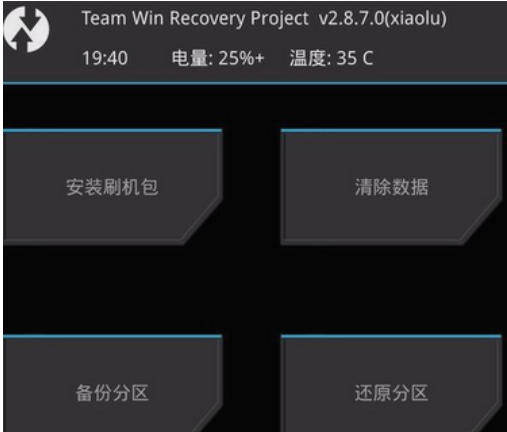
It adopts an intuitive touch screen design to replace traditional physical button operations and improve user experience.
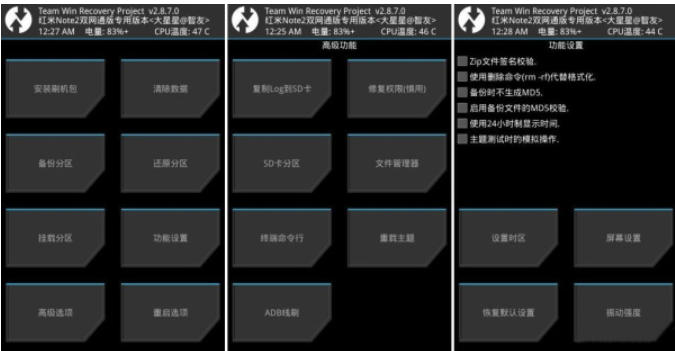
The main menu is clearly classified, including core functions such as installation, clearing, backup, recovery, mounting, and settings.
Open source and compatibility
As an open source project, TWRP's code is open and transparent, allowing developers to customize and optimize.
It supports more than 200 Android devices, covering mainstream brands and niche models, and continues to add new adaptations.
Multifunctional integration
System backup and recovery: Complete backup of system, data, boot partition, etc., supports MD5 verification to ensure backup integrity.
Third-party firmware installation: Supports flashing custom ROMs, kernels, Google Apps (GApps), etc. to expand device functionality.
Partition management: Provides functions of erasing and formatting partitions (such as system, data, cache), and solving software conflicts or system errors.
Advanced tool support
File management: Built-in file manager, supports file transfer with computer through MTP protocol, convenient for importing/exporting data.
Terminal emulator: Provides a command line interface that allows advanced operations (such as repairing file permissions).
Theme customization: Supports changing interface themes to meet personalized needs.
Software function
Core functions
Install third-party firmware: Flash a custom ROM, kernel, or module (such as Magisk) in ZIP format via the Install menu.
System backup and recovery:
Backup: Select the partition to be backed up (such as System, Data, Boot), generate a compressed file and store it on the device or external SD card.
Restore: Select the corresponding partition file from the backup folder and restore the device to the backup state.
Partition management:
Clear data: Format the specified partition (such as Dalvik cache, user data) through the "Wipe" menu to resolve system lags or software conflicts.
Mount partition: Manually mount the system partition to the computer to facilitate direct modification of files (such as replacing system applications).
Advanced features
ADB sideloading: Push files to the device via ADB commands without requiring a physical connection to the computer.
Terminal access: Use command line tools to perform advanced operations (such as repairing file system errors).
MTP support: Connect to a computer via USB to directly manage files in device storage.
FAQ
How to enter TWRP Recovery?
Key combination method: After shutting down, press and hold the "power button + volume up button" (some devices need to be adjusted, such as Samsung's "power + volume down + home button") until the TWRP interface appears.
ADB command method: Execute the adb reboot recovery command through the computer to reboot the device to TWRP.
What should I do if flashing fails or the device cannot be started?
Check firmware compatibility: Make sure the flashed ROM or kernel exactly matches the device model and system version.
Clear the data and try again: Enter the "Wipe" menu of TWRP, format the "Dalvik Cache" and "Cache Partition", and then try to flash the firmware.
Restore backup: If the system has been backed up before, you can restore it to the backup state through the "Restore" menu.
TWRP Recovery update log:
1. Optimize content
2. The details are more outstanding and bugs are gone.
Huajun editor recommends:
TWRP Recovery is a software that is simple to operate, powerful, and easy to use. You can download it and try it. Everyone is welcome to download it. This site also providesPerfect flash machine,Understand mobile phones in seconds,Absinthe2.0,One-click root tool,Qitu flash machineWaiting for you to download.




Your comment needs to be reviewed before it can be displayed