



Tip: CD pre-press elf supports coreldraw x4~x7 version, but does not support X3.
Updated to the perfect version of CD Prepress Elf 3.15, supporting coreldraw X4 to the latest CorelDraw X7 The 32-bit version (can support 32/64-bit systems, please note that it is a 32/64-bit system, not the coreldraw version that supports 64-bit, the CDR version only supports 32-bit) coreldraw plug-in has a hundred flowers blooming flavor, which everyone is familiar with The well-known front plug-in, magic mirror, Xiaoke box plug-in, super companion, and now the CD pre-press elf have joined them. Numerous plug-ins make coreldraw even more powerful, especially some boring and repetitive operations can be easily completed using plug-ins, saving effort and worry. In addition to some common functions, the CD Prepress Wizard's biggest feature is prepress inspection, such as checking document white overprint, four-color black, low-precision bitmap, etc. It is a rare CDR enhancement plug-in for prepress workers.
CD Prepress Wizard installation instructions:
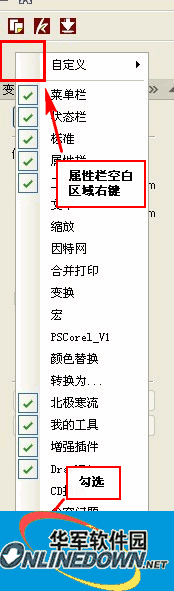
CD Prepress Wizard version 3.15 installation instructions
1) If the toolbar is incomplete, please manually import "App_YangkeCD.xslt"
2) If you do not want "YangKe_CD" in the print preview menu, please manually import "App_YangkeCD.xslt",
X4: ...Delete "App_YangkeCD.xslt" in the ProgramsAddonsCommonCDTool folder
X5/6:...ProgramsAddonsCDTool-Delete "App_YangkeCD.xslt" in the X5/6 folder
3) If you use an old version of the .xslt file, you cannot embed the X7 toolbar. If you want to display it in the toolbar, please manually import "X7 toolbar.cdws", then right-click on the toolbar and select the elf (Note: Just leave YangkeCD unselected, do not delete it)
CD prepress elf function icon
The prepress inspection function of CD Prepress Elf is more powerful than the other coreldraw prepress inspection plug-in shared by this site.
Note: Due to VBA reasons and the coding method of QUERY, the CD prepress wizard currently does not support CDR X3 and below. Because the VBA writing environment is XP, this macro may conflict with control classes under WIN7, especially for users who have installed the front-end plug-in (because the front-end itself has also replaced many system controls). Some functions of this macro may not support X6 64-bit.
Prepress Elf update history
Version 2.0
1. Solved the problem that version 1.8 cannot be used normally or reports a VB error in the 2003 system X4.
2. Several bug fixes
Prepress Elf version 2.3
1. Strengthened the imposition part (added book organ folding method, added ordinary imposition function, fixed some bugs in X6), interfaces such as QQ automatically hide, etc.
2. Fixed the problem that x4 and x5 cannot use pre-press elf at the same time.
Instructions for automatic imposition using the Prepress Elf
1. The automatic imposition must have the same specifications and sizes:
1) The number of left and right, top and bottom impositions are the number of openings of the entire page. I won’t go into details about these.
2) Page 1 is side A, page 2 is bottom A, page 3 is side B, page 4 is bottom B... and so on, select "Odd and even are front and back"
Page 1 is side A, page 2 is side B,... page n is bottom A, page n+1 is bottom B... and so on, do not select "Odd and even are front and back"
3) Imposition method: Choose to reverse left and right, otherwise choose to reverse top and bottom. I won’t go into details about these. The expressions may be different, but you just need to understand.
4) If there are multiple pieces of A and B, press the green "Refresh" button first. To determine the number of pieces, select it from the list and then set the number of pieces.
Note: If you spell one of each, there is no need to set the others. The direct version will be OK.
2. Manual imposition, the size is not limited.
1) Manually set the base accordingly (note: once defined, the group cannot be dissolved)
2) Just manually put together the base or surface, the corresponding surface or base, and click "Place", and it will be put together for you. Not only is it half the speed, but it also reduces errors. Why not?
Prepress Elf 2.4
1) Right-click the window title to cancel or automatically resize the window
2) Corrected color separation preview to display the number of colors (spot color channels of images in PS are not supported)
3) Add personalized paste function
4) Fixed a series of BUGs
Prepress Elf 2.5 perfect version
Fixed some bugs found in version 2.4 to make the plug-in more perfect.
2014.07.20 Updated to Prepress Elf version 3.15
There are still no new features added, mainly fixing some bugs in the old version.










Useful
Useful
Useful