
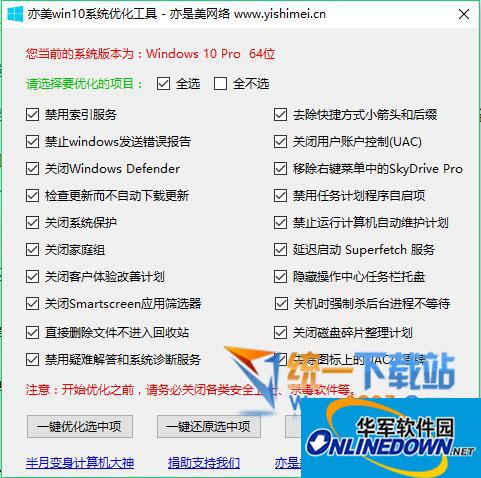



Instructions for use of Win10 Optimize Tool green version (Win10 system optimization tool):
1. By default, all selected items are optimized, but you can perform customized optimization by checking the check box in front of each item.
2. When optimizing the program, modifications to the registry and services are involved. To ensure that no unexpected errors occur, be sure to turn off various security guards, anti-virus software, etc.
3. The Win10 system optimization tool supports win10 and win8.1/8 systems.
Win10 Optimize Tool green version (Win10 system optimization tool) contains 20 optimization projects:
1. Disable indexing service
2. Disable Windows from sending error reports
3. Turn off Windows Defender
4. Check for updates without automatically downloading them
5. Turn off system protection
6. Close the family group
7. Close the customer experience improvement plan
8. Turn off the Smartscreen application filter
9. Delete files directly without entering the recycle bin
10. Disable troubleshooting and system diagnostic services
11. Remove shortcut arrows and suffixes
12. Turn off User Account Control (UAC)
13. Remove SkyDrive Pro from the right-click menu
14. Disable task scheduler auto-start item
15. It is prohibited to run automatic computer maintenance plans
16. Delayed startup of Superfetch service
17. Hide the action center taskbar tray
18. Forcibly kill background processes without waiting when shutting down
19. Turn off the disk defragmentation plan
20. Remove the small UAC shield on the icon

















Useful
Useful
Useful