





UASP function introduction
UASP mode can increase the speed of USB a lot, especially the processing speed of small files is much faster under USB3.0, so if you want to use this mode, you need to use the SwitchUASP tool, which can quickly and automatically switch the USB3.0 transmission mode to UASP mode.
UASP installation steps
1. Download the UASP official version installation package from Huajun Software Park
2. After downloading, unzip the compressed package into a folder named after this software
3. Open the folder and double-click the "exe" program
4.UASP is green software and can be used without installation.
How to use UASP
First run:
1First double-click the SwitchUASP.exe icon on the local system (non-wtg system)
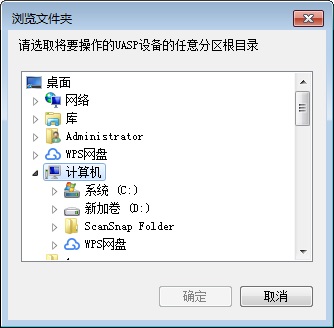
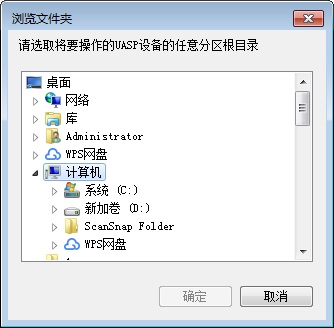
2A browse folder dialog box will pop up, select the root directory of the drive letter where the U disk is located, and then click OK
3Select the operation according to your own needs, click Yes or No
4Confirm the serial number PID VID and click OK
5Copy the program and the Data directory to the WTG system (the path cannot have spaces), complete
Second run:
6Double-click the SwitchUASP.exe icon in the WTG system
7 prompts whether to use the last saved U disk information, click yes, goto 9, click no, goto 8
8A browse folder dialog box will pop up, select the root directory of the drive letter where the U disk is located, and then click OK
9Select the operation according to your own needs, click Yes or No
10Confirm the serial number PID VID and click OK
11Complete
Error message:
A. Failed to obtain device VID PID SN
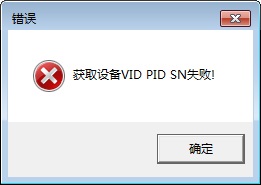
a. What you selected is not a UASP device or USB device
b. The program runs on a U disk (such as WTG, solution: use the feature of the program to record the last operation information, run the program once on the local system, let the program record the serial number of the U disk and save it in DataConfig.ini, then copy the program and the Data directory to the WTG system, and follow the second run operation)
B. Confirming the device VID PID SN is not the desired result
UASP update log
1. Sweep the bug out and carry it out to the end
2. The most stable version ever
Huajun editor recommends:
UASP is a good system optimization software. If you are interested, please download it and use it. I believe you will like it.driver wizard,Seewo Butler,Rubik's Cube Optimization Master,DirectX,TcSyscleanIt is also a good software and is recommended for students to download and use.




Useful
Useful
Useful