

If you are looking for software to use, go to Huajun Software Park! software release AI product list

Hello, if there is a need for software inclusion, please package the software and attach the software name, software introduction, software-related screenshots, software icon, soft copy, business license (if you do not have a business license, please provide the front and back of the corresponding developer ID card and a photo of yourself holding the ID card), and send it to email http://softwaredownload4.com/sbdm/user/login

Close >>

Send to email:news@onlinedown.net

Close >>

Location: Home pagePC softwareNetwork softwareDial tool virtual wireless router
virtual wireless router

Virtual Wireless Router 3.3 Green Free Edition

QR code
  • Software licensing: free software
  • Software size: 13.14MB
  • Software rating:
  • Software type: Domestic software
  • Update time: 2024-12-30
  • Application platform: Win2003,WinXP,WinAll
  • Software language: Simplified Chinese
  • Edition: 3.3 Green Free Edition

Dial-up tool reputation rankings

Download the service agreement at the bottom of the page

Software introduction Related topics FAQ Download address

Basic introduction
Virtual wireless router segment first LOGO
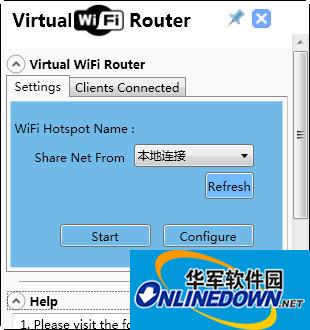
Virtual WiFi Router can easily create WiFi hotspots, allowing mobile phones and computers to share a network. Of course, the computer must have an unlimited network card to use it.

Screenshot of virtual wireless router

Virtual WiFi Router software features

1. Virtual Router is completely free. There is no regular version or professional version. No registration is required. We can easily download and use it from its official website.

2. Vitual Router is released in the form of msi (Windows Installer data package), which is only 1.01MB in size. It does not have any bundled plug-ins. It will not make any malicious modifications to the system (such as modifying the IE homepage). It will not cause any form of harassment such as pop-up advertisements during the running of the program, and the program interface is clean and concise.

3. The operation of Virtual Router is simple and clear. All ordinary users need to do is name the network connection, set a password, and then click the Start Virtual Router button.

4. Virtual Router has good stability and compatibility (note, XP system is not supported). I have recommended friends to use other similar software, but some caused blue screens, some often appeared unresponsive, some settings were cumbersome and unnecessary, and Intel My WiFi only supports a few wireless network cards.

5. Virtual Router takes up very little memory when running. Installation and uninstallation do not require restarting the computer, and have little impact on the system.

FAQ

virtual wireless router

Virtual Wireless Router 3.3 Green Free Edition

close

