





Xiaomi mobile phone usb driver software functions
1. The official version of Xiaomi driver is a USB driver common for Xiaomi mobile phones and Xiaomi tablets.
2. Xiaomi driver supports Xiaomi 1, Xiaomi 2, Xiaomi 3, and Xiaomi 4 generations of Xiaomi mobile phones and Xiaomi tablets
3. Can be installed on Win7, Win8 and other systems
Xiaomi mobile phone USB driver installation instructions
1. Turn on USB debugging on the phone, connect it to the computer, and right-click "Computer" (XP is "My Computer")--"Manage"--Device Manager
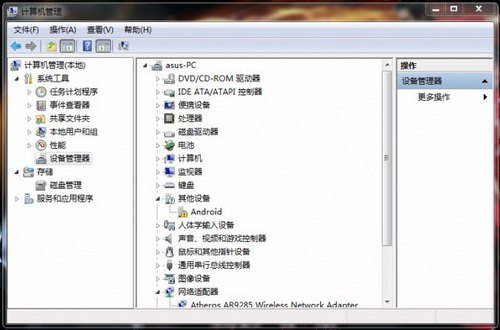
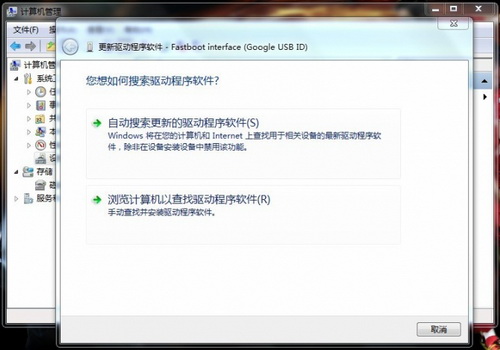
2. Right-click "android"--"Update Driver Software"--"Browse my computer for driver"
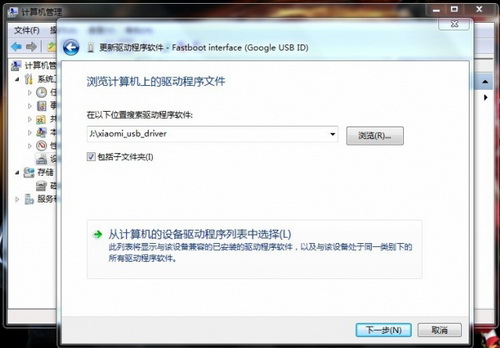
3. Find the Xiaomi mobile phone driver compressed file, right-click - "Compress to current folder", select the Xiaomi mobile phone driver decompression folder "xiaomi_usb_driver", next step
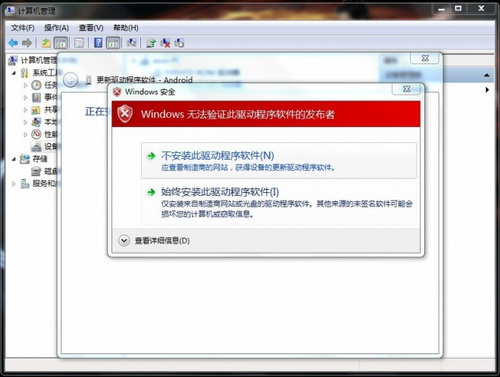
4. If a security warning pops up, click "Install this driver software anyway"
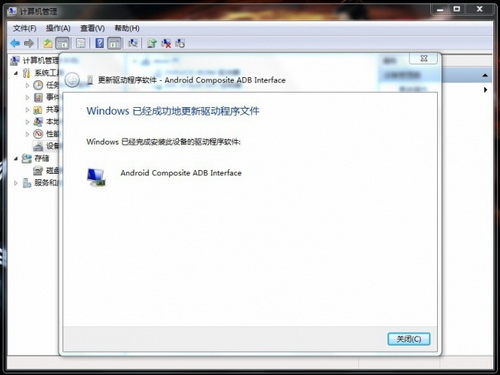
5. Then you’re done
Device not recognized
Problem description:
When connecting a Xiaomi phone to a computer using a USB cable, the computer cannot recognize or recognizes an unknown device.
Solution:
Check the USB cable and interface: Make sure the USB cable is not damaged and the interface is tightly connected. Try changing the USB cable or using another USB interface.
Turn on USB debugging: In the settings of your Xiaomi phone, go to "Developer Options" and make sure the "USB debugging" function is turned on. If "Developer Options" is not found, you can click "MIUI Version" multiple times in "About Phone" to activate it.
Install or update drivers: If the computer fails to automatically install the driver, you can try to manually download and install the latest Xiaomi phone driver
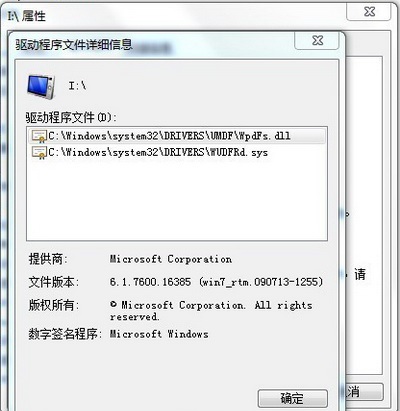
Xiaomi mobile phone usb driver driver information
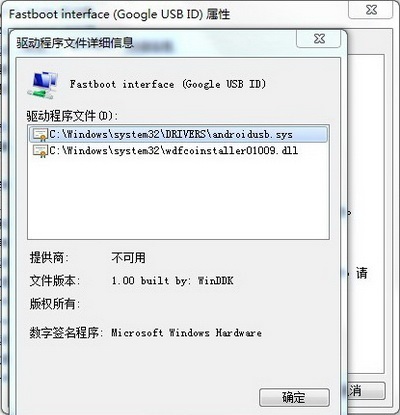
Driver installation is actually to copy the driver file to the system folder, confirm whether the driver is installed correctly, and just check the information.
Driver information in fastboot mode
Turn on driver information in USB debugging mode
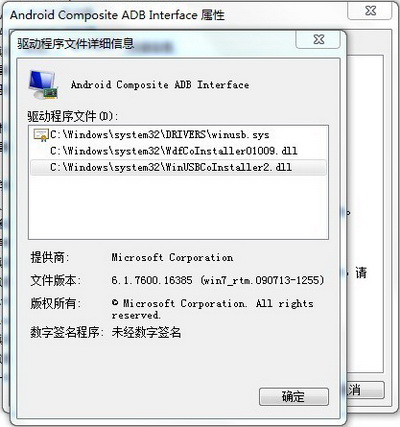
Turn off driver information in USB debugging mode
Xiaomi mobile phone usb driver precautions
The decompressed and used driver folder "xiaomi_usb_driver" can be deleted, and the programs in this folder can no longer be used. The next time you install the driver, you need to re-download and decompress the driver package. This is also the reason why many people fail to install the driver. Keeping this used folder leads to failure.
If no other device is found, you can change the USB port and plug it in again.
Comparison of similar software
NVIDIA control panelA next-generation NVIDIA hardware control application, the NVIDIA Control Panel allows users to take full advantage of the many features of award-winning NVIDIA hardware and ForceWare drivers. If there is no NVIDIA driver, you can download the NVIDIA driver and install it. If you have installed the driver, right-click on the desktop-Properties-Settings-Advanced-NVIDIA can open it. Or in the Control Panel-Administrative Tools-enable NVIDA Control Panel and add it.
Aiken micu vst sound card driverThe official version is a sound card driver built for Aiken micu vst. Aikenmicu The official version of vst sound card driver can realize visual audio adjustment of the sound card and maximize the performance of the sound card. Aikenmicu The sampling rate supported by the vst sound card driver: 44.1k/48k/88.2k/96k/176.4/192k Hz, which can be flexibly switched.
Huajun editor recommends:
Xiaomi mobile phone usb driverIt also supports Xiaomi mobile phones and Xiaomi tablets of all generations including Xiaomi 1, Xiaomi 2, Xiaomi 3 and Xiaomi 4, and can be installed on Win7, Win8 and other systems. Believe me, as long as you use the Xiaomi mobile phone USB driver, other mobile phone driver software can be uninstalled, and it will definitely meet all your needs.









Useful
Useful
Useful