

If you are looking for software to use, go to Huajun Software Park! software release AI product list

Hello, if there is a need for software inclusion, please package the software and attach the software name, software introduction, software-related screenshots, software icon, soft copy, business license (if you do not have a business license, please provide the front and back of the corresponding developer ID card and a photo of yourself holding the ID card), and send it to email http://softwaredownload4.com/sbdm/user/login

Close >>

Send to email:news@onlinedown.net

Close >>

Convert

Convert 5.0 Beta 3 official version

QR code
  • Software licensing: free software
  • Software size: 0.15MB
  • Software rating:
  • Software type: foreign software
  • Update time: 2024-12-23
  • Application platform: winall
  • Software language: English
  • Edition: 5.0 Beta 3 official version

Download the service agreement at the bottom of the page

Software introduction Related topics FAQ Other versions Download address

Recommended for you:- Convert

Basic introduction
Convert paragraph first LOGO
Convert official version is a comprehensive unit conversion tool. The latest version of Convert helps users convert multiple unit types, including distance, temperature, volume, time, speed, mass, etc. The conversion speed is fast and the results are accurate. Convert software is small in size, has a simple and intuitive interface, and its functions are clear at a glance. No installation is required, which greatly improves the user's conversion efficiency.

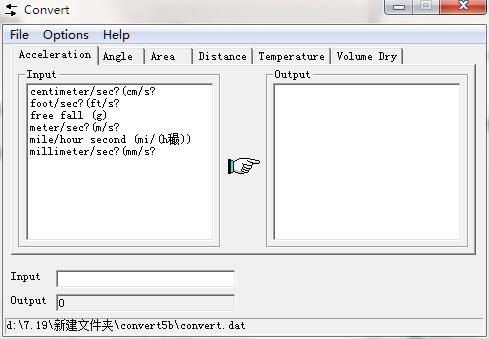
Convert screenshot

Convert software introduction

​​​​Convert is a free and easy-to-use unit conversion program that will convert the most commonly used units of distance, temperature, volume, time, speed, mass, power, density, pressure, energy, and more, including the ability to create custom conversions!

Convert software features

The base unit for conversion can be typed (using autocomplete) or selected from a list.

As you enter units, the list of units automatically filters to only show units with matching words.

Usually, the full name or abbreviation of the unit can be used.

Units can be combined with the "*" and "/" operators.

You can use the "^" operator to raise units to powers (square, cubic, etc.).

Units in the denominator can be grouped using parentheses.

Units with non-linear scaling (such as temperature) can also be converted.

You can select the most recently used unit combination from the menu.

You can enter a number on the "from" or "to" unit side to convert in both directions.

You can enter basic mathematical expressions in place of numbers.

The options control the format of numeric results.
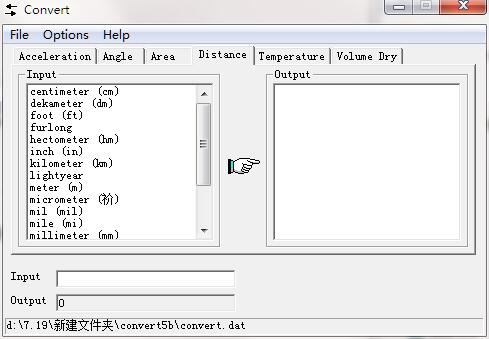
Convert screenshot

Convert applicable system

​​​Convert runs on the following operating systems:

Windows 95

Windows NT 4

Windows 98

Windows 98SE

Windows ME

Windows 2000

Windows XP

Windows 2003

Windows Vista (32-bit and 64-bit)

Windows 7 (32-bit and 64-bit)

Windows 8 (32-bit and 64-bit)

Windows 10 (32-bit and 64-bit)

Linux/UNIX/any operating system running Wine1

Convert update log

​​ 1.Fix some bugs

​​ 2. Optimized some functions

Huajun editor recommends:

Convert is so easy to use. It’s one of the best software among science tools. I believe everyone who has used it will say it’s easy to use. If you don’t like it, we still have it.ACD ChemSketch,Jidao Junior High School Physics VR 3D Virtual Simulation Laboratory (Demo Version),ZX mathematical function grapher,Gear parameter calculator,Enjoy Chemistry Assistant

Related topics

  • Music video software download

    Music video software download

  • Audio format converter software download

    Audio format converter software download

  • Conversion tool software download

    Conversion tool software download

  • APE music download collection

    APE music download collection

  • quicktime software encyclopedia

    quicktime software encyclopedia

FAQ

Associated version

close