



- Green versionView
- Green versionView
- Green versionView
- Green versionView
- Green versionView
Xshell Plus 6 software introduction
Multi-theme experience
Two new theme modes, bright and dark, have been added. Now you can choose the color and overall theme of Xshell according to your needs. There are three default theme styles. Users can also switch back to v5. version of that traditional theme.
Session manager
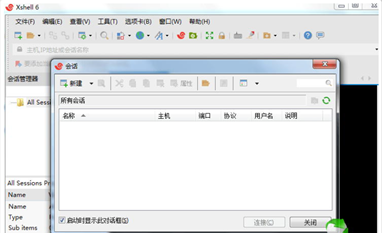
The biggest change is the addition of the session manager panel, which is divided into columns to facilitate quick connection to the server. Users can easily create, edit and delete session files. All aspects of session management and the ability to start multiple sessions simultaneously are now accessible in Xshell via the Session Manager.
Dockable UI
Session manager windows, editing windows, and other window buttons can be docked in Xshell’s main window. This provides more functionality for Xshell's customizable configuration. Users can simply drag and drop windows.
Xshell Plus 6 software features
Xshell supports VT100, VT220, VT320, XTERM, LINUX, SCOANSI and ANSI terminal emulation, and provides various terminal appearance options to replace traditional remote login clients.
Xshell 6 supports RSA/DSA/ECDSA/ED25516 public key, password and keyboard interactive user authentication. Xshell 6 also includes support for the strict requirements of PKCS#11. Encrypt traffic using a constantly updated list of encryption algorithms and store session files securely in the cloud using Xshell's master password feature.
Xshell 6 makes managing sessions easier than ever. Whether you are working on 2 hosts or 200 hosts, Xshell's management capabilities are easily comparable and commands can be entered simultaneously in multiple sessions. Optimize your workflow with a session manager, tabbed environment, highlight settings, quick commands and more. You can customize Xshell as needed to do what you want.
Xshell Plus 6 update log
1: Brand new interface, refreshing, simple and efficient
2: Performance is getting better and better
Huajun editor recommends:
Xshell Plus 6 is so easy to use. It is one of the best software among other tools. I believe friends who have used it will say it is easy to use. If you don’t like it, we still have it.91 Assistant,Certificate manager,Duobaoshi multimedia visual training system,PDFdo TXT To PDF,Reading and Writing Guest




Useful
Useful
Useful