




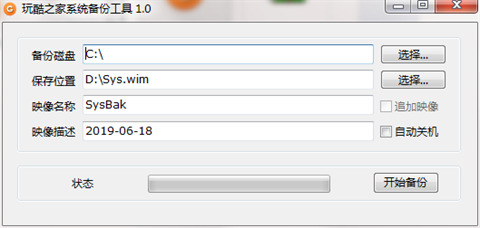
Introduction to CoolBacku software, system backup tool of Wankuzhijia
CoolBackup is a Windows system backup tool developed by CoolBackup. The backup format is WIM image and supports incremental backup. In addition to supporting backup under PE, it also supports backing up Windows systems in the currently running system. It is suitable for use under winpe and can also be used on the desktop. Its backup and restore is based on the wim format, not the ghost core, so it can be used for backup and restore of win10 system or win7 system. It supports gpt format hard disk system backup and restore, and supports incremental backup. It is a good system backup and restore tool.
CoolBacku system backup tool CoolBacku software features
1. For friends whose system becomes slower and slower with use, it is best to use such tools to backup and restore the system.
2. Wankuzhijia system backup tool is suitable for use under winpe, and can also be used on the desktop. Its backup and restore is based on the wim format, not the ghost core, so it can be used for backup and restore of win10 system or win7 system. It supports gpt format hard disk system backup and restore, and supports incremental backup. It is a good system backup and restore tool.
3. If you used ghost before, the current hard disk mode is no longer easy to use, so it is recommended to use such tools to backup and restore the system, which can save time and hard disk space.
How to use CoolBacku system backup tool
After downloading, do not run the software in the compressed package and use it directly, decompress it first;
The software supports both 32-bit and 64-bit operating environments;
If the software cannot be opened normally, please right-click and run in administrator mode;
Operating Instructions:
1. Backup system: Select "Backup System (B)" - Click "Save (S)" - Select the save file path (such as: C_WinXP.GHO) - Execute (E)
2. Restore the system: Select "Restore System (R)" - Click "Open (O)" - Select the Ghost backup image (such as: C_WinXP.GHO) - Execute (E)
3. Install the system: Select "Restore System (R)" - click "Open (O)" - select the GhostXP image (such as: WINXPSP3.GHO) - execute (E)
Options:
1. Disable access to IDE devices: -noide parameter. If you cannot enter the Ghost interface, please check this option.
2. Ignore CRC errors: CRC errors indicate the presence of corrupted data. Using this conversion parameter can help you decompress corrupted image files.
3. Define Ghost kernel: Copy Ghost.exe to the sys directory under the CoolBackup program directory and replace the original Ghost.exe.
CoolBacku system backup tool CoolBacku update log
1. The details are more outstanding!
2.BUG gone without a trace
Huajun editor recommends:
CoolBacku is a very good system backup tool that can solve a lot of troubles. This site also providesOne-click system restore,Ghost,Ghost Elf,Seewo one-click recovery tool,ODBC data source repair toolWaiting for you to download.




Your comment needs to be reviewed before it can be displayed